
Activation Error Installing FSX on New Win10 System

Milton Shupe

Staff Contributor
Staff member
Installed fine but need to activate. But when the activation window tries to come up, I get this error message 1-80004005 as shown.

Looking for a solution.
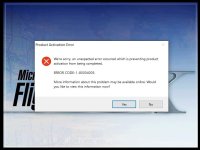
activ.jpg

EDIT: The Registry fixes suggested internet wide did not do the trick, but Uninstalling completely and Re-installing worked.

Thanks
 
Last edited:
Hey Milton, good to see you on here but sorry for the circumstances. Take a look at the linked thread below. I was having problems with loading acceleration causing activation errors. Don’t know if it fits your situation but might be worth a look. Wellis provided this fix. Wish I could be of more help.

Steve

http://www.sim-outhouse.com/sohforums/showthread.php/120723-FSX-installation-help-please?p=1233202&viewfull=1#post1233202


- - - Updated - - -

Hey Milton, good to see you on here but sorry for the circumstances. Take a look at the linked thread below. I was having problems with loading acceleration causing activation errors. Don’t know if it fits your situation but might be worth a look. Wellis provided this fix. Wish I could be of more help.

Steve

http://www.sim-outhouse.com/sohforums/showthread.php/120723-FSX-installation-help-please?p=1233202&viewfull=1#post1233202
 
OOPS! Didn’t see your edit. Glad you got it sorted. Sorry about the repeated reply above. Don’t know what happened.

Steve
 
Hey Duckie; good to se you too.

Yes, corrected by Uninstalling the original installation. Fortunately, the uninstall only deletes the original install stuff, not my added goodies. Had a backup anyhow JIC.

Yes, the old "PartMgr" trick was tried but did not work for me; it was the old install that was confusing things.

The Registry fixes suggested internet wide (PartMgr) did not do the trick, but Uninstalling completely and Re-installing worked.

Thanks
 
Back
Top