• Please see the most recent updates in the "Where did the .com name go?" thread. Posts number 16 and 17.

    Post 16 Update

    Post 17 Warning old domain name stealing credentials

  • Special Server Maintenance

    Just when you think you have everything running some what better...

    You get a message from the Hosting company. Short story they need to move us to a new server. I have been working with them to plan a good date for all concerned. Here is what we have come up with as a schedule.

    1. November 4th 17:00 -5UTC shut off the forums and start backup proceedures. During this time there will be no access to the forums or the Resource Section.
    2. November 5th Continue with Backups and download same until complete.
    3. November 6th 7:00 turn over server to hosting company to move system to new server
    4. November 7th - 8th restore backups and upgrade forum software.

    If all goes well we should be back online on November 8th.

    To keep you updated we will post updates on AVSIM forums.

    Thank you for your support.

Aero Soft JayHawk no sound

gray eagle

SOH-CM-2026
Thought I'd try the new yellow Coast Guard AeroSoft Jayhawk but I have no sound. Tried other aircraft and I hear their sounds.
I don't hear sounds from any of the AeroSoft helo's. Reinstalled it and still no sounds.

Read something in the start up manual that would load one of their flights with everything already running but no sounds there either.
All the sound files work when individually played, but not when the helo is running.

Below is a quote from their manual:
attachment.php


I loaded above ^ and still no sounds. The sounds from all other aircraft/helos work, just not the ones from Aerosoft.
I know that this helo will not start with the CTRL + E and I guess that the Default all systems running is a shortcut
to get a helo to running and I would of hoped with sound but no sounds.


EDIT: Which ever airport I pick, this helo will already be running, no cold and dark start.
 
GE,
I will load up FSX and see what mine does.
Last time I flew the Jay it had sound.

Joe
 
Thought I'd try the new yellow Coast Guard AeroSoft Jayhawk but I have no sound. Tried other aircraft and I hear their sounds.
I don't hear sounds from any of the AeroSoft helo's. Reinstalled it and still no sounds.

Read something in the start up manual that would load one of their flights with everything already running but no sounds there either.
All the sound files work when individually played, but not when the helo is running.

Below is a quote from their manual:
attachment.php


I loaded above ^ and still no sounds. The sounds from all other aircraft/helos work, just not the ones from Aerosoft.
I know that this helo will not start with the CTRL + E and I guess that the Default all systems running is a shortcut
to get a helo to running and I would of hoped with sound but no sounds.


EDIT: Which ever airport I pick, this helo will already be running, no cold and dark start.


I just loaded mine and have sound.
You say there is a "sound" folder for the aircraft with sound files in it.
Is there a sound.cfg file with entries..?

I would check that the aircraft.cfg file has "sound" entries that point to that sound folder.


I found a different problem with textures.
I don't have a base texture folder so I needed to copy over "SH-60_0.bmp" to have rotor blade textures.
I also see a hull issue and have checked with two seperate paints.
 
NC,

I just loaded my 6006 from cold & dark. Started the engines with CTL-E. Sounds present.
Changed to one of the Navy helos at KNGU. Same scenario. Sounds present.
Check as Seahawk72s said. Sound folder in the aircraft folder and the sound folder has the wav files and the sound.cfg.

Seahawk72s,

Are all my paints showing the same as that pictured?
 
EveryThing Okay

I had completely removed the AeroSoft Helo and did yet another install and lo and behold I now have sound.

Thought I'd try it out first before tinkering with anything; looks like I don't have to troubleshoot any farther.

Makes me wonder why I had no sound, but if it works, I don't need to fix it. :)

Thank you all for your responses. Now, I have to put that new yellow helo back in there and go for a ride. :encouragement:
 
Yes, looks just like Seahawks72s. I had over 29 liveries in there. WOW. Now I have just the stock ones + the new yellow one.
That one looks Nice, :encouragement: Never new they were yellow at one time.

BTW me GE (Grayeagle). :biggrin-new:


NC, see if your paints of the CG helos are okay or like the one Seahawk72s pictured.
 
I only installed the 6001 version. Other ones look same to me.
The Aircraft.cfg file just says Sound =


I just loaded mine and have sound.
You say there is a "sound" folder for the aircraft with sound files in it.
Is there a sound.cfg file with entries..?

I would check that the aircraft.cfg file has "sound" entries that point to that sound folder.


I found a different problem with textures.
I don't have a base texture folder so I needed to copy over "SH-60_0.bmp" to have rotor blade textures.
I also see a hull issue and have checked with two seperate paints.
 
Gray Eagle

Here's three files. Unzip them and put them in your 6001 folder and over write . see if this fixes the paint.
 

Attachments

  • SH-6001.zip
    962 KB · Views: 0
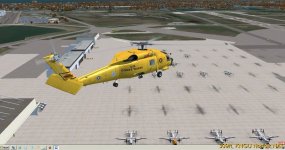
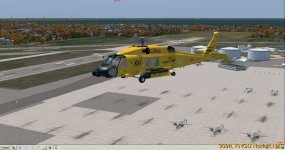
Here's 6001 leaving KNGU.

attachment.php
attachment.php
 

Attachments

  • Snap--2016-sep-8-001.jpg
    Snap--2016-sep-8-001.jpg
    69.1 KB · Views: 0
  • Snap--2016-sep-8-003.jpg
    Snap--2016-sep-8-003.jpg
    63.4 KB · Views: 0
I unfortunately haven't had time to download/install this paint yet, as have relatives in town. But will, hopefully tomorrow :encouragement: NC
 
Back
Top