
-
Please see the most recent updates in the "Where did the .com name go?" thread. Posts number 16 and 17.
-
Special Server Maintenance
Just when you think you have everything running some what better...
You get a message from the Hosting company. Short story they need to move us to a new server. I have been working with them to plan a good date for all concerned. Here is what we have come up with as a schedule.
- November 4th 17:00 -5UTC shut off the forums and start backup proceedures. During this time there will be no access to the forums or the Resource Section.
- November 5th Continue with Backups and download same until complete.
- November 6th 7:00 turn over server to hosting company to move system to new server
- November 7th - 8th restore backups and upgrade forum software.
If all goes well we should be back online on November 8th.
To keep you updated we will post updates on AVSIM forums.
Thank you for your support.
You are using an out of date browser. It may not display this or other websites correctly.
You should upgrade or use an alternative browser.
You should upgrade or use an alternative browser.
Aeroplane Heaven P-51D released
- Thread starter ColoKent
- Start date


jankees
SOH-CM-2026
Anyone know which texture sheet has the fuselage antenna, and where it's located on that sheet? Trial and error so far, I've not found it.
Not sure, but my guess would be top right corner of 1001?
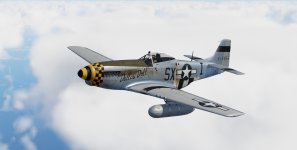
Meanwhile, I've uploaded these two:
 jk2117 by JanKees Blom, on Flickr
 jk2104 by JanKees Blom, on Flickr

jankees
SOH-CM-2026
Just thought I'd toss that one in!
DaveQ
PS - Beautiful work as always JK!
I think I painted that one too?

Fnerg
SOH-CM-2023
Anyone know which texture sheet has the fuselage antenna, and where it's located on that sheet? Trial and error so far, I've not found it.
For any repainters, I solved the mystery.
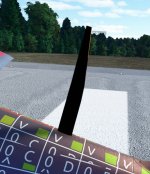
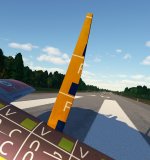
Depending on the light direction, the sunny side is clear whereas the shaded side is all black.
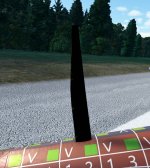
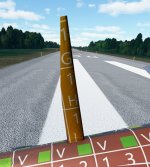
The problem is that, on the default COMP file for texture 1001, the RED channel, or the Ambient Occlusion, is in the dark. This section needs to be made white in order for both sides to be illuminated properly.
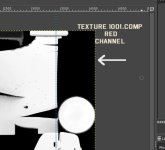
Mystery solved. You're welcome.

UnknownGuest12
New member

collensr
SOH-CM-2025
It should be: "\..\..\ac_flyingiron-spitfire\SimObjects\Airplanes\flyingiron_spitfire\ sound\"
Cheers
Priller
Sorry - please can I double check that I am doing this correctly - my P-51 and Spitfire are in my E/MSFS/Community/.... drive
I am copying the following "\..\..\ac_flyingiron-spitfire\SimObjects\Airplanes\flyingiron_spitfire\sound\" into the sound section of the individual aircraft livery cfg
However I am not getting the Spit sound. I deleted the space before \sound in the final string above
any help gratefully received
