
• Please see the most recent updates in the "Where did the .com name go?" thread. Posts number 16 and 17.

    Post 16 Update

    Post 17 Warning

  • Bandwidth Drive 2026 is over

    Thanks to everyone who donated.

AH Douglas DC-3

tgycgijoes

Members +
Way back in history, LOL, I was DC3 type rated in FS9 at the DC-3 Airways Virtual Airline which though I haven't visited in a long time am still a member. Now that I have downloaded all the videos I need to become familiar with the much more capable DC-3 tyhan the ol' MAAM-Sim I flew back then, and then the MJ which is really a nice aircraft in FSX/P3D, I am looking forward to getting rated (on my own) again and flying the Capital Airways routes that I have downloaded. I have the Duckworks update and will post/comment here as I get back into the cockpit. I want to try and "share the cockpit" with that software as well and see how that works out. I have downloaded all the airports I need from flightsim.to and really looking forward to it all. Happy New Year to you all from coastal Carolina where its 61 degrees and sunny right now but I won't hold my breath for that to continue.
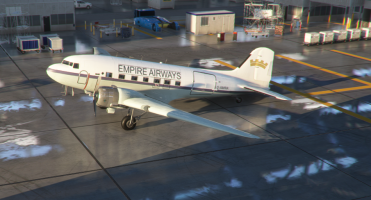
 
After a week of studying youtube videos on repainting in MSFS 2020 with Photoshop NOT the (to me) elusive, confusing Blender, I was blessed with insight and with the Aeroplane Heaven DC3 psd paintkit with many nice layers, I was able to recreate my Empire Airways C-47/DC-3 in MSFS 2020. The most difficult which is always the case I don't care what sim and which aircraft, is painting a fuselage stripe that matches up when you have multiple pieces of the fuselage. As one of my videos said, the hardest part is waiting for the sim to reload to check your work each time you make a change/correction. I have yet figured out how to open up an MSFS model in Model Converter X which is how I always checked my work in FSX and in P3D. I love the quality of the graphics but still don't love the sim yet. Anyway, here is a screenshot in the hanger I shot earlier once it was completed.Empire Airways DC3.png

I am looking forward this coming week of getting recertified as a DC-3 pilot as I fly the DCA certification program I completed a few years ago in FSX in MSFS 2020.
 
I learned how to paint liveries first for FS9, FSX in Paintshop. Then when MSFS arrived I switched to GIMP with way better compression options for exports, plus you can make the PBR sets within the program. It really is a great program for layering detail.
Then, I found there is nothing like painting on the 3D model it's self. No longer do I have to try and line up lines on the fuselage between multiple texture sheets. I know that headache very well. I switched over to Substance Painter recently, and I love it.

To get the model into SP, this is where MCX is an essential tool, first I import the model's .GLTF from LOD00, remove the parts that I don't intend to paint - usually interior parts, and export the remaining model to a mesh format SP understands like, .fbx, .obj, .dae, or .gltf. I tend to keep everything .gltf for MSFS/2024. With a blank unpainted model in the 3D window of SP, I just start painting away in layers and export the new texture set for my new livery. It's great to be able to move around the 3D model, and there are so many methods for weathering and surface detail, it's a whole other school of learning. Substance painter by default follows the original UV mapping and takes the guess work out of figuring out where the lines go by filling in the textures for me.

I've heard of a little program called 3DViewer which some use, however I've not used it myself. It's similar to MCX 3D window though.
 
Thank you for the information. I also have GIMP and use it but I just like Photoshop having learned to repaint with it and am just so familiar. At 78 I really don't like switching from one thing to another. I do appreciate your tip on how to open the model Gltf in Model Converter X. I didn't know where to look for it. LOD00, ok. I just checked out Substance Painter but don't intend to give Adobe monthly for anything. I OWN my copy of Photoshop. It works great even though it's an older copy. Back when you could pay for and download it. None of this subscribe stuff that so many companies are switching to. License...phooey.
 
Hi at all,

You have an other method to paint directly on 3D.
- use a Blender 3.3.x installation with the FlyByWire plugin which permit to import your exterior LOD00 gltf/bin file.
- save then your model after removing the parts that you don't intend to paint
- use PBR Painter (20 $) a plugin for Blender (the recommended version is the 4.2.x) to paint like Gimp (layers) but on a 3D model
- load your blend file and paint on it like you do under Gimp


The old release of Blender are here: https://download.blender.org/release
FlyByWire plugin for Blender 3.3.x : https://github.com/flybywiresim/msfs2blender2msfs/tree/rewrite
PBR Painter is less expenseive than SP and it's a woderful program : https://superhivemarket.com/products/pbr-painter
Currently, PBR Painter can be installed very simply and use to paint on 3D under Blender 4.2
For more information about this tool, you can find a lot of video here : https://www.youtube.com/@pbrpainter1091
 
That is about when I bought mine, Brian-Gladden. Because I OWN it on DVD I have been able to migrate it from XP to Windows 7 AND to Windows 10.

I have tried to use Blender twice now and it just boggles my mind. I wish I could because I would love to port some of my favorite P3D sceneries into MSFS 2020. I have not uninstalled it. It's still on my computer and again, when I feel really confident, I may try and see about converting my 60J Odell Williamson airport which I will be across the street from again this morning at Publix picking up my BOGO order.

I guess I am old (school???) too Spook48. I love Photoshop and since I got it to create the repaint IMO so well, I don't need frustration but success. Thank you though lagaffe for your suggestion and taking the time to reply. You have helped me over at FSDeveloper a number of times and I respect and appreciate your advice.
 
Ah it was you on FSDeveloper. Since you didn’t have the same image attached to your speudo, I hadn’t made the link.

Now I do remember the Piper HE-1 Ambulance and Blender questions ;)
 
Back
Top