• Please see the most recent updates in the "Where did the .com name go?" thread. Posts number 16 and 17.

    Post 16 Update

    Post 17 Warning old domain name stealing credentials

  • Special Server Maintenance

    Just when you think you have everything running some what better...

    You get a message from the Hosting company. Short story they need to move us to a new server. I have been working with them to plan a good date for all concerned. Here is what we have come up with as a schedule.

    1. November 4th 17:00 -5UTC shut off the forums and start backup proceedures. During this time there will be no access to the forums or the Resource Section.
    2. November 5th Continue with Backups and download same until complete.
    3. November 6th 7:00 turn over server to hosting company to move system to new server
    4. November 7th - 8th restore backups and upgrade forum software.

    If all goes well we should be back online on November 8th.

    To keep you updated we will post updates on AVSIM forums.

    Thank you for your support.

AI Fdg2 P-51B 355th

Pierre_NC

Members +
Hello All,

I-ve downloaded the AI_Fdg2_P-51B_355th.zip, converted it to FSX and I'm using it for my AI Military prop Traffic.

I'm very happy with the plane, been looking for an AI P51-B Mustang for a long time and finding it here was a very pleasant surprise for me. Thank you so much for this awesome fighter, Captain Kurt.

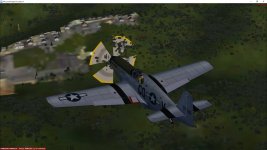
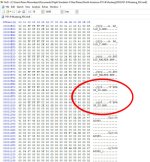
I have two inquiries about it : the .MDL file lists a prop_us.bmp file that is not part of the zip I've downloaded. Would it be possible to include it, please ? I'm currently using a prop blur from another AI Warbird that I have, the best I could find in my files, but as you can see on the enclosed pic, it does'nt look good with the Mustang. It's much too opaque and that's not mentionning the trees that show through the blur.

attachment.php
attachment.php


My second inquiry is about painting. There are two bomb or whatever supports under the wings, see the pic, that I can't paint because I couldn't find them on the bitmaps provided with the zip. They appear all black.

attachment.php


Unless they're painted from the .MDL file, could you please be kind to tell me where they are on the bitmaps ?

Than you so much for your kind cooperation.

Pierre_NC.
 

Attachments

  • HEX_Edito FDG_P51Br.jpg
    HEX_Edito FDG_P51Br.jpg
    171.3 KB · Views: 183
  • AI_Fdg2_P-51B_355th_prop.jpg
    AI_Fdg2_P-51B_355th_prop.jpg
    55.3 KB · Views: 183
  • AI_Fdg2_P-51B_355th.jpg
    AI_Fdg2_P-51B_355th.jpg
    27.8 KB · Views: 183
That prop texture is a default CFS2 texture, might be in FS2002/4 also, can't remember.
 

Attachments

  • prop_us.bmp
    0 bytes · Views: 6
  • prop_us.zip
    41.6 KB · Views: 4
First off, the model is by Fighter Design Group 2, no credit to me. I had permission to modify the flight files, repaint it, and update the 2D panel a bit; and it was used in a CFS2 campaign. DR is correct, it uses the prop file he posted above.

The drop tank pylons are not textured which is why you aren't finding anything to paint. The color is set in the model itself. I'm not sure why they would show up black in FS2004. In CFS2 they are a white shade color.
 
First off, the model is by Fighter Design Group 2, no credit to me. I had permission to modify the flight files, repaint it, and update the 2D panel a bit; and it was used in a CFS2 campaign. DR is correct, it uses the prop file he posted above.

The drop tank pylons are not textured which is why you aren't finding anything to paint. The color is set in the model itself. I'm not sure why they would show up black in FS2004. In CFS2 they are a white shade color.

Thank you so much, CK. And even though uou didn't make the model, you did post the plane so I could get it. So thank you again and thanks to FDG for making such a great plane.

Pierre_NC.
 
The drop tank pylons are not textured which is why you aren't finding anything to paint. The color is set in the model itself. I'm not sure why they would show up black in FS2004. In CFS2 they are a white shade color.

If you have ModelConverterX you could try finding the model part and assigning it a texture file. You can then paint it the correct colour. If it has no colour or texture file set, in FSX it will show up black.

DaveQ

PS I've just had a quick look at an FDG P-51B model for CSF2; if it's the same one the pylons are set to a texture 'p-51D_t', which is not included in the texture folder. That would explain why it shows up black. If you can make a .bmp file of that name of the right colour it'll fix the problem.
 
If you have ModelConverterX you could try finding the model part and assigning it a texture file. You can then paint it the correct colour. If it has no colour or texture file set, in FSX it will show up black.

DaveQ

PS I've just had a quick look at an FDG P-51B model for CSF2; if it's the same one the pylons are set to a texture 'p-51D_t', which is not included in the texture folder. That would explain why it shows up black. If you can make a .bmp file of that name of the right colour it'll fix the problem.

Thank you so much for your research, Dave. I'll give it a try.
 
Back
Top