Ambitious Pilots - Very useful FPS stats tool

collensr

SOH-CM-2025
Apologies if this has been posted before or if everyone already is aware of this utility.
Freeware tool that shows you information like: FPS (Frames per second), Simulation rate, Coordinates, Wind speed and direction, Airspeed, Altitude, Heading, Fuel remaining

 
It's been out a while. I tried it once, but didn't like the fact that the developer decided to advertise himself in the readouts. I couldn't find the right code to delete that part, so I just dumped the whole thing.
 
It's been out a while. I tried it once, but didn't like the fact that the developer decided to advertise himself in the readouts. I couldn't find the right code to delete that part, so I just dumped the whole thing.
That fades out after 2 seconds, leaving the stats themselves. I can't really fly without it now, having edited it to show Ground Speed on the top line - very useful on final approach and when taxiing.
 
I use it every flight

Just like FSX you can cycle through different sets of text, and yes the by line fades out almost immediately
 
The sim rate indicator in this is super-useful if you ever accelerate time. I used Shift-Z stats for a couple of years until this awesome utility was released:

 
Used this since FS9, helos often work best from outside and need To The Point information (only).
What I did do, thanks to this thread, is go looking under the bonnet a little.
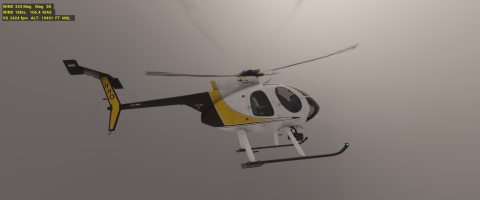
There are so many lighting situations where the default red font just does not work.
However.
Yellow text on black background works EVERYWHERE.

Microsoft Flight Simulator Screenshot 2025.10.02 - 13.33.49.14.png

The changes are made in the userconfig.ini file which is somewhere in the downloaded folder.
Like this
[TextInfo.1]
TextColor.1=245,245,0
BackGroundColor.1=0,0,0,128
WindDirection=1,1
TextColor.2=245,245,0
BackGroundColor.2=0,0,0,128
Heading=1,2
TextColor.1=245,245,0
BackGroundColor.1=0,0,0,128
Windspeed=2,1
TextColor.1=245,245,0
BackGroundColor.1=0,0,0,128
Airspeed=2,2
TextColor.3=245,245,0
BackGroundColor.3=0,0,0,128
VerticalSpeed=3,1
TextColor.3=245,245,0
BackGroundColor.3=0,0,0,128
Altitude=3,2


The toolbar is full in my sim so I don't display this one there - <Alt>Z is fine.
[Main]
EnableShiftZShortcut=true
; Note: Toolbar icon cannot be hidden when EnableShiftZShortcut is false
ShowToolbarIcon=false


Likewise to change sim rate, no toolbar bloat just "H" and "J" happened to be free on the keyboard to assign to "Decrease" and "Increase" in sim key assignments.
 
Back
Top