• Please see the most recent updates in the "Where did the .com name go?" thread. Posts number 16 and 17.

    Post 16 Update

    Post 17 Warning old domain name stealing credentials

  • Special Server Maintenance

    Just when you think you have everything running some what better...

    You get a message from the Hosting company. Short story they need to move us to a new server. I have been working with them to plan a good date for all concerned. Here is what we have come up with as a schedule.

    1. November 4th 17:00 -5UTC shut off the forums and start backup proceedures. During this time there will be no access to the forums or the Resource Section.
    2. November 5th Continue with Backups and download same until complete.
    3. November 6th 7:00 turn over server to hosting company to move system to new server
    4. November 7th - 8th restore backups and upgrade forum software.

    If all goes well we should be back online on November 8th.

    To keep you updated we will post updates on AVSIM forums.

    Thank you for your support.

Animation problems in 3dsmax

michelredsky

Members +
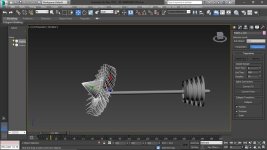
[FONT=&quot] When try to animate the engine fan it gets spinning out of axis. Same problem with the nose gear doors. Can anyone help me with this problem?[/FONT]

attachment.php
 

Attachments

  • 3.17.2020 21-11-13.jpg
    3.17.2020 21-11-13.jpg
    56.1 KB · Views: 2
The very best place to ask questions about Gmax would be here: https://www.fsdeveloper.com/forum/

There's a Gmax-specific forum there that can help with any issues you come up against.

For your rotation problem, I'd say that you'll need to reset the pivot so that the pivot axis is properly aligned with the environment.

1. Make sure the part isn't a 'child' of another part ('Unlink Selection' broken chain link' icon, upper left);

2. 'Utilities' [hammer icon, upper right of screen], then press 'Reset Xfom'. This makes sure the part is properly sized.

3. After that, 'Heirarchy' [icon is a square with three small squares underneath], then press 'Affect Pivot Only', "Align to World', 'Transform' and 'Scale').

Then the pivot axis will be aligned with the environment in both 'View' and 'Local' settings. I use 'Local" to animate a part that is tilted, as then the pivot will follow the parts' new angle.

This may result in the part becoming bigger or smaller, but in that case just re-size it. You may have to redo the animation, as well.
 
The very best place to ask questions about Gmax would be here: https://www.fsdeveloper.com/forum/

There's a Gmax-specific forum there that can help with any issues you come up against.

For your rotation problem, I'd say that you'll need to reset the pivot so that the pivot axis is properly aligned with the environment.

1. Make sure the part isn't a 'child' of another part ('Unlink Selection' broken chain link' icon, upper left);

2. 'Utilities' [hammer icon, upper right of screen], then press 'Reset Xfom'. This makes sure the part is properly sized.

3. After that, 'Heirarchy' [icon is a square with three small squares underneath], then press 'Affect Pivot Only', "Align to World', 'Transform' and 'Scale').

Then the pivot axis will be aligned with the environment in both 'View' and 'Local' settings. I use 'Local" to animate a part that is tilted, as then the pivot will follow the parts' new angle.

This may result in the part becoming bigger or smaller, but in that case just re-size it. You may have to redo the animation, as well.

Big thanks for the help

attachment.php
 

Attachments

  • 3.16.2020 23-35-43.jpg
    3.16.2020 23-35-43.jpg
    50 KB · Views: 2
Back
Top