
-
Please see the most recent updates in the "Where did the .com name go?" thread. Posts number 16 and 17.
-
Special Server Maintenance
Just when you think you have everything running some what better...
You get a message from the Hosting company. Short story they need to move us to a new server. I have been working with them to plan a good date for all concerned. Here is what we have come up with as a schedule.
- November 4th 17:00 -5UTC shut off the forums and start backup proceedures. During this time there will be no access to the forums or the Resource Section.
- November 5th Continue with Backups and download same until complete.
- November 6th 7:00 turn over server to hosting company to move system to new server
- November 7th - 8th restore backups and upgrade forum software.
If all goes well we should be back online on November 8th.
To keep you updated we will post updates on AVSIM forums.
Thank you for your support.
You are using an out of date browser. It may not display this or other websites correctly.
You should upgrade or use an alternative browser.
You should upgrade or use an alternative browser.
Attaching PC to TV Screen??
- Thread starter Twice43
- Start date

blanston12
SOH-CM-2025
As long as the TV has a HDMI port yes. Your computer should have either a HDMI or DVI output ports, if only DVI you can get an adapter that goes from DVI to HDMI pretty cheaply. You can even get USB-C to HDMI cables, I have one I use for my work Macbook, not sure what the performance would be for that though.

Check the specs and make sure it can run at least 1080 resolution. I've seen some older TV's that would display a 1080 broadcast, but reverted to a smaller resolution when connected to a computer - even through an HDMI cable.
Also, if you notice that the edges of the screen are cut off, look up "overscan" and you'll find plenty of info on how to fix it.
Also, if you notice that the edges of the screen are cut off, look up "overscan" and you'll find plenty of info on how to fix it.

Brian_Gladden
SOH-CM-2025
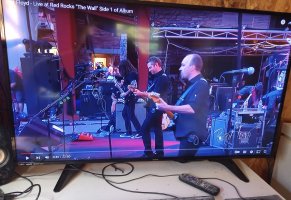
It is a 32" Samsung TV screen.
It does have an HDMI receptacle on the back so I would go DVI on the PC to HDMI at the screen.
Presumably I have to fiddle with the TV screen settings, so I need to find the remote, & the power cord, both buried somewhere in about 70 'moved house ' boxes in the garage.
T43
PS - Its a Samsung UN32J400DAf, which was given to me.
Looking at the specs I think its not going to work very well.
Display format is listed as 720p and Resolution, 1366 768.
I think I'll watch the sales for something better.
It does have an HDMI receptacle on the back so I would go DVI on the PC to HDMI at the screen.
Presumably I have to fiddle with the TV screen settings, so I need to find the remote, & the power cord, both buried somewhere in about 70 'moved house ' boxes in the garage.
T43
PS - Its a Samsung UN32J400DAf, which was given to me.
Looking at the specs I think its not going to work very well.
Display format is listed as 720p and Resolution, 1366 768.
I think I'll watch the sales for something better.
Last edited:
If it's a Samsung and you can't find the remote, you can use just about any other Samsung remote to access the features. This one is currently available dirt cheap.
Ticks me off too - I paid full price for mine...
Ticks me off too - I paid full price for mine...

Cazzie
SOH-CM-2026
Sure it is. I don't do it for MSFS, as the monitor I have is plenty large enough for me (Samsung 32" 4HD). But I have an HD ACER Laptop (1920 X 1080), that I HDMI over to a Samsung 65" HD TV to watch my bike races via the Online Channels I subscribe to (Peacock, BR Sports, and FLO Bikes). I think I would go VR before I would try to fly using my 65" TV. As a side note, if I wanted to, this Samsung 4HD monitor will cast via 5G Wi-Fi to the TV. It's a marvelous world, but I only use part of it.
Cazzie
Cazzie
If you sit at the distance from the screen where you would normally sit if you had a PC Monitor in place is the TV screen sharp, or do you have to move back to get some sharpness?I'm running a 54 incher that I was given by my Girlfriend's grandson.... I have to move my head to see everything when in full screen...
Also, does the mouse pointer track across a TV screen, the same as a PC monitor?
T43

modelr
SOH-CM-2025
Depends on the screensize. 32" curved monitor is what I have now, and because of my astigmatism prescription, arms length starts double visioning text. I was using a 50" LG HD tv, at about 4' distance, and my neck would start hurting after an hour or so from having to look up to much. Sharpness seems about same.If you sit at the distance from the screen where you would normally sit if you had a PC Monitor in place is the TV screen sharp, or do you have to move back to get some sharpness?
Also, does the mouse pointer track across a TV screen, the same as a PC monitor?
T43
Bit of an update - after some fiddling around with the 'order' of the 2 video cards , ( which was #1 & which was #2), which affected which showed all the home screen icons on boot up, I got a 40" smart TV screen running as the primary flight sim monitor, & it is brilliant.
Very immersive in the shake down flight using a DC-3.
I need to sit back a bit, but I can accommodate that.
If you are contemplating putting a TV Screen on as a monitor I would recommend it, particularly as USA Black Friday deals are popping up. 40" can be had for under $125 & possibly better.
I have the maps on a PC monitor, so good to go for MSFS 2024.
Thanks to all who had suggestions, I appreciate your help.
T43
Very immersive in the shake down flight using a DC-3.
I need to sit back a bit, but I can accommodate that.
If you are contemplating putting a TV Screen on as a monitor I would recommend it, particularly as USA Black Friday deals are popping up. 40" can be had for under $125 & possibly better.
I have the maps on a PC monitor, so good to go for MSFS 2024.
Thanks to all who had suggestions, I appreciate your help.
T43