• There seems to be an uptick in Political comments in recent months. Those of us who are long time members of the site know that Political and Religious content has been banned for years. Nothing has changed. Please leave all political and religious comments out of the forums.

    If you recently joined the forums you were not presented with this restriction in the terms of service. This was due to a conversion error when we went from vBulletin to Xenforo. We have updated our terms of service to reflect these corrections.

    Please note any post refering to a politician will be considered political even if it is intended to be humor. Our experience is these topics have a way of dividing the forums and causing deep resentment among members. It is a poison to the community. We appreciate compliance with the rules.

    The Staff of SOH

  • Please see the most recent updates in the "Where did the .com name go?" thread. Posts number 16 and 17.

    Post 16 Update

    Post 17 Warning

Beechcraft D18S Port Over Final (Freeware)

Rick,

Thanks Rick. The whole panel including that window requires the ST_D18.cab in either the panel folder or the FSX/Gauges folder. I see it in the package I uploaded. Do you not have that?

Thanks for the head-up.

Anyone else have this issue?

No issues here,Milton.
Fantastic model as usual.
Michael:applause:
 
No issues here,Milton.
Fantastic model as usual.
Michael:applause:

Well, that is interesting.

Although I show the gauge cab in the package I uploaded, it does not appear in the download I just did. :-/

I will correct the archive. Meanwhile, attached is the gauge cab zipped.

Later: Okay, I see what I did. You will need both the attached cab files.

Just unzip and copy each of the cab files to your panel folder.
 
Revised Package Uploaded to include ...

I have revised the upload to include the 2 cab files as of now.

If you download after this post's timestamp, you should have all 3 cab files in the panel folder.

My apologies to those affected.

For those of you who were not affected, you likely had the ST_D18 and Tripacer.cab in your general FSX/Gauges folder.
 
Yes,the ST_D18 is for example in the panel folder of your Beech AT-11.
Michael


Yes Mike.

That's one of the things that allow these issues to pop up on release.

I usually have the cabs in the generic gauges folder from previous like-releases.

So, the test works fine until someone grabs it who did not have the earlier release of this or a like-product.

It's one of the frustrating things that happen after so much testing. That's why a public beta is a good thing to do.

Unfortunately, I thought to include the cabs in the beta test but not in the final release. :)
 
I can understand,how frustrating that must be.
For me the Beech D18 is one of the aircrafts you must have.
I allways install her in every new FSX Setup together with some other "Milton" airplanes.
Michael
 
I can understand,how frustrating that must be.
For me the Beech D18 is one of the aircrafts you must have.
I allways install her in every new FSX Setup together with some other "Milton" airplanes.
Michael

Thank you Mike. Lots of appreciation for understanding and support for the many things required to be "right" to get these releases working for everyone.

Happy to keep plugging away here to bring some added joy to the hobby. I know that portovers are not for everyone but some do appreciate having at least a portover over nothing even though they are not much more than a poor substitute for a native version.

Thank you Milton and I'll give her a whirl. How is the DHC7 coming?

The Dash 7 textures are coming along very well. Mike Kelly is very maticulous about texture details and I am in no hurry. When its ready, you all will be first to know. :)
 
I have revised the upload to include the 2 cab files as of now.

If you download after this post's timestamp, you should have all 3 cab files in the panel folder.

My apologies to those affected.

For those of you who were not affected, you likely had the ST_D18 and Tripacer.cab in your general FSX/Gauges folder.

Works great now!
Thanks Milton...
Rick

Wonderful model:salute:
 
Beech D18S

Milton.

I have the previous version of the D18S in my FSX.

Should it be removed before I install you newest D18S Port Over??.

My the way.Yesterday I installed all your AVIA 51/56 and 156 models.I like all of them.I do enjoy the float and amphibian versions.I hope I can find some paints for them.I'm currently looking around for some on the Web.


THX


GrayRider
 
Milton.

I have the previous version of the D18S in my FSX.

Should it be removed before I install you newest D18S Port Over??.

My the way.Yesterday I installed all your AVIA 51/56 and 156 models.I like all of them.I do enjoy the float and amphibian versions.I hope I can find some paints for them.I'm currently looking around for some on the Web.


THX


GrayRider

Both versions will work together in one sim. You can keep the old one there.

Happy you like the Avia products. I am not aware of any repaints as I do not frequent other sites.
 
D18S

I just downloaded the D18S.Five minutes ago.I have been following this thread.

I have a couple of questions.

Since I just downloaded the D18S.Is this one the beta or the final version?

After I downloaded the plane.I looked inside the panel folder and the three .CAB file's ST_D18/ST_Xpnder and the Tripacer_DME are there.I looked inside my main FSX guages folder.The same .CAB files are there as well.These are dated 1/21/12.Will I experience any guage conflicts when I install the new D18S I just downloaded?.


I mentioned in a previous reply.The other Beech 18's I have installed is the Beechcraft MSA AT-11/C-45H Cargo and the Beechcraft MSA D18S passenger Amphibian.I guess this is why I have the same Guage .CAB files in my main FSX Guages folder.

I hope I don't have any plane conflicts,based on the others I have installed?.


THX

GrayRider
 
If you downloaded from SOH just now, you have the final version of the D18S for FSX port-over.

You will have no issues with either set of the ST_D18.cab (or other cabs) with the D18S.

If you have these 3 cab files in your main gauges folder, you can delete the ones from the D18S folder. They have not changed.

Hope this helps.
 
CameraDefinition sections

Hello Milton,

I like your Fsx portover of the D18S. The model is wonderful.

I have modified the aircraft.cfg file to include the following CameraDefinition sections. Makke a safegard copy of the aircraft.cfg original file under another nae. Then add at the end of the aircraft.cfg file the following sections


;--- CameraDefinition ---------------------------------

[CameraDefinition.0]
Title = "Right Wing"
Guid = {C690EAFD-223A-42d0-99E0-681ADF93BB59}
Description = View from the right wing looking at the cockpit
Origin = Center
SnapPbhAdjust = Swivel
SnapPbhReturn = FALSE
PanPbhAdjust = Swivel
PanPbhReturn = FALSE
Track = None
ShowAxis = FALSE
AllowZoom = TRUE
InitialZoom = 1.0
ShowWeather = Yes
InitialXyz = 11.5, 0.7, -0.2
InitialPbh = 5, 0, 275
XyzAdjust = TRUE
Category=Aircraft
ClipMode=Minimum

[CameraDefinition.1]
Title = "Left Wing"
Guid = {3A09FD6C-D406-4d8f-A5CD-FA4F5E0C12ED}
Description = View from the left wing looking at the cockpit
Origin = Center
SnapPbhAdjust = Swivel
SnapPbhReturn = FALSE
PanPbhAdjust = Swivel
PanPbhReturn = FALSE
Track = None
ShowAxis = FALSE
AllowZoom = TRUE
InitialZoom = 1.0
ShowWeather = Yes
InitialXyz = -11.5, 0.6, -0.2
InitialPbh = 5, 0, 85
XyzAdjust = TRUE
Category=Aircraft
ClipMode=Minimum

[CameraDefinition.2]
Title = "Tail"
Guid = {D8D67955-2E9B-4e75-9D8B-8EFFBBFAC64A}
Description = Looking forward from behind the aircraft
Origin = Center
SnapPbhAdjust = Swivel
SnapPbhReturn = FALSE
PanPbhAdjust = Swivel
PanPbhReturn = FALSE
Track = None
ShowAxis = FALSE
AllowZoom = TRUE
InitialZoom = 0.75
ShowWeather = Yes
InitialXyz = 0, 2.0, -15.0
InitialPbh = 7, 0, 0
XyzAdjust = TRUE
Category=Aircraft
MomentumEffect=TRUE
ClipMode=Minimum

;--- CameraDefinition in VC ------------------------------

[CameraDefinition.000]
Title = "Flying"
Guid = {195EAB58-9E4A-1E2A-A34C-A8D9D948F077}
Origin = Virtual Cockpit
MomentumEffect = Yes
SnapPbhAdjust = Swivel
SnapPbhReturn = False
PanPbhAdjust = Swivel
PanPbhReturn = False
Track = None
ShowAxis = YES
AllowZoom = TRUE
InitialZoom = 0.40
SmoothZoomTime = 2.0
ZoomPanScalar = 1.0
ShowWeather = Yes
XyzAdjust = TRUE
ShowLensFlare=FALSE
Category = Cockpit
PitchPanRate=20
HeadingPanRate=60
InitialXyz=0.0, 0.0, 0.0
InitialPbh=12, 0, 0

[CameraDefinition.001]
Title = "Right Seat"
Guid = {195EAB58-9E4A-1E2A-A34C-A8D9D948F078}
Origin = Virtual Cockpit
MomentumEffect = Yes
SnapPbhAdjust = Swivel
SnapPbhReturn = False
PanPbhAdjust = Swivel
PanPbhReturn = False
Track = None
ShowAxis = YES
AllowZoom = TRUE
InitialZoom = 0.40
SmoothZoomTime = 2.0
ZoomPanScalar = 1.0
ShowWeather = Yes
XyzAdjust = TRUE
ShowLensFlare=FALSE
Category = Cockpit
PitchPanRate=20
HeadingPanRate=60
InitialXyz=0.52, 0.0, 0.0
InitialPbh=12, 0, 0

[CameraDefinition.002]
Title = "Engines instruments"
Guid = {195EAB58-9E4A-2E2A-A34C-A8D9D948F078}
Origin = Virtual Cockpit
MomentumEffect = No
SnapPbhAdjust = Swivel
SnapPbhReturn = False
PanPbhAdjust = Swivel
PanPbhReturn = False
Track = None
ShowAxis = FALSE
AllowZoom = TRUE
InitialZoom = 0.9
SmoothZoomTime = 2.0
ZoomPanScalar = 1.0
ShowWeather = Yes
XyzAdjust = TRUE
ShowLensFlare=FALSE
Category = Cockpit
PitchPanRate=20
HeadingPanRate=60
InitialXyz=0.27, 0.0, -0.2
InitialPbh=20, 0, 0

[CameraDefinition.003]
Title = "Engine Controls"
Guid = {563fdda0-af36-4c28-ab71-b5db7e77e474}
Origin = Virtual Cockpit
MomentumEffect = No
SnapPbhAdjust = Swivel
SnapPbhReturn = False
PanPbhAdjust = Swivel
PanPbhReturn = False
Track = None
ShowAxis = FALSE
AllowZoom = TRUE
InitialZoom = 0.7
SmoothZoomTime = 2.0
ZoomPanScalar = 1.0
ShowWeather = Yes
XyzAdjust = TRUE
ShowLensFlare=FALSE
Category = Cockpit
PitchPanRate=20
HeadingPanRate=60
InitialXyz=0.35, -0.3, -0.2
InitialPbh=25, 0, 0

[CameraDefinition.004]
Title = "Switches"
Guid = {195EAB58-9E4A-3E2A-A34C-A8D9D948F078}
Origin = Virtual Cockpit
MomentumEffect = No
SnapPbhAdjust = Swivel
SnapPbhReturn = False
PanPbhAdjust = Swivele
PanPbhReturn = False
Track = None
ShowAxis = FALSE
AllowZoom = TRUE
InitialZoom = 0.30
SmoothZoomTime = 2.0
ZoomPanScalar = 1.0
ShowWeather = Yes
XyzAdjust = TRUE
ShowLensFlare=FALSE
Category = Cockpit
PitchPanRate=20
HeadingPanRate=60
InitialXyz=0.02, -0.42, 0.35
InitialPbh=45, 0, 0.0

Have a good day

Benoit

 
Big Brass visit Iwo Jima

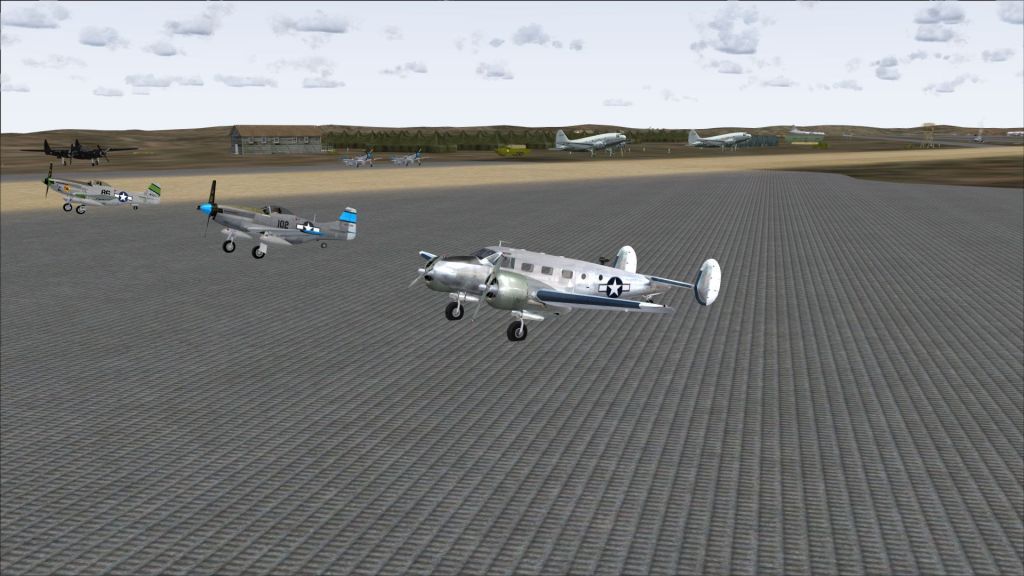
Great aircraft Milton, thanks for making the Beech D18 available for FSX. Here we see the big brass visiting Iwo Jima once the island was secure and in operation supporting the big boy going to and from Japan. They chose the D18 to make the trip.

BeechD18IwoJima.jpg
 
Might have double posted this,, mod, if so apologies, it is meant to be here.

Thanks again, Milton. Lovely to have this bird in my growing FSX stable. She flies great and looks great too. I installed some of the FS2004 textures but they failed to show. Is there a tweak for this, or should they show?
 
Might have double posted this,, mod, if so apologies, it is meant to be here.

Thanks again, Milton. Lovely to have this bird in my growing FSX stable. She flies great and looks great too. I installed some of the FS2004 textures but they failed to show. Is there a tweak for this, or should they show?

They should work fine JH. Check texture folder names against the cfg.
 
Back
Top