• There seems to be an uptick in Political comments in recent months. Those of us who are long time members of the site know that Political and Religious content has been banned for years. Nothing has changed. Please leave all political and religious comments out of the forums.

    If you recently joined the forums you were not presented with this restriction in the terms of service. This was due to a conversion error when we went from vBulletin to Xenforo. We have updated our terms of service to reflect these corrections.

    Please note any post refering to a politician will be considered political even if it is intended to be humor. Our experience is these topics have a way of dividing the forums and causing deep resentment among members. It is a poison to the community. We appreciate compliance with the rules.

    The Staff of SOH

  • Please see the most recent updates in the "Where did the .com name go?" thread. Posts number 16 and 17.

    Post 16 Update

    Post 17 Warning

Beechcraft D18S Port Over Final (Freeware)

They should work fine JH. Check texture folder names against the cfg.

It's an air file problem I think. The port over uses D18Shupe. All the FS2004 textures use D18S. I guess it's just a matter of changing these to the D18Shupe air file. I will post in an hour or two with the result.
 
It's an air file problem I think. The port over uses D18Shupe. All the FS2004 textures use D18S. I guess it's just a matter of changing these to the D18Shupe air file. I will post in an hour or two with the result.


The air file name itself has no bearing on the folders and textures.

Just make sure that the [fltsim] section data agrees with the folder names and the sim name.
 
Use of Fs9's repaint

Hello,

One of my friend, Marc Haardoin, have done in the past, several beautiful repaints of the D18S for Fs9. Take for example hs french navy repaint. You can find it under the name texture.marine.zip at Avsim. To use it with the fsx I have used thee following procedure:
1/ Unzip the texture.marine.zip in a temporary folder
2/ In tthe D18Sfsxport folder make a copy of the texture folder and rename the copy texture.marine
3/ Take all the files of the fs9 paint folder and copy them in the texture.marine you have previously created. Accept to overwrite the files.
4/ In the fs9 paint you have a marine.jpg file. Copy this file under the name thumbnail.jpg
5/ ea safeguard copy of the aircraft.cfg file unnder another name. Then editt the aircraft..cfg file and add


[fltsim.1]

title=Beech D18S Shupe Marine
sim=D18Shupe
model=
panel=
sound=
texture=marine
kb_checklists=Beech18_check
kb_reference=Beech18_ref
atc_id=N700MS
atc_id_color = 0xffffffff
atc_parking_types = RAMP
atc_parking_code = 1
ui_manufacturer=Beechcraft MSA
ui_type="D18S FSX Port"
ui_variation="Aéronavale fançaise, flotille 55S, mid 60"
description="Marc"cokin"Hardouin - august 2005"
atc_heavy=0
atc_airline=
atc_flight_number=
description="Revised Sept 2012 for Full Interior Model - FSX Portover Friendly"


The result is quite satisfactorry for me. Thank Marc Hardoin

d18s02a.jpg


Have a good day

Benoit
 
Navy Jrb 2 Conversion

Uncle Milton,

I would like to see this bird made compatible with the new port over. It's the Navy JRB2 that was in the FS9 corral. I have copied some of the textures files from the core plane and for
the most part, it's not too bad however I need some seats in the back (black void for now) and the other files that would make this compat with the new portover.

View attachment 72433
 
Uncle Milton,

I would like to see this bird made compatible with the new port over. It's the Navy JRB2 that was in the FS9 corral. I have copied some of the textures files from the core plane and for
the most part, it's not too bad however I need some seats in the back (black void for now) and the other files that would make this compat with the new portover.

So would I Rich. You will need to contact Dave Bitzer who did this model with my permissions. :)

Check the JRB-2 Documentation folder with that aircraft.
 
So would I Rich. You will need to contact Dave Bitzer who did this model with my permissions. :)

Check the JRB-2 Documentation folder with that aircraft.

I found it! Works great. (Had to "mirror" some of the entries so as to work in your Aircraft.cfg. )

BTW I stumbled upon a nice sound set for "The Bug smasher" SNJ/D18 as well. It's not too bad, I was around them in my younger days at NAS Cubi RP. (CIRCA 66/69.

Sound set by Gary Jones.

http://www.britsim.com/index.php?option=com_remository&Itemid=162&func=fileinfo&id=1814
 
I found it! Works great. (Had to "mirror" some of the entries so as to work in your Aircraft.cfg. )

BTW I stumbled upon a nice sound set for "The Bug smasher" SNJ/D18 as well. It's not too bad, I was around them in my younger days at NAS Cubi RP. (CIRCA 66/69.

Sound set by Gary Jones.

http://www.britsim.com/index.php?option=com_remository&Itemid=162&func=fileinfo&id=1814

I agree; Gary does awesome sound works.

Actually, he did the sounds for our AT-11 that you could have copied over or aliased if you have that.
 
panel board light

Hello,

I have slightly modified in the [LIGHTS] section, the panel board light in ordeer to improve the reading of the instruments during night.


[LIGHTS]
// types: 1=beacon, 2=strobe, 3=navigation, 4=cockpit, 5=landing
// 6=Taxi, 7=Recognition, 8=Wing, 9=Logo, 10=Cabin
light.0 = 3, -0.6, -23.495, 1.796, fx_navred ,
light.1 = 3, -0.5, 23.495, 1.696, fx_navgre ,
//light.2 = 3, -24.3, 0, 3.700, fx_navwhi ,
light.3 = 4, 3.80, 0.00, 2.00, fx_vclight,
//light.4 = 10, 2.70, 0.00, 2.050, fx_vclight,
light.5 = 10, -3.70, 0.00, 3.250, fx_vclight,
light.6 = 1, -17.68, 0.00, 3.999, fx_beacon_commander.fx ,
light.7 = 1, -0.1, 0.00, -1.700, fx_beacon_commander.fx ,
light.8 = 5, 8.3, -14.0, -2.9, Newll ,//wing lite reflections
light.9 = 5, 8.3, 14.0, -2.9, Newll ,//wing

The result I have obtained is showed on the following screenshot:

d18s11.jpg


Have a good day

Benoit
 
bmd,

I think its great that everyone can set these as they like them.

The original kept the cockpit as dark as possible so as not to destroy night vision.
If you fly night time with lights out in the room, even the original is a little bright.
Of course, all these at my room and monitor settings.

I set it based on comments I have received over 10 years of doing night lighting.

Of course everyones monitor brightness and color displays are different. That's why it is so important for simmers to be able to tweak their own.

Thanks
 
Stovall converted a model file for use as AI.

The attached removes the Interior model/VC, and horizontal tail lights.

Anyone who wishes to setup an AI with this is welcome to.

This is heavy for a typical AI model (texture-wise) but as long as it is spawned sparingly in each setting, it should do fine.

Of course you can downsize the textures by half (and maybe convert to 8-bit) with minimal clarity affect at distance.

This is just the b18ms.mdl file, not a full complement of an AI folder.

EDIT: Updated attachment to change landing light animation to be active with gear animation.
 
Thanks Milton, I am off to give this a try. The objective is to remove the landing lights from working and the light on the horizontal stabilizer. Thanks for doing this.

Just returned from the test. All visible lights removed. All that is left is the animation of the landing lights beneath the winds. That would make the AI model perfect.
 
Thanks Milton, I am off to give this a try. The objective is to remove the landing lights from working and the light on the horizontal stabilizer. Thanks for doing this.

Just returned from the test. All visible lights removed. All that is left is the animation of the landing lights beneath the winds. That would make the AI model perfect.

Tom,

I got your message after I posted the model above. I did not remove the landing lights. If you would like, I can animate them with the gear, or remove altogether.

Milton

EDIT: What about cowl flaps? Would you prefer them closed?
 
Stovall,

I updated the attachment above to have the landing lights animate and come on when gear comes down.

Try that as I believe it works.

Otherwise, I will simply remove them.
 
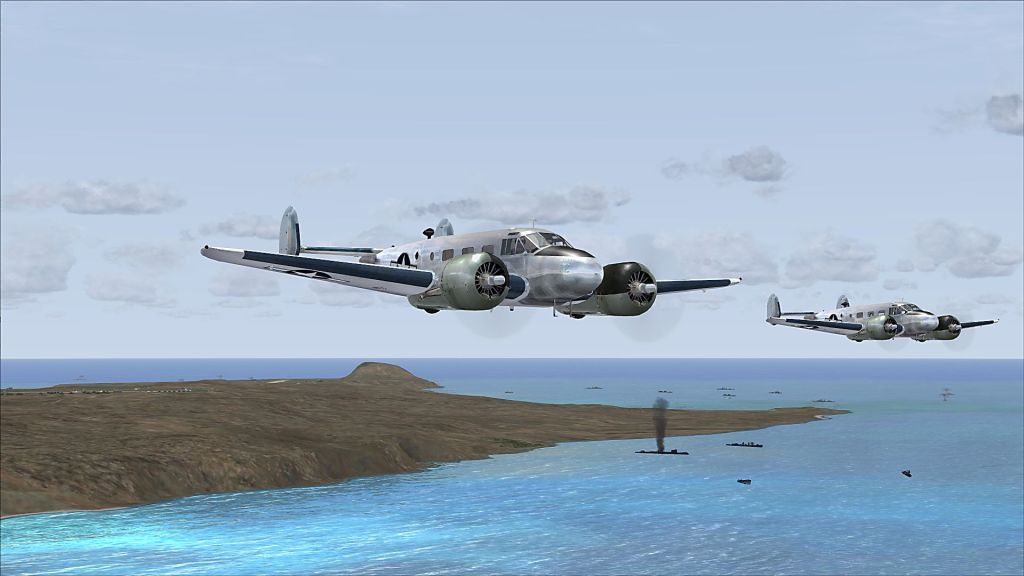
I will give the new attachment a try. This picture is what I was trying to accomplish. The far D-18 is the AI version. I hex edited your first attachment. Off to try the new updated version.

IwoBeech_D-18.jpg
 
The animation of the lights works perfectly on the AI aircraft. Thanks Milton for doing that. Before they stayed on all the time. Now they only come on when the wheels are down as they should. Perfect. Much appreciated.
 
Back
Top