

-
Please see the most recent updates in the "Where did the .com name go?" thread. Posts number 16 and 17.
-
Special Server Maintenance
Just when you think you have everything running some what better...
You get a message from the Hosting company. Short story they need to move us to a new server. I have been working with them to plan a good date for all concerned. Here is what we have come up with as a schedule.
- November 4th 17:00 -5UTC shut off the forums and start backup proceedures. During this time there will be no access to the forums or the Resource Section.
- November 5th Continue with Backups and download same until complete.
- November 6th 7:00 turn over server to hosting company to move system to new server
- November 7th - 8th restore backups and upgrade forum software.
If all goes well we should be back online on November 8th.
To keep you updated we will post updates on AVSIM forums.
Thank you for your support.
You are using an out of date browser. It may not display this or other websites correctly.
You should upgrade or use an alternative browser.
You should upgrade or use an alternative browser.
Before I do ANOTHER complete uninstall/reinstall....
- Thread starter Navy Chief
- Start date

SiR_RiPPER
Members +
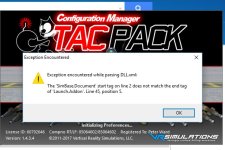
Check if your dll.xml has a </SimBase.Document> line in it. It should be the very last line in the file. If not, then addind it should solve it.
What is important to have right:
<?xml version="1.0" encoding="Windows-1252"?>
<SimBase.Document Type="Launch" version="1,0">
<Descr>Launch</Descr>
<Filename>dll.xml</Filename>
<Disabled>False</Disabled>
<Launch.ManualLoad>False</Launch.ManualLoad>
....
....
<Launch.Addon> entry </Launch.Addon>
...
...
</SimBase.Document>
Here's what mine looks like.
What is important to have right:
<?xml version="1.0" encoding="Windows-1252"?>
<SimBase.Document Type="Launch" version="1,0">
<Descr>Launch</Descr>
<Filename>dll.xml</Filename>
<Disabled>False</Disabled>
<Launch.ManualLoad>False</Launch.ManualLoad>
....
....
<Launch.Addon> entry </Launch.Addon>
...
...
</SimBase.Document>
Here's what mine looks like.
Code:
<?xml version="1.0" encoding="Windows-1252"?>
<SimBase.Document Type="Launch" version="1,0">
  <Descr>Launch</Descr>
  <Filename>dll.xml</Filename>
  <Disabled>False</Disabled>
  <Launch.ManualLoad>False</Launch.ManualLoad>
  <Launch.Addon>
    <Name>Object Placement Tool</Name>
    <Disabled>True</Disabled>
    <ManualLoad>False</ManualLoad>
    <Path>..\Microsoft Flight Simulator X SDK\SDK\Mission Creation Kit\object_placement.dll</Path>
  </Launch.Addon>
  <Launch.Addon>
    <Name>Traffic Toolbox</Name>
    <Disabled>True</Disabled>
    <ManualLoad>False</ManualLoad>
    <Path>..\Microsoft Flight Simulator X SDK\SDK\Environment Kit\Traffic Toolbox SDK\traffictoolbox.dll</Path>
  </Launch.Addon>
  <Launch.Addon>
    <Name>Visual Effects Tool</Name>
    <Disabled>True</Disabled>
    <ManualLoad>False</ManualLoad>
    <Path>..\Microsoft Flight Simulator X SDK\SDK\Environment Kit\Special Effects SDK\visualfxtool.dll</Path>
  </Launch.Addon>
  <Launch.Addon>
    <Name>XMLTools</Name>
    <Disabled>False</Disabled>
    <ManualLoad>False</ManualLoad>
    <Path>XMLTools.dll</Path>
    <DllStartName>module_init</DllStartName>
    <DllStopName>module_deinit</DllStopName>
  </Launch.Addon>
  <Launch.Addon>
    <Name>CarrierExtensions</Name>
    <Disabled>False</Disabled>
    <ManualLoad>False</ManualLoad>
    <Path>Gauges\CarrierExtensions.dll</Path>
  </Launch.Addon>
  <Launch.Addon>
    <Name>A7 Ordnance Weight Manager</Name>
    <Disabled>False</Disabled>
    <ManualLoad>False</ManualLoad>
    <Path>Addon Modules\A7_Ordnance_Mngr.dll</Path>
    <DllStartName>module_init</DllStartName>
    <DllStopName>module_deinit</DllStopName>
  </Launch.Addon>
  <Launch.Addon>
    <Name>FSUIPC 4</Name>
    <Disabled>False</Disabled>
    <Path>Modules\FSUIPC4.dll</Path>
  </Launch.Addon>
  <Launch.Addon>
       <Name>VRS_TacPack</Name>
       <Disabled>False</Disabled>
       <ManualLoad>True</ManualLoad>
       <Path>Modules\VRS_TacPack\VRS_TacPack.dll</Path>
   </Launch.Addon>
</SimBase.Document>
Navy Chief
Senior Member
<?xml version="1.0" encoding="utf-8"?>
<SimBase.Document Type="Launch" version="1,0">
<Descr>Launch</Descr>
<Filename>dll.xml</Filename>
<Disabled>False</Disabled>
<Launch.ManualLoad>False</Launch.ManualLoad>
<Launch.Addon>
<Name>Object Placement Tool</Name>
<Disabled>True</Disabled>
<ManualLoad>False</ManualLoad>
<Path>..\Microsoft Flight Simulator X SDK\SDK\Mission Creation Kit\object_placement.dll</Path>
</Launch.Addon>
<Launch.Addon>
<Name>Traffic Toolbox</Name>
<Disabled>True</Disabled>
<ManualLoad>False</ManualLoad>
<Path>..\Microsoft Flight Simulator X SDK\SDK\Environment Kit\Traffic Toolbox SDK\traffictoolbox.dll</Path>
</Launch.Addon>
<Launch.Addon>
<Name>Visual Effects Tool</Name>
<Disabled>True</Disabled>
<ManualLoad>False</ManualLoad>
<Path>..\Microsoft Flight Simulator X SDK\SDK\Environment Kit\Special Effects SDK\visualfxtool.dll</Path>
</Launch.Addon>
<Launch.Addon>
<Name>CarrierExtensions</Name>
<Disabled>False</Disabled>
<ManualLoad>False</ManualLoad>
<Path>Gauges\CarrierExtensions.dll</Path>
</Launch.Addon>
<Launch.Addon>
<Name>VRS_TacPack</Name>
<Disabled>False</Disabled>
<ManualLoad>False</ManualLoad>
<Path>Modules\VRS_TacPack\VRS_TacPack.dll</Path>
</Launch.Addon>
<Launch.Addon>
<Name>XMLTools</Name>
<Disabled>False</Disabled>
<ManualLoad>False</ManualLoad>
<Path>XMLTools.dll</Path>
<DllStartName>module_init</DllStartName>
<DllStopName>module_deinit</DllStopName>
</Launch.Addon>
</SimBase.Document>
<SimBase.Document Type="Launch" version="1,0">
<Descr>Launch</Descr>
<Filename>dll.xml</Filename>
<Disabled>False</Disabled>
<Launch.ManualLoad>False</Launch.ManualLoad>
<Launch.Addon>
<Name>Object Placement Tool</Name>
<Disabled>True</Disabled>
<ManualLoad>False</ManualLoad>
<Path>..\Microsoft Flight Simulator X SDK\SDK\Mission Creation Kit\object_placement.dll</Path>
</Launch.Addon>
<Launch.Addon>
<Name>Traffic Toolbox</Name>
<Disabled>True</Disabled>
<ManualLoad>False</ManualLoad>
<Path>..\Microsoft Flight Simulator X SDK\SDK\Environment Kit\Traffic Toolbox SDK\traffictoolbox.dll</Path>
</Launch.Addon>
<Launch.Addon>
<Name>Visual Effects Tool</Name>
<Disabled>True</Disabled>
<ManualLoad>False</ManualLoad>
<Path>..\Microsoft Flight Simulator X SDK\SDK\Environment Kit\Special Effects SDK\visualfxtool.dll</Path>
</Launch.Addon>
<Launch.Addon>
<Name>CarrierExtensions</Name>
<Disabled>False</Disabled>
<ManualLoad>False</ManualLoad>
<Path>Gauges\CarrierExtensions.dll</Path>
</Launch.Addon>
<Launch.Addon>
<Name>VRS_TacPack</Name>
<Disabled>False</Disabled>
<ManualLoad>False</ManualLoad>
<Path>Modules\VRS_TacPack\VRS_TacPack.dll</Path>
</Launch.Addon>
<Launch.Addon>
<Name>XMLTools</Name>
<Disabled>False</Disabled>
<ManualLoad>False</ManualLoad>
<Path>XMLTools.dll</Path>
<DllStartName>module_init</DllStartName>
<DllStopName>module_deinit</DllStopName>
</Launch.Addon>
</SimBase.Document>

Penzoil3
SOH-CM-2024
Definitely! That's it.Looks like after the seventh line you need to add launch addon.exactly the same as the line above it.
It appears to be missing.Back it up first.
Cheers Chris
Navy Chief
Senior Member
I will check that! Hurricane Nate is beginning to pass by where I live, so I shut down my system. Hopefully won't lose power here, but might. The storm is west of us, but winds might knock out power. NC
From a file comparison
Excluding the A7 Ordnance Weight Manager Addon and the FSUIPC 4
Addon, the files are identical except for the two lines below. I have
adjusted the order of the other lines and their indentations to facilitate
file comparison. Otherwise, the file below should work.
**********************************************
<?xml version="1.0" encoding="Windows-1252"?> Line one
<ManualLoad>False</ManualLoad> Within the VRS_TacPack Addon
**********************************************
File:
Excluding the A7 Ordnance Weight Manager Addon and the FSUIPC 4
Addon, the files are identical except for the two lines below. I have
adjusted the order of the other lines and their indentations to facilitate
file comparison. Otherwise, the file below should work.
**********************************************
<?xml version="1.0" encoding="Windows-1252"?> Line one
<ManualLoad>False</ManualLoad> Within the VRS_TacPack Addon
**********************************************
File:
Code:
<?xml version="1.0" encoding="utf-8"?>
<SimBase.Document Type="Launch" version="1,0">
  <Descr>Launch</Descr>
  <Filename>dll.xml</Filename>
  <Disabled>False</Disabled>
  <Launch.ManualLoad>False</Launch.ManualLoad>
  <Launch.Addon>
    <Name>Object Placement Tool</Name>
    <Disabled>True</Disabled>
    <ManualLoad>False</ManualLoad>
    <Path>..\Microsoft Flight Simulator X SDK\SDK\Mission Creation Kit\object_placement.dll</Path>
  </Launch.Addon>
  <Launch.Addon>
    <Name>Traffic Toolbox</Name>
    <Disabled>True</Disabled>
    <ManualLoad>False</ManualLoad>
    <Path>..\Microsoft Flight Simulator X SDK\SDK\Environment Kit\Traffic Toolbox SDK\traffictoolbox.dll</Path>
  </Launch.Addon>
  <Launch.Addon>
    <Name>Visual Effects Tool</Name>
    <Disabled>True</Disabled>
    <ManualLoad>False</ManualLoad>
    <Path>..\Microsoft Flight Simulator X SDK\SDK\Environment Kit\Special Effects SDK\visualfxtool.dll</Path>
  </Launch.Addon>
  <Launch.Addon>
    <Name>XMLTools</Name>
    <Disabled>False</Disabled>
    <ManualLoad>False</ManualLoad>
    <Path>XMLTools.dll</Path>
    <DllStartName>module_init</DllStartName>
    <DllStopName>module_deinit</DllStopName>
  </Launch.Addon>
  <Launch.Addon>
    <Name>CarrierExtensions</Name>
    <Disabled>False</Disabled>
    <ManualLoad>False</ManualLoad>
    <Path>Gauges\CarrierExtensions.dll</Path>
  </Launch.Addon>
  <Launch.Addon>
       <Name>VRS_TacPack</Name>
       <Disabled>False</Disabled>
       <ManualLoad>False</ManualLoad>
       <Path>Modules\VRS_TacPack\VRS_TacPack.dll</Path>
   </Launch.Addon>
</SimBase.Document>
Navy Chief
Senior Member
I don't know if it fixed it or not, but before I even did anything else today (when I got my system turned on again, after the storm....no damage here) I reinstalled my registered FSUIPC. I tried reinstalling the Superbug and Tacpac, and they installed just fine. FSX starts up just fine!
So all ok right now. But Matt's comment about the A7 Ordnance Weight Manager reminds me that installing the A7 packages had previously given me problems. Seem like I had installed them manually? NC
So all ok right now. But Matt's comment about the A7 Ordnance Weight Manager reminds me that installing the A7 packages had previously given me problems. Seem like I had installed them manually? NC