
-
Please see the most recent updates in the "Where did the .com name go?" thread. Posts number 16 and 17.
-
IMPORTANT DOWNLOADING INFORMATION - ALL MEMBERS PLEASE READ
Please see this thread for updates. Update Thread
SOH ADMINISTRATION
You are using an out of date browser. It may not display this or other websites correctly.
You should upgrade or use an alternative browser.
You should upgrade or use an alternative browser.
Br2 p-51d
- Thread starter Browncoat
- Start date

Can we have a new rule? It is simple. Link to any aircraft, object .etc that you are having a problem with. The search function for the library is't good.
Example:
View attachment 85243
Example:
View attachment 85243

As it is the Br2 p-51d, I assume the BR stand for Bruno Duffort. Based on which I think it is the P-51 D by Pascal Auterive and and Bruno Duffort which can be found on the "Free Flight Site" which is hosted here at the Sim-Outhouse.
This model can be found here: The Free Flight Site, The Knifemakers Aircraft Collection (sim-outhouse.com)
And I think Allen's idea to post a link is very useful.
Cheers,
Huub
This model can be found here: The Free Flight Site, The Knifemakers Aircraft Collection (sim-outhouse.com)
And I think Allen's idea to post a link is very useful.
Cheers,
Huub

Reply...
Good morning,
Here is the direct link: http://www.sim-outhouse.com/freeflight/BR_P51D_CFS.zip
Good morning,
Here is the direct link: http://www.sim-outhouse.com/freeflight/BR_P51D_CFS.zip
Yep! Thanks Rami, that’s the one. And great suggestion Allen. I’ll be sure to keep that in mind for the future. I agree with that the search function isn’t helpful from time to time.
Okay. The model dose have the needed part for a working VC but it looks like the [Vcockpit01] is from the CFS1 P-51D and doesn't work with the model. Dumping the model as obj or .3ds now so I can get the UV mapping of the flat plane used for the VC gauges.
Edit:
Here you go.
View attachment BR2 P51D VC Fix.zip
Edit:
Here you go.
View attachment BR2 P51D VC Fix.zip
I converted the model to a .bgl so I could look at the model in Model Converter X to see if the model had a 3d plane for VC gauges (it is the checker board).
View attachment 85289
Got the name from the material editor. Parts made to put gauges on start with "$". Exported the model as .obj than used some Blender magic to do texture baking (transfer of a texture from one part onto another) This is how I made the $VCpan.bmp to use later with CfgEdit (panel editor).
In the panel.cfg I found texture=$VCpan in the [Vcockpit01] and changed it to $VCMAIN so the gauges are placed on the model. Added file=$VCpan.bmp and did some changes other changes to the [Vcockpit01].
Now in CfgEdit $VCpan.bmp is used as template to place gauges on. Once gauges are placed, save and check in CFS2. Edit gauges if needed.
View attachment 85289
Got the name from the material editor. Parts made to put gauges on start with "$". Exported the model as .obj than used some Blender magic to do texture baking (transfer of a texture from one part onto another) This is how I made the $VCpan.bmp to use later with CfgEdit (panel editor).
In the panel.cfg I found texture=$VCpan in the [Vcockpit01] and changed it to $VCMAIN so the gauges are placed on the model. Added file=$VCpan.bmp and did some changes other changes to the [Vcockpit01].
Now in CfgEdit $VCpan.bmp is used as template to place gauges on. Once gauges are placed, save and check in CFS2. Edit gauges if needed.
Hi Allen,
Any chance you could do some magic on BR2 P38L5 available at the same page ?
Question : I have been considering painting this P-51 or the P-38L5, mapping are brilliant and would allow for precise details. However, MDL format are too old to be read and tweaked using MDLMAT. Would it be possible to make them "MDLMAT-proof" by converting them through Model Converter X ?
Best
L'iguane
Any chance you could do some magic on BR2 P38L5 available at the same page ?
Question : I have been considering painting this P-51 or the P-38L5, mapping are brilliant and would allow for precise details. However, MDL format are too old to be read and tweaked using MDLMAT. Would it be possible to make them "MDLMAT-proof" by converting them through Model Converter X ?
Best
L'iguane
For the P-38 I had to search the mdl with a hex editor as the model was broken when l loaded it into Model Converter X but I did fine flat 3d plane for placing gauges on.
Open the panel.cfg and go to the [Vcockpit01] section and change texture=$P38F to texture=$VCDISP. Add file=VCPan.bmp as well. Now go to the texture folder and copy the VCPan.bmp and paste it into the panel folder.
Grab and run CfgEdit http://www.sim-outhouse.com/sohforums/local_links.php?catid=49&linkid=6212 Set it up so it can see CFS2 gauges if you have never installed it. Once done open the BR2_P38L-5 panel.cfg. than go to Window Vcockpit01. This should look like large stock CFS2 P-38 gauges and behind them should be the image of VCPan.bmp.
At this point delete the stock CFS2 P-38 gauges and start adding new ones. Once done save and check CFS2.
Model Converter X can't fix things like that. Well it can't fix just about anything for FS04 and older as all updates to MCX has been done for FSX based things.
Open the panel.cfg and go to the [Vcockpit01] section and change texture=$P38F to texture=$VCDISP. Add file=VCPan.bmp as well. Now go to the texture folder and copy the VCPan.bmp and paste it into the panel folder.
Grab and run CfgEdit http://www.sim-outhouse.com/sohforums/local_links.php?catid=49&linkid=6212 Set it up so it can see CFS2 gauges if you have never installed it. Once done open the BR2_P38L-5 panel.cfg. than go to Window Vcockpit01. This should look like large stock CFS2 P-38 gauges and behind them should be the image of VCPan.bmp.
At this point delete the stock CFS2 P-38 gauges and start adding new ones. Once done save and check CFS2.
Model Converter X can't fix things like that. Well it can't fix just about anything for FS04 and older as all updates to MCX has been done for FSX based things.
For the P-38 I had to search the mdl with a hex editor as the model was broken when l loaded it into Model Converter X but I did fine flat 3d plane for placing gauges on.
Open the panel.cfg and go to the [Vcockpit01] section and change texture=$P38F to texture=$VCDISP. Add file=VCPan.bmp as well. Now go to the texture folder and copy the VCPan.bmp and paste it into the panel folder.
Grab and run CfgEdit http://www.sim-outhouse.com/sohforums/local_links.php?catid=49&linkid=6212 Set it up so it can see CFS2 gauges if you have never installed it. Once done open the BR2_P38L-5 panel.cfg. than go to Window Vcockpit01. This should look like large stock CFS2 P-38 gauges and behind them should be the image of VCPan.bmp.
At this point delete the stock CFS2 P-38 gauges and start adding new ones. Once done save and check CFS2.
Model Converter X can't fix things like that. Well it can't fix just about anything for FS04 and older as all updates to MCX has been done for FSX based things.
Thank you very much for these info, will give a try.
By any chance, as unsuccessful with MDLMAT, would it be possible to give the mdl. some speculare shine and make it reflective through Ivan Hsu CFS2/FS8/FS9 converter ? That would be awesome !
I'm running a 64bit rig and I have not succeeded so far to emulate to make a 32bit application run.
That P-38 texture mapping is the best amongst freeware and I'd love to give it a try. Haven't started yet due to limitations quoted above
Cheers
L'iguane
MDLC.exe it self is a 16bit program (DOS 16bit I think) and doesn't work on Win 7 and above natively. The most common way to use mdlc now is by DOSBox (RIP the Mk MDLC GUI) I set up this package to run mdlc in DOSBox http://www.sim-outhouse.com/sohforums/local_links.php?catid=49&linkid=25224
Download the package and drop the DOSMdlc 2.0 folder into your main C: drive. than start DOSBox Shine and follow what it says.
Download the package and drop the DOSMdlc 2.0 folder into your main C: drive. than start DOSBox Shine and follow what it says.
MDLC.exe it self is a 16bit program (DOS 16bit I think) and doesn't work on Win 7 and above natively. The most common way to use mdlc now is by DOSBox (RIP the Mk MDLC GUI) I set up this package to run mdlc in DOSBox http://www.sim-outhouse.com/sohforums/local_links.php?catid=49&linkid=25224
Download the package and drop the DOSMdlc 2.0 folder into your main C: drive. than start DOSBox Shine and follow what it says.
Hello Allen,
Working fine now ! I was able to turn mdl's project into reflective ones. Worked well on some mdls and getting some weird stuff with others :
One weird stuff I haven't a clue about is the BR2 P-38 (cfs2) model and R Laborie M2000D (fs9)
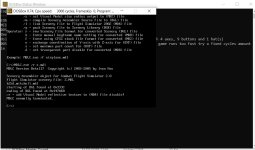
Using the MDLC command line to turn them reflective, I'm getting this message for the P38 :
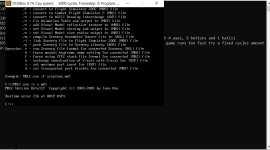
And this for the M2000D :
I can send you these 2 mdls if you would like to take a loo at it ?
Thanks!
L'iguane