
• Please see the most recent updates in the "Where did the .com name go?" thread. Posts number 16 and 17.

    Post 16 Update

    Post 17 Warning old domain name stealing credentials

  • Special Server Maintenance

    Just when you think you have everything running some what better...

    You get a message from the Hosting company. Short story they need to move us to a new server. I have been working with them to plan a good date for all concerned. Here is what we have come up with as a schedule.

    1. November 4th 17:00 -5UTC shut off the forums and start backup proceedures. During this time there will be no access to the forums or the Resource Section.
    2. November 5th Continue with Backups and download same until complete.
    3. November 6th 7:00 turn over server to hosting company to move system to new server
    4. November 7th - 8th restore backups and upgrade forum software.

    If all goes well we should be back online on November 8th.

    To keep you updated we will post updates on AVSIM forums.

    Thank you for your support.

C-123/FSX Error

falcon409

SOH-CM-2026
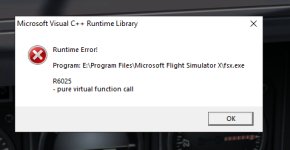
Working in FSPanel Studio (with the Provider active in the Sim) and I make a change (any change at all, makes no difference), I save the change in FSPS then go to the aircraft selection window to reload the airplane to view the change. . . .when the airplane reloads (and before the change can be viewed) I get the error message shown here. Once I clear the error message I get a CTD and I have to restart the Sim. This happens only with this airplane and I know that because I've done this same scenario with literally hundreds of other airplanes over the years and this is the only airplane I've ever had this problem with. Any ideas?
 

Attachments

  • error.jpg
    error.jpg
    69.6 KB · Views: 134
Not sure what the issue is Ed. FSX can be wonky. Mine just stopped working one day and after un-installing and re installing it never worked again. That's when I switched to P3D.

Also I have a joystick button mapped to "Reload aircraft" so I don't have to go into the aircraft selection menu. Helps a ton when working with FSPS.
 
Ed, you probably already looked but M$ says that error lies within the app likely due to a corrupted app.

[h=1]“C Runtime Error R6025[/h][FONT=&quot]
  • Article
  • 08/03/2021
  • 2 minutes to read
    • [COLOR=var(--theme-secondary-invert)]+2


[/FONT][/COLOR]
[FONT=&quot]pure virtual function call[/FONT]
[FONT=&quot][COLOR=var(--theme-info-dark)]
​
Note

If you encounter this error message while running an app, the app was shut down because it has an internal problem. The most common reason for this error is a bug in the app, or a corrupted installation.
You can try these steps to fix this error:

  • Use the Apps and Features or Programs and Features page in the Control Panel to repair or reinstall the program.
  • Check Windows Update in the Control Panel for software updates.
  • Check for an updated version of the app. Contact the app vendor if the problem persists.”

Please forgive if this is old info here.

Steve
[/FONT][/COLOR]
 
Might be time for FSX Steam Edition. I went the Steam Edition route with this new computer, not regretting it either.
 
Back
Top