• Please see the most recent updates in the "Where did the .com name go?" thread. Posts number 16 and 17.

    Post 16 Update

    Post 17 Warning old domain name stealing credentials

  • Special Server Maintenance

    Just when you think you have everything running some what better...

    You get a message from the Hosting company. Short story they need to move us to a new server. I have been working with them to plan a good date for all concerned. Here is what we have come up with as a schedule.

    1. November 4th 17:00 -5UTC shut off the forums and start backup proceedures. During this time there will be no access to the forums or the Resource Section.
    2. November 5th Continue with Backups and download same until complete.
    3. November 6th 7:00 turn over server to hosting company to move system to new server
    4. November 7th - 8th restore backups and upgrade forum software.

    If all goes well we should be back online on November 8th.

    To keep you updated we will post updates on AVSIM forums.

    Thank you for your support.

c199 Fairchild

willemkelder

Members +
Hallo,

I installed the C-119 Fairchild in FSX via orbx but the both gauges “Options” or “Eyepoint too”l will not stay in vieuw.
After selecting the option or the eyepoint gauge but the only thing i see is a glitch that the gauge will pop-up and then disappered within one second.
I use FSX in Windows 11.

Hope you cane help.

Info, i ask The Aeroplaneheaven team the same question but they gave no help for FSX anymore.
 
I didn't realize this aircraft was available so I installed it to check out your problem. I have Win10 Home Edition. The installation went as it should and after loading the airplane into the Sim (FSX/Accel) both the "Options" popup and the "eye point tool" display as they should. They only disappear if I change views (going from interior VC to exterior spot view) but that's normal.
 
I didn't realize this aircraft was available so I installed it to check out your problem. I have Win10 Home Edition. The installation went as it should and after loading the airplane into the Sim (FSX/Accel) both the "Options" popup and the "eye point tool" display as they should. They only disappear if I change views (going from interior VC to exterior spot view) but that's normal.

Strange but thanks for the info, so perhaps something with windows 11.

rgds Willem
 
Microsoft

I wonder if MS is doing it on purpose that every new version cooperates with FSX a little less (or worse) so that you have to buy MSFS. That would be fine if there MSFS would run on the systems that FSX does not have to buy a whole new computer/video card etc. and all new aircraft and scenery. Ya think?????
 
Just Downloaded And Installed

I opened up ORBX Central and just installed the Boxcar into my Prepar3d V4.5 and it works in THERE prefectly including the eyepoint screen. I don't fly FSX any more but just keep it for testing scenery or repaints/adaptations for folks who still use it. I have been able to port-over almost all my scenery into P3D4.5 but I have FSX aircraft (payware no less) that just won't work in it which is very disappointing. I am not going to buy any of them from the developers who have redesigned them for Prepar3D V4 and V5 because I just choose not to spend the money on them. I understand that they are a business and have no animosity, just my choice. I really applaud A2A, Aeroplane Heaven, Milviz/Blackbird and the other designers for sharing so many for free now that they have moved into the MSFS arena. If I ever do upgrade my systems to be able to run MSFS I will support them for their generosity to us.
 
Albeit that ORBX lists that aircraft for P3DV4, I found out that I can locate on my HD where is stores stuff for P3DV4 and copy it over to my addons in P3DV5 at use it there with no issues.


I opened up ORBX Central and just installed the Boxcar into my Prepar3d V4.5 and it works in THERE prefectly including the eyepoint screen. I don't fly FSX any more but just keep it for testing scenery or repaints/adaptations for folks who still use it. I have been able to port-over almost all my scenery into P3D4.5 but I have FSX aircraft (payware no less) that just won't work in it which is very disappointing. I am not going to buy any of them from the developers who have redesigned them for Prepar3D V4 and V5 because I just choose not to spend the money on them. I understand that they are a business and have no animosity, just my choice. I really applaud A2A, Aeroplane Heaven, Milviz/Blackbird and the other designers for sharing so many for free now that they have moved into the MSFS arena. If I ever do upgrade my systems to be able to run MSFS I will support them for their generosity to us.
 
Paratroopers

Albeit that ORBX lists that aircraft for P3DV4, I found out that I can locate on my HD where is stores stuff for P3DV4 and copy it over to my addons in P3DV5 at use it there with no issues.
I had an effect for airdrop of cargo or paratroopers for my C47 in FSX I believe from AVSIM which as an effect will work in P3D I am almost sure. It was originally created for Fallshirmjager and a Luftwaffe aircraft but they did a mod for modern paratroopers. I had to do some creative work on the bmp's for wwii 82nd and 101st AB.
 
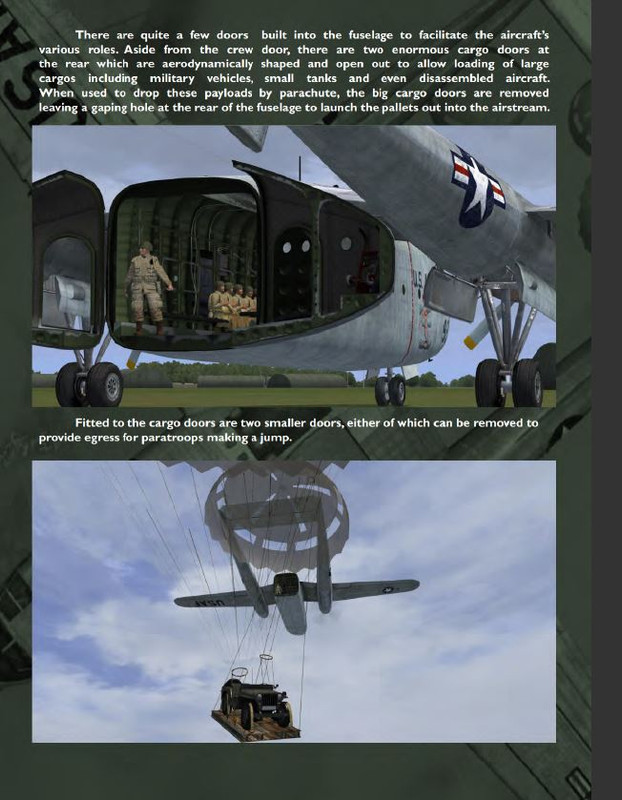
Apparently, the C-119 already has the ability for para drops. Perhaps certain liveries have this ability.

A page from the manual:
Capture.jpg


Capture.jpg


I had an effect for airdrop of cargo or paratroopers for my C47 in FSX I believe from AVSIM which as an effect will work in P3D I am almost sure. It was originally created for Fallshirmjager and a Luftwaffe aircraft but they did a mod for modern paratroopers. I had to do some creative work on the bmp's for wwii 82nd and 101st AB.
 
Last edited:
I wonder if MS is doing it on purpose that every new version cooperates with FSX a little less (or worse) so that you have to buy MSFS. That would be fine if there MSFS would run on the systems that FSX does not have to buy a whole new computer/video card etc. and all new aircraft and scenery. Ya think?????

I agree with you every time when there is a new game you have to buy a new computor system even if your computor system is up to date.
 
I didn't realize this aircraft was available so I installed it to check out your problem. I have Win10 Home Edition. The installation went as it should and after loading the airplane into the Sim (FSX/Accel) both the "Options" popup and the "eye point tool" display as they should. They only disappear if I change views (going from interior VC to exterior spot view) but that's normal.

After some trouble shooting i reinstalled Sp1 and Sp2 for FSX again and the panels reappeared again
 
Back
Top