• Please see the most recent updates in the "Where did the .com name go?" thread. Posts number 16 and 17.

    Post 16 Update

    Post 17 Warning old domain name stealing credentials

  • Special Server Maintenance

    Just when you think you have everything running some what better...

    You get a message from the Hosting company. Short story they need to move us to a new server. I have been working with them to plan a good date for all concerned. Here is what we have come up with as a schedule.

    1. November 4th 17:00 -5UTC shut off the forums and start backup proceedures. During this time there will be no access to the forums or the Resource Section.
    2. November 5th Continue with Backups and download same until complete.
    3. November 6th 7:00 turn over server to hosting company to move system to new server
    4. November 7th - 8th restore backups and upgrade forum software.

    If all goes well we should be back online on November 8th.

    To keep you updated we will post updates on AVSIM forums.

    Thank you for your support.

Can't change default folder

AussieMan

SOH Staff .."Bartender"
After pre-paying and waiting for the release of MSFS2020I am disappointed that I am unable to install the sim in any other folder than C\:program Files\******. To conserve space on my C drive I want to install it on another partition where I have plenty of space. Any advice would be welcome.
 
Google how to change the default location for Microsoft Store apps. There's a couple of settings to change in Windows settings but it worked for me. It uses symbolic links though so it will still look like you're installing on C but it'll report the space available as the drive you're actually using.
 
It's odd that you don't get an option on which drive to install it. But no need to hassle with symbolic links; you can install it on C: and then move it.

Just install the program. Then, before you run it, go to Settings, Apps & Features, and click on Microsoft Flight Simulator. Then click "Move" and choose another drive.

One other thing to note: The main install is pretty small. Once you run it, you can choose a folder on any drive for the 100-gigabyte-ish data file collection.
 
It's odd that you don't get an option on which drive to install it. But no need to hassle with symbolic links; you can install it on C: and then move it.

Just install the program. Then, before you run it, go to Settings, Apps & Features, and click on Microsoft Flight Simulator. Then click "Move" and choose another drive.

One other thing to note: The main install is pretty small. Once you run it, you can choose a folder on any drive for the 100-gigabyte-ish data file collection.

Indeed, the main install in C:programs is very small. I'm downloading the 95gb of content right now to a separate 1TB SSD that will be dedicated to all things FS. The big content download seems fairly fast, but it is going to be a good hour or more to complete aircraft, airports, tutorials...... quite a list of items.

-d
 
After pre-paying and waiting for the release of MSFS2020I am disappointed that I am unable to install the sim in any other folder than C\:program Files\******. To conserve space on my C drive I want to install it on another partition where I have plenty of space. Any advice would be welcome.

That is odd, when I started my download if first asked which of my three drives it wanted to install in, and then it also asked where I wanted to download and install the content, and actual folder that time. But at first started it, it seamed like it was not doing anything, I rebooted and then when I started it asked me what folder to install the content to, I of course told it the new SSD I installed for this purpose.
 
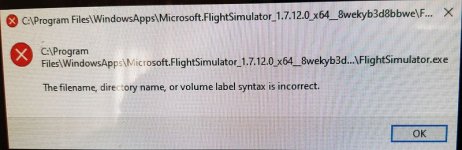
I finally got the program insralled but now I am getting this error message.
 

Attachments

  • error message 2020.jpg
    error message 2020.jpg
    61.2 KB · Views: 4
Back
Top