
-
Please see the most recent updates in the "Where did the .com name go?" thread. Posts number 16 and 17.
-
Special Server Maintenance
Just when you think you have everything running some what better...
You get a message from the Hosting company. Short story they need to move us to a new server. I have been working with them to plan a good date for all concerned. Here is what we have come up with as a schedule.
- November 4th 17:00 -5UTC shut off the forums and start backup proceedures. During this time there will be no access to the forums or the Resource Section.
- November 5th Continue with Backups and download same until complete.
- November 6th 7:00 turn over server to hosting company to move system to new server
- November 7th - 8th restore backups and upgrade forum software.
If all goes well we should be back online on November 8th.
To keep you updated we will post updates on AVSIM forums.
Thank you for your support.
You are using an out of date browser. It may not display this or other websites correctly.
You should upgrade or use an alternative browser.
You should upgrade or use an alternative browser.
Carrier Landing TACAN Question
- Thread starter hardlucksam
- Start date

fsafranek
SOH-CM-2024
I'm not familiar with this gauge arrangement you've got there.
I've never seen text with AI Carriers unless there was an issue with it not finding a component to show. As in one ship of a formation is missing from SimObjects/Boats.
I've seen text with the RFN TACAN gauge you are using in the green line. Red text if the tuned carrier/base isn't within 100 miles and yellow text if it is.

I've never seen text with AI Carriers unless there was an issue with it not finding a component to show. As in one ship of a formation is missing from SimObjects/Boats.
I've seen text with the RFN TACAN gauge you are using in the green line. Red text if the tuned carrier/base isn't within 100 miles and yellow text if it is.

PhantomTweak
Members +
I'm not sure what text goes there.
AICarriers will print up the ship's BRC, wind speed/direction, and so on, but it's not permanent. It pops up, then drops off.
Your screenshot says that "flight information" is missing now, yes? Just what "flight information" do you expect AICarriers to print up?
AIC is all about ships and formations of ships. We'll ignore helicopter sling loads for the moment. What sort of flight information does it ever provide you?
I am not trying to be snide, or snarky. I am really trying to understand what, exactly, is missing, and how it relates to AIC. I've been using AIC for a LONG time now, like ever since Orion created the .NET version, and Orion is an acquaitance, if not friend, of mine. So let's see if we can't figger out what's going on here
Pat☺
AICarriers will print up the ship's BRC, wind speed/direction, and so on, but it's not permanent. It pops up, then drops off.
Your screenshot says that "flight information" is missing now, yes? Just what "flight information" do you expect AICarriers to print up?
AIC is all about ships and formations of ships. We'll ignore helicopter sling loads for the moment. What sort of flight information does it ever provide you?
I am not trying to be snide, or snarky. I am really trying to understand what, exactly, is missing, and how it relates to AIC. I've been using AIC for a LONG time now, like ever since Orion created the .NET version, and Orion is an acquaitance, if not friend, of mine. So let's see if we can't figger out what's going on here
Pat☺
hardlucksam
Members +
Gentlemen; thank you for your reply's. I have been using the AICarrier for a couple of years now. I have tried and tried to install the net version to no avail. So I still have the JAVA version.
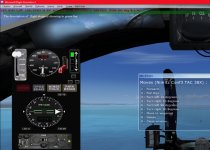
Basically, I would see something like this text toward the end of the sentence: *Nimitz Conf3*. When this showed up; the gauge would start working properly.
Basically, I would see something like this text toward the end of the sentence: *Nimitz Conf3*. When this showed up; the gauge would start working properly.
PhantomTweak
Members +
First, the hard question: In what way can you not install AICarriers.NET? It's as easy as cake. Download the zip file, unzip it to the directory (folder, nowadays) of your choice. You can add it to your EXE.XML file if you like, but it's not a requirement. It just makes life easier if you use it all the time (I sure do!).I have been using the AICarrier for a couple of years now. I have tried and tried to install the net version to no avail. So I still have the JAVA version.
IF you want to add it to your EXE.XML, first, make a back-up, naturally, then just cut-n-paste the example Orion provides in his Readme file into your EXE.XML. Get rid of the old AIC entry. The trick with adding it to the EXE.XML file is to make absolutely certain the <Path>XXXXXX</path> line entry is absolutely perfect. It must match the actual path to the executable file of AICarriers.NET.
Like This for example: <Path>C:\AICarriers\AICarriers.exe</path>
Always, ALWAYS run the AICarriers.NET executable as Administrator.
Second critical step is to download and install the correct .NET Framework file. There is a link in the Readme file to it. Just download and install it. Ensure that when you run the installer, you run it as Administrator. Be forewarned, the installer can take a long time to do it's thing. It can even appear to lock up, or freeze. Just let it run. Go get a cuppa joe or a hamncheeze sammich. Just let it run until it's done. It's not locked up or frozen, it just appears that way.
As to the information in the green line: That is information from and about the RFN Gauge you're using. The "Nimitz Conf3" portion indicates the particular carrier you are using to match up with the RFN gauge's settings. That indicates the Nimitz Configuration 3. If you haven't chosen, and loaded into the world, the proper AICarriers line from it's menu to match up with the RFN gauge's settings, the problems you're seeing (or not seeingBasically, I would see something like this text toward the end of the sentence: *Nimitz Conf3*. When this showed up; the gauge would start working properly.
 ) will appear.
 Have you updated to the 64 bit version of the RFN Gauges lately? If so, undo it. That's only for P3Dv4 and up as far as I know. Or any new version of it? Or the Nimitz/Ike carriers? Have you tried to edit ANY files in you AIC, RFN, FSX, or any other, folders? Are you running everything as Administrator? Have you moved or re-installed anything since the latest Windows 10 update?
We'll get both you problems figured out. The .NET version is the only version that works with a lot of the newer stuff. P3D, FSX:SE, RFN, etc. It might be what you need to run properly under Win10.
Pat☺
hardlucksam
Members +
Well, still no luck. I have version *aicar2r2 by the way. I reinstalled it. I installed the Boeing T45C again. Reinstalled the TACAN instructions. I left the aicarriers.cfg in the folder aicarrier. Does that need to go somewhere else? The formation titles do not show anymore; suddenly.

Marine0326
Members +
https://github.com/ollyau/AICarriers/releases Use this link to download the .NET version of AICarriers. Check to make sure you have the latest Net Framework 4.xx As for your TACAN gauge, it looks different than mine. Is it for P3Dv4?? If so, delete it, and get the 32bit version.