
-
Please see the most recent updates in the "Where did the .com name go?" thread. Posts number 16 and 17.
-
IMPORTANT DOWNLOADING INFORMATION - ALL MEMBERS PLEASE READ
Please see this thread for updates. Update Thread
SOH ADMINISTRATION
You are using an out of date browser. It may not display this or other websites correctly.
You should upgrade or use an alternative browser.
You should upgrade or use an alternative browser.
CFS 2 help
- Thread starter Maverick_21
- Start date
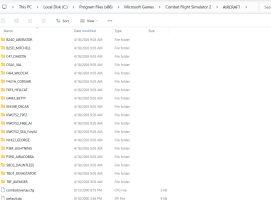
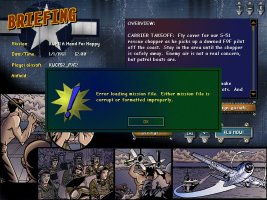
Hi Maverick, open the mission file with Notepad and make sure the aircraft and ships which are needed for the mission are actually in your inventory.
The error.log which is in the main CFS2 directory may show which unit is missing. Is the S-51 rescue chopper needed?
The error.log which is in the main CFS2 directory may show which unit is missing. Is the S-51 rescue chopper needed?

Maverick_21
Members +
https://simviation.com/1/download-file?file=botoko5.zip&fileId=33370 ThisHi Maverick, open the mission file with Notepad and make sure the aircraft and ships which are needed for the mission are actually in your inventory.
The error.log which is in the main CFS2 directory may show which unit is missing. Is the S-51 rescue chopper needed?
Maverick_21
Members +
it was in the respective foldersHi Maverick, open the mission file with Notepad and make sure the aircraft and ships which are needed for the mission are actually in your inventory.
The error.log which is in the main CFS2 directory may show which unit is missing. Is the S-51 rescue chopper needed?

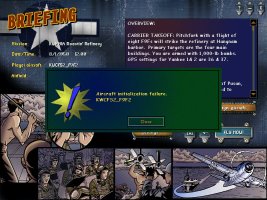
It looks like you have the F9F2 however something is missing it need. My guess is that F9F2's sound.cfg is aliased to an aircraft you don't have. Go into the KWCFS2_F9F2 folder than the sound folder. Open the sound.cfg if you see something like below than the aircraft is looking to use the sound files from another aircraft.
[fltsim]
alias=A6M2_Zero\sound
If you see the alias= line that you need to find and DL the aircraft it wants or change alias to another aircraft.
[fltsim]
alias=A6M2_Zero\sound
If you see the alias= line that you need to find and DL the aircraft it wants or change alias to another aircraft.
Maverick_21
Members +
[FLTSIM]
product_code=FSIM
product_code=FSIM
Go into the KWCFS2_F9F2 than sound folder. Open the sound.cfg with a text editor like Notpad or Wordpad. Make sure it only has the below
[fltsim]
alias=lear45\sound
Next check the main AIRCRAFT folder and make sure you have a Lear45 folder. Inside of that should be a sound folder that has a sound.cfg file and some wave sounds you can play.
[fltsim]
alias=lear45\sound
Next check the main AIRCRAFT folder and make sure you have a Lear45 folder. Inside of that should be a sound folder that has a sound.cfg file and some wave sounds you can play.
Maverick_21
Members +
It doesn't list as an alias in the cfg

copy past the cfg sound file like from the A6m5 Zero or non player flyable stock aircraft into your helicopter sound folder and let it overwrite whatever is in the helicopter sound folder. personally i would look for helicopter sounds for cfs2 I'm sure they existIt doesn't list as an alias in the cfg