CFS2 and Wndows8? Windows10?

Bearcat,

Clicking the "install" option from the download folder installs msinet.ocx into the System32 folder. Still no "Register" option in the context menu and still get the error message when trying to start FSMetar.

I will try installing from inside the SysWOW64 folder and see what happens.

Same deal. Installs the ocx file to the System32 folder. No Register option in the context menu. No joy opening FSMetar.

I wonder if rebooting the computer will get it to register?

Chris
 
Okay, Bearcat. Just saw your latest.

Just to be clear, I type in

msinet.ocx to register .ocx. or.

Is that right?

Chris
 
Thanks Bearcat,

I am running a 64-bit install of Windows8.1Pro.

So I need to put the ocx file into the SysWOW64 folder, right?

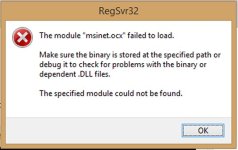
The reason I ask is because when msinet.ocx is in the SysWOW64 folder and I run the command regsvr32 msinet.ocx I get the following error message:
attachment.php


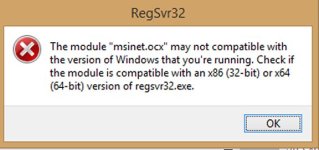
When I put the file into the System32 folder and run the command I get this message:
attachment.php


So it sounds as though I have a windows 64 version of regsvr32.exe, and msinet.ocx is a 32-bit version and never the twain shall meet, eh? I guess I should check and see if there is a 64-bit version.

Chris
 

Attachments

  • cmd-eror-00.jpg
    cmd-eror-00.jpg
    36.6 KB · Views: 10
  • cmd-error-01.jpg
    cmd-error-01.jpg
    31.5 KB · Views: 10
Okay Bearcat!

Got it up and running.

Did some Googling on "64 Bit version of msinet.ocx"and came up with this web page

With MSINET.OCX in the sysWOW64 folder type the following:

regsvr32 c:\windows\syswow64\MSINET.OCX

FSMetar is up and running like a Big-Dog!

Thanks for steering me in the right direction!

Chris
 
Thanks Rhumba

I've attached a zipped file to correct the .hlp file issue. It should work for windows 7, 8, 10. Run the install.cmd as administrator ( right-click to choose ). Works for me.

Dick

Hi Rhumbaflappy
Thanks for this little gem. It works for me as well. (Windows 10).
Cheers
Stuart
PS I have CFS2 running as an administrator in the (x86) folder.
 
... I have MDLC running by DOS box...

Hi Allen,

Okay. I have arrived at a point where I need to do some shining.

Cinfirmed: MDLC doesn't work with Windows8.1

So, a couple of questions:

1. What is the difference between DOSBox and a DOSBox front-end?

2. Can you please explain a little how to use DOSBox in conjunction with MDLC?

Thanks
Chris

PS
 
Last edited:
Just finished reading through your February 2017 thread DOSBox and DOSMdlc users? Good Stuff!

Did you happen to do any bats that will put a basic shine on un-shined AC?

Will keep searching forums for anymore discussions.

Thanks,
Chris
 
I keep adding to the unreleased DOSMdlc 2.0.

Try the attached copy below. Put the DOSMdlc 2.0. into your C: drive only. DO NOT PUT IT IN SOMETHING LIKE C:\Combat Flight Simulator 2\Editing tools. Just put it into C: only.

The DOSBox Shine.bat should work. I have no real idea how MDLC dose it's shine settings. Did my best to add what info I could get from the ReadMe and from MK MDLC.

View attachment 51218
 
I keep adding to the unreleased DOSMdlc 2.0.

Try the attached copy below. Put the DOSMdlc 2.0. into your C: drive only. DO NOT PUT IT IN SOMETHING LIKE C:\Combat Flight Simulator 2\Editing tools. Just put it into C: only.

The DOSBox Shine.bat should work. I have no real idea how MDLC dose it's shine settings. Did my best to add what info I could get from the ReadMe and from MK MDLC.

View attachment 51218

Allen,

Thanks very much!

Just got home for the day. Am excited to install and give it go later this evening.

Will feedback.

Cheers,
Chris
 
No Dice
Kind of not sure yet what I'm doing with it. I still need to add things to the Tutorial docs like the DOSBox Shine.bat info.
 
Not a high demand DOSMdlc 2.0 so it has been sitting but being used by me for every project I have done this year.

Another project WIP. A variant of a stock aircraft. Now the stock aircraft I have not converted to another variant are Kate, Val, George, Oscar, Dauntless and Devastator.

View attachment 51222View attachment 51223
 
Sometimes using MWright's MDLmat can shine up mdl components. Less user friendly, but still usable under WIN 7 Home Premium.:encouragement:
 
Back
Top