
-
Please see the most recent updates in the "Where did the .com name go?" thread. Posts number 16 and 17.
-
IMPORTANT DOWNLOADING INFORMATION - ALL MEMBERS PLEASE READ
Please see this thread for updates. Update Thread
SOH ADMINISTRATION
You are using an out of date browser. It may not display this or other websites correctly.
You should upgrade or use an alternative browser.
You should upgrade or use an alternative browser.
CFS2 Perma-stickied help / problem / tweaking thread
- Thread starter gedm
- Start date


Question: How to I fix a Windows 7+ panel issue?
Good morning,
I am having a CTD error problem in free flight and MB with the VC in this aircraft, and I can't seem to find a way to correct this. Can anyone help me out here?
Aircraft: https://simviation.com/cgi-bin/syb2.cgi?section=cfs&file=SM84cfs2.zip
Texture: https://simviation.com/cgi-bin/syb2.cgi?section=cfs&file=SM84cfs2_texture.zip
Thanks in advance,
Good morning,
I am having a CTD error problem in free flight and MB with the VC in this aircraft, and I can't seem to find a way to correct this. Can anyone help me out here?
Aircraft: https://simviation.com/cgi-bin/syb2.cgi?section=cfs&file=SM84cfs2.zip
Texture: https://simviation.com/cgi-bin/syb2.cgi?section=cfs&file=SM84cfs2_texture.zip
Thanks in advance,

Reply...
Allen,
Thanks for the prompt reply, but that line is not present. I am getting it when I switch from the 2d panel to the VC. Any time the VC loads, the sim crashes out. I am not getting this problem with any other aircraft, and I have tried reinstalling this aircraft three times from the ground up.
If I remove the panel entirely, I have no problems with the aircraft.
I'm using Windows 10, if that makes a difference?
Just remove render_3d_window=1 from the panel.cfg is the quickest.
EDIT
Installed the SM84cfs2.zip and not getting any problems with FF or QC. Using Win7
Allen,
Thanks for the prompt reply, but that line is not present. I am getting it when I switch from the 2d panel to the VC. Any time the VC loads, the sim crashes out. I am not getting this problem with any other aircraft, and I have tried reinstalling this aircraft three times from the ground up.
If I remove the panel entirely, I have no problems with the aircraft.
I'm using Windows 10, if that makes a difference?

Reply...
Allen,
Going section-by-section, I narrowed it down to this panel.cfg entry, but I can't determine what is the actual trigger. The remainder of the panel.cfg works flawlessly.
[Vcockpit04]
Background_color=0,0,0
size_mm=512,512
position=7
visible=0
ident=
pixel_size=512,512
texture=$vc4.bmp
gauge00=737-400!Transponder, 9,27,175,64
gauge01=boeing777-300!PFD, 187,30,111,61
gauge02=boeing777-300!Comm 1, 5,94,144,67
gauge03=boeing777-300!Clock, 5,165,72
gauge04=boeing777-300!Nav 1, 148,95,150,67
gauge05=cessna!VOR1, 78,164,70,71
gauge06=cessna!Master_Alt_Bat, 5,240,41,60
gauge07=cessna!Avionics Switch, 48,240,36,63
gauge08=cessna182rg!Switches, 93,244,193,61
gauge09=concorde!Annunciator, 0,306,286,32
gauge10=concorde!Radio-Lights, -1,340,286,48
gauge11=concorde!Radio-Adf, 294,334,127
gauge12=concorde!Radio-Altimeter, 150,166,74
gauge13=concorde!Radio-Comm1, 293,278,127
gauge14=concorde!Radio-Naviagtion-1, 429, 278 ,55,52
gauge15=concorde!Radio-Naviagtion-2, 431,333,56
gauge16=concorde!Radio-Transponder, 298,173,199,94
gauge17=GPS100A, 303,29,194,132
gauge18=concorde!Fuel-Flow, 226,169,64,70
gauge19=mooney_bravo!Fuel Flow, 343,391,144,70
gauge20=mooney_bravo!Clock, 232,393,108,64
gauge21=mooney_bravo!Amps, 169,391,58,62
gauge22=mooney_bravo!Fuel Pressure, 100,391,67,61
gauge23=mooney_bravo!Altitude Alerter, 2,391,95,62
Allen,
Going section-by-section, I narrowed it down to this panel.cfg entry, but I can't determine what is the actual trigger. The remainder of the panel.cfg works flawlessly.
[Vcockpit04]
Background_color=0,0,0
size_mm=512,512
position=7
visible=0
ident=
pixel_size=512,512
texture=$vc4.bmp
gauge00=737-400!Transponder, 9,27,175,64
gauge01=boeing777-300!PFD, 187,30,111,61
gauge02=boeing777-300!Comm 1, 5,94,144,67
gauge03=boeing777-300!Clock, 5,165,72
gauge04=boeing777-300!Nav 1, 148,95,150,67
gauge05=cessna!VOR1, 78,164,70,71
gauge06=cessna!Master_Alt_Bat, 5,240,41,60
gauge07=cessna!Avionics Switch, 48,240,36,63
gauge08=cessna182rg!Switches, 93,244,193,61
gauge09=concorde!Annunciator, 0,306,286,32
gauge10=concorde!Radio-Lights, -1,340,286,48
gauge11=concorde!Radio-Adf, 294,334,127
gauge12=concorde!Radio-Altimeter, 150,166,74
gauge13=concorde!Radio-Comm1, 293,278,127
gauge14=concorde!Radio-Naviagtion-1, 429, 278 ,55,52
gauge15=concorde!Radio-Naviagtion-2, 431,333,56
gauge16=concorde!Radio-Transponder, 298,173,199,94
gauge17=GPS100A, 303,29,194,132
gauge18=concorde!Fuel-Flow, 226,169,64,70
gauge19=mooney_bravo!Fuel Flow, 343,391,144,70
gauge20=mooney_bravo!Clock, 232,393,108,64
gauge21=mooney_bravo!Amps, 169,391,58,62
gauge22=mooney_bravo!Fuel Pressure, 100,391,67,61
gauge23=mooney_bravo!Altitude Alerter, 2,391,95,62

MaskRider
Tiller of Soil
Rami,
Try editing out a subgroup of gauges and retrying the AC. As soon as you get it to work ok you will know that the offending gauge is in the last subgroup you deleted. Then reinstall all gauges and start eliminating each gauge from that last subgroup one at a time until the thing works. Then dump that gauge permanently.
Narrowing it down like that is sometimes the only way to do it.
Have fun! :^)
MR
Try editing out a subgroup of gauges and retrying the AC. As soon as you get it to work ok you will know that the offending gauge is in the last subgroup you deleted. Then reinstall all gauges and start eliminating each gauge from that last subgroup one at a time until the thing works. Then dump that gauge permanently.
Narrowing it down like that is sometimes the only way to do it.
Have fun! :^)
MR
Andrew,
I'm using Windows 7 and the panel is working perfectly for me. I had a look at virtual cockpit 4 in FS Panel Studio and all the gauges are displaying.
Try deleting the entire Vcockpit04 section and see what happens. The gauges are unrealistic after all.
Kevin
I'm using Windows 7 and the panel is working perfectly for me. I had a look at virtual cockpit 4 in FS Panel Studio and all the gauges are displaying.
Try deleting the entire Vcockpit04 section and see what happens. The gauges are unrealistic after all.
Kevin

I wish I had known how to do this earlier...
Good evening,
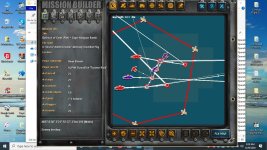
Shaking my head in disgust about some missions I did in the past. I dug out an old mission I did on the Battle of Cape Matapan, and did a complete re-do for the Balkans update. Breaking up the flight of eight Swordfish into four flights of two, and setting them up like a Stuka mission, I used object health triggers for all ships in the Italian formation of cruisers and destroyers. Each flight of two Swordfish targeted a different cruiser, (Fiume, Bolzano, Duca degli Abruzzi, Guiseppe Garibaldi) and on their attack run, all four cruisers got sent to the bottom. Two Swordfish were lost to AA fire.
Chopping up the flight of eight into four groups off two means that you as the player get credit for you and your wingmen sinking four cruisers, rather than just one. This worked on a couple of German and Italian missions as well with torpedo and dive bombers.
Good evening,
Shaking my head in disgust about some missions I did in the past. I dug out an old mission I did on the Battle of Cape Matapan, and did a complete re-do for the Balkans update. Breaking up the flight of eight Swordfish into four flights of two, and setting them up like a Stuka mission, I used object health triggers for all ships in the Italian formation of cruisers and destroyers. Each flight of two Swordfish targeted a different cruiser, (Fiume, Bolzano, Duca degli Abruzzi, Guiseppe Garibaldi) and on their attack run, all four cruisers got sent to the bottom. Two Swordfish were lost to AA fire.
Chopping up the flight of eight into four groups off two means that you as the player get credit for you and your wingmen sinking four cruisers, rather than just one. This worked on a couple of German and Italian missions as well with torpedo and dive bombers.
Sarg Willy
SOH-CM-2014
That's an interesting observation Rami, did you set them up to attack from four quadrants to split the AA fire, or just designate the attack order?
I'm guessing that each flight of two, therefor had their own assigned priority target. If I understand your statement correctly, I'm thinking if they all went in at the same time , you must have a pretty good computer to track all the damage records.
Well done, thanks for the tip.
I'm guessing that each flight of two, therefor had their own assigned priority target. If I understand your statement correctly, I'm thinking if they all went in at the same time , you must have a pretty good computer to track all the damage records.
Well done, thanks for the tip.
Reply...
Sarg Willy,
Thanks for responding. I wish I could set them up from four quadrants, but the AI have a set pattern. As you they approach a ship target, they peel off to starboard and drop down to about one hundred feet, passing astern of the ship formation. About three or four miles away from the ship(s), they then make a turn to port and swing 'round to attack the ships essentially from an angle a bit off dead astern.
With a Beaufighter, Sm-79, Sm-84, He-111, Avenger, or a Barracuda, the attack run is usually pretty quick. When flying a Swordfish or an Albacore, you have time for a hot towel and a shave.
I also set it up so that you are not the lead aircraft in the formation. Since you are flying a Swordfish, Albacore, He-111, Sm-84, or the like, you're not going to be asking the AI to break off and attack fighters anyway. The AI will automatically follow through with the attack, and because you can play follow the leader, it gives you some flexibility to hang back a bit and see if the AI hit their targets, then select another ship that the AI weren't assigned to hit if you wish.
That's why I include all ships in the formation when I use health triggers and events. It makes the missions more complicated to write, but it gives you many more attack options as well.
Sarg Willy,
Thanks for responding. I wish I could set them up from four quadrants, but the AI have a set pattern. As you they approach a ship target, they peel off to starboard and drop down to about one hundred feet, passing astern of the ship formation. About three or four miles away from the ship(s), they then make a turn to port and swing 'round to attack the ships essentially from an angle a bit off dead astern.
With a Beaufighter, Sm-79, Sm-84, He-111, Avenger, or a Barracuda, the attack run is usually pretty quick. When flying a Swordfish or an Albacore, you have time for a hot towel and a shave.
I also set it up so that you are not the lead aircraft in the formation. Since you are flying a Swordfish, Albacore, He-111, Sm-84, or the like, you're not going to be asking the AI to break off and attack fighters anyway. The AI will automatically follow through with the attack, and because you can play follow the leader, it gives you some flexibility to hang back a bit and see if the AI hit their targets, then select another ship that the AI weren't assigned to hit if you wish.
That's why I include all ships in the formation when I use health triggers and events. It makes the missions more complicated to write, but it gives you many more attack options as well.

Ravenna
SOH-CM-2023
Hi Rami,
Very interesting reading. As I read your post it sounds as though the new player flight is 2 aircraft and the other 3 flights are generated separately, being assigned using triggers to attack particular ships. If that's what you set up then Sarge's idea of attacking from 4 quadrants would also be possible using quadrant specific areas from which attacks could proceed, with loitering timed to "dilute" the AA fire.
Very interesting reading. As I read your post it sounds as though the new player flight is 2 aircraft and the other 3 flights are generated separately, being assigned using triggers to attack particular ships. If that's what you set up then Sarge's idea of attacking from 4 quadrants would also be possible using quadrant specific areas from which attacks could proceed, with loitering timed to "dilute" the AA fire.
Reply...
Ravenna,
In theory, that could dilute AA fire to an extent, but now you're talking about adding extra layers of timing complexity onto a scenario that already is very complex, for a benefit that would likely be marginal to minimal.
You are attacking a ship formation of eleven Italian vessels; four cruisers and seven destroyers. Each one is set up so that if you sink one, you get credit for it. Sinking one of the cruisers or light cruisers is a mission goal, and you can also get the same benefit of a mission goal if any combination of two destroyers in the formation are also sunk.
Timing the mission is already tricky due to the nature of using object health as a trigger. Because this implies that the ships exist when the mission starts, you have to spawn the ships at the first waypoint, when the mission begins. Ergo, your attack waypoint has to coincide where the ships will be at the same time as the waypoint for the aircraft flight, which requires practice to get right. Now multiply that for the other ten ships and three additional flights, making sure the ships are in recognizable order with the destroyers screening the vessels.
And, because this attack did not exist in a vacuum, the British cruiser and destroyer flotilla is sandwiched between the southern formation, which you attack, and the northern formation, which included the Vittorio Veneto, their own cruisers and destroyers, and an attack by Fairey Albacores which are coming in as you skedaddle to the south.
I use a similar approach with carrier missions in this specific campaign. When you take off, the carrier and her protection screen continue on their way, and when you come back, you meet the carrier and her escorts where they would be when you get back, not where you began. This requires the same technique of timing.
It's why I'm not a big fan of naval missions the way I construct them.....they are time consuming!
Ravenna,
In theory, that could dilute AA fire to an extent, but now you're talking about adding extra layers of timing complexity onto a scenario that already is very complex, for a benefit that would likely be marginal to minimal.
You are attacking a ship formation of eleven Italian vessels; four cruisers and seven destroyers. Each one is set up so that if you sink one, you get credit for it. Sinking one of the cruisers or light cruisers is a mission goal, and you can also get the same benefit of a mission goal if any combination of two destroyers in the formation are also sunk.
Timing the mission is already tricky due to the nature of using object health as a trigger. Because this implies that the ships exist when the mission starts, you have to spawn the ships at the first waypoint, when the mission begins. Ergo, your attack waypoint has to coincide where the ships will be at the same time as the waypoint for the aircraft flight, which requires practice to get right. Now multiply that for the other ten ships and three additional flights, making sure the ships are in recognizable order with the destroyers screening the vessels.
And, because this attack did not exist in a vacuum, the British cruiser and destroyer flotilla is sandwiched between the southern formation, which you attack, and the northern formation, which included the Vittorio Veneto, their own cruisers and destroyers, and an attack by Fairey Albacores which are coming in as you skedaddle to the south.
I use a similar approach with carrier missions in this specific campaign. When you take off, the carrier and her protection screen continue on their way, and when you come back, you meet the carrier and her escorts where they would be when you get back, not where you began. This requires the same technique of timing.
It's why I'm not a big fan of naval missions the way I construct them.....they are time consuming!

P51FAN
SOH-CM-2024
Rami if you don't mind my asking, is there a reason you can't just add the spawn event as part of the trigger?Because this implies that the ships exist when the mission starts, you have to spawn the ships at the first waypoint, when the mission begins
Reply...
P51Fan,
Because I include a "mission failure" trigger for each ship if their health remains above 51 percent, and a "mission success" for each ship if their health reaches 50 percent or below. (Conversely, if you're protecting a convoy for ship formation, these percentages are switched)
This is how I generate target flexibility and increased mission success for both the AI and yourself.
If the ships are not spawned so that they are present when the mission starts, then the sim interprets that as the ships already being either destroyed or saved, and if it's a protection mission, this sim were interpret this as the ships being destroyed, and since I include multiple targeted ships being lost as a failure, the mission will end twenty-five seconds after takeoff. Fortunately, unless the AI are making torpedo or dive bombing runs, they can't hit the broad side of a barn during level bombing attacks.
Conversely, if it's an attack mission, the mission will end in failure or a "better luck next time" message once you release your bombs/torpedoes and fire off your ammo without damaging any of the ships. However, the chances of this happening become very unlikely, because not only do you get credit for any ships that your wingman / wingmen get, you also get credit for any ships that the other AI flights get as well. So not only does it make it easier to achieve mission success, it also provides you with a way to avoid a mission failure if your aim sucks.
I use the same technique for Stuka mission against ships.
P51Fan,
Because I include a "mission failure" trigger for each ship if their health remains above 51 percent, and a "mission success" for each ship if their health reaches 50 percent or below. (Conversely, if you're protecting a convoy for ship formation, these percentages are switched)
This is how I generate target flexibility and increased mission success for both the AI and yourself.
If the ships are not spawned so that they are present when the mission starts, then the sim interprets that as the ships already being either destroyed or saved, and if it's a protection mission, this sim were interpret this as the ships being destroyed, and since I include multiple targeted ships being lost as a failure, the mission will end twenty-five seconds after takeoff. Fortunately, unless the AI are making torpedo or dive bombing runs, they can't hit the broad side of a barn during level bombing attacks.
Conversely, if it's an attack mission, the mission will end in failure or a "better luck next time" message once you release your bombs/torpedoes and fire off your ammo without damaging any of the ships. However, the chances of this happening become very unlikely, because not only do you get credit for any ships that your wingman / wingmen get, you also get credit for any ships that the other AI flights get as well. So not only does it make it easier to achieve mission success, it also provides you with a way to avoid a mission failure if your aim sucks.
I use the same technique for Stuka mission against ships.