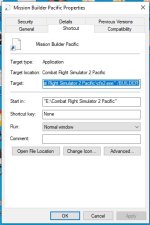
Just got back to flying in CFS2 after a long time. My previous install was lost when my HD crashed last year and I am currently using a really old install I had stashed on my external (G:\) drive. Works fine but I would like to move it over to my main (C:\) drive. Can I just move/copy the whole folder over to my main drive and change the .exe path without worrying about registry entries?
Second question: Over the past few years has anybody figured out how to make aircraft lights work in CFS2? The game has lighting command options but I am clueless as to how to get any kind of nav light, beacon, or other aircraft lights (other than vc_light) to work. I know there's a lot of CFS2 corporate knowledge here so any info would be appreciated.
Second question: Over the past few years has anybody figured out how to make aircraft lights work in CFS2? The game has lighting command options but I am clueless as to how to get any kind of nav light, beacon, or other aircraft lights (other than vc_light) to work. I know there's a lot of CFS2 corporate knowledge here so any info would be appreciated.