Easy Flier,
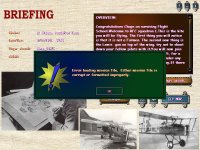
Also, with that error message you should get an error.txt in your main CFS2 folder down under the folders list.
That error text looks like this:
[Mission file error]
error=Unable to init unit 9786
title=Tuskegee Airmen - Fardjouna ferry
filename=C:\Program Files (x86)\Microsoft Games\Combat Flight Simulator 2 (MTO Late)\CAMPAIGNS\Tuskegee Airmen 3
What that error txt is saying is that unit 9786 is missing in a mission "Fardjouna ferry".
So, in that mission MIS file, I have to search for 9786. That will give me:
[unit.0]
id=9786
type_id=3890
name=%name_string.0%
allegiance=7
skill=1
aggression=1
payload=2
I then search for 3890, which gives me lots of hits until I get to the last one, which gives me:
[unit_type.0]
type_id=3890
unit_family=1
name=KM_P-40F_V1
This tells me that I probably have a KM_P-40F either missing a sound.cfg that is accurate or some other problem finding that aircraft.
The very first thing I would then check is that I have sounds in the aircraft sound folder. I do not alias sounds at all, EVER.
If it is not a sound problem, I use Morton's CFS2 utility program.
MKs_CFS2_util will show me in red text what aircraft is missing and I can replace it with another in my aircraft folder.
Hope all of this helps you.