Compatability questions

leatherneck

Members +
I am a "newbie wannabe" who just inherited several older flight sim software programs, including CFS, CFS 2, CFS 3, and Ubisoft's "Ultimate Collection" (Pacific Fighters, IL 2, Lock-On). I have 2 computers, one running XP SP3, the other W-7.
Before I try installing any or all of them, I'd like to know which ones, if any, are compatable
with either of my operating systems.
Any help from the pro's will be greatly appreciated.
 
Hi Leatherneck,
Welcome aboard!

To be honest, if you use the XP pc you'll have no trouble running any of them. CFS was made for Win'95/Win'98 (and runs well with XP), CFS2 for Win'98, ME and 2000 (and runs very well with XP), and CFS3 for XP.

Some people have not any or many probs using Win7 running these, but usually there are certain issues.
I haven't tried any of them in Win7, best to ask on each sim forum here to get expert answers. Members on this forum will no doubt give you the answer on CFS2.

Have fun!

Cheers Shessi
 
A fine collection of Combat Flight Sims, Install them all on both machines and link them with a wired LAN then invite your buddies for a bit of one on one air combat.

I have had no problems running those on Win7, even CFS1! I know others chaps have not fared so well,
programs designed to run on Win98 write user data and such in their own folder in C:\Program Files\

Programs designed for XP write user data to the users folder in C:\Documents and Settings\

Win7 hates the first aproach for security reasons, it will only allow the Win98 programs to run if they are given administrative privilages.
Right click the icon and select Run as Administrator.

For the XP type programs Win7 can run them in a compatability mode.
Win7 stores user files in C:\Users\ and provides a kind of linkfile to allow XP programs to install their folders smoothly.

Have fun
 
I've installed CFS2 on Windows 7 Home premium 64. It runs perfectly but there is a couple of issues I mentioned in another thread:

Just a heads up on Windows 7

I've been using it absolutely fine, however there is something that left me bewildered for a short while

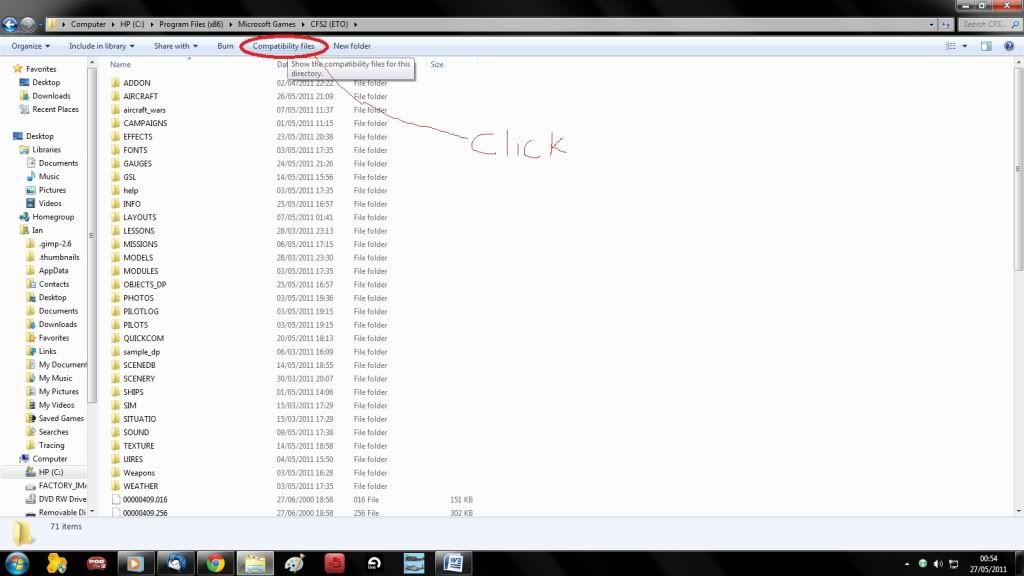
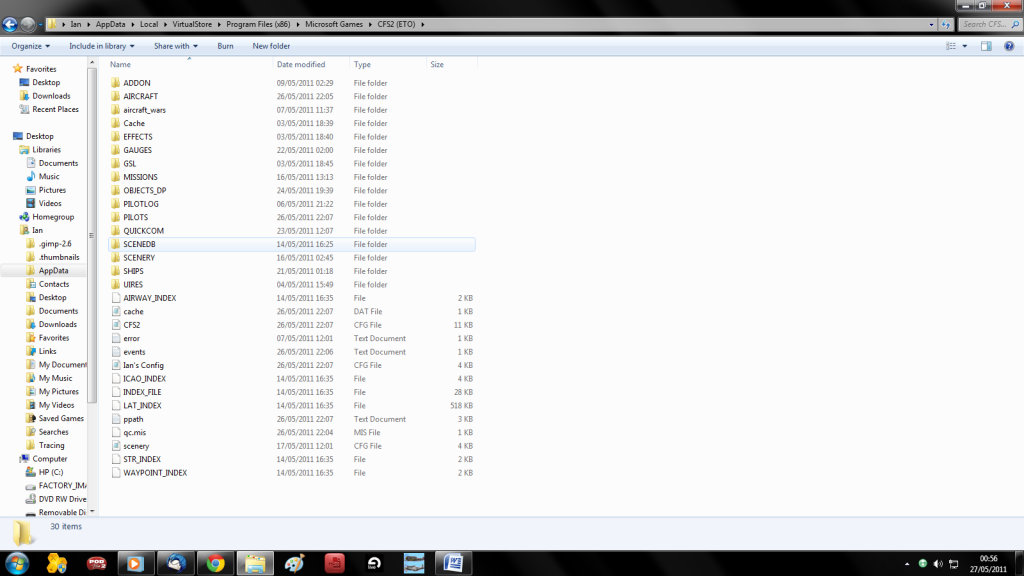
If you install something and it disappears mysteriously, or you can't find certain docs (I.e. Scenery.cfg and Filelist.dat) Look at your folder options and click compatibility files and a whole underworld of CFS2 shall appear!

For some reason windows 7 seems to dislike some parts of your CFS2 install and has created a segregated community lol. It does all work however, and if it doesn't I usually cut the doc and paste back into the CFS2 root folder


You may already know this or understand it better but it left me scratching my head on a few occasions

Windows71.jpg


Windows72.png


It seems to be when you alter cfg/dat/dp files etc. For instance if you add GSL scenery with Martin Wrights tool you will see that the GSL file in the GSL folder is not altered (size remains the same) but if you click Compatibility files you will find the modified GSL (larger size)
 
For the XP type programs Win7 can run them in a compatability mode.
Win7 stores user files in C:\Users\ and provides a kind of linkfile to allow XP programs to install their folders smoothly.

Simonu, I heard someone say CFS2 runs better if you install it in your users folder when running windows7. Is this necessary? Are there really any benefits. It runs fine from my PROGRAMS folder but there have been a few small anomalies.
 
Simonu, I heard someone say CFS2 runs better if you install it in your users folder when running windows7. Is this necessary?
It was me that you heard, but I was wrong or at least, its not better in that way, it occured to me that I have not actually installed CFS2 to Win7, I am using a cloned image that was originally installed on my old XP box.
I tend not to install my favorite games to the same Disk as the operating system, I keep a separate partition or physical drive for simulator files.
I just installed LockOn to Win7 and it works fine.
 
I intalled my game in the default location (C/Prorams/Microsoft Games) in my Windows 7, laptop system and it and the Mission Builder run just fine.
 
Back
Top