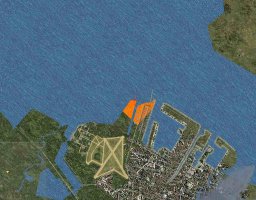
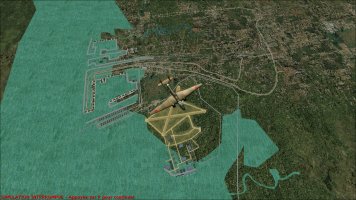
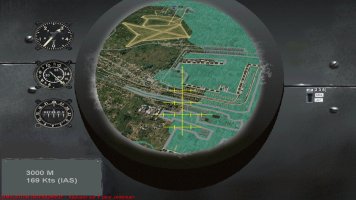
cotes de l'ile de Java ports de Surabaya et tandjoeng Priok

dombral

Charter Member
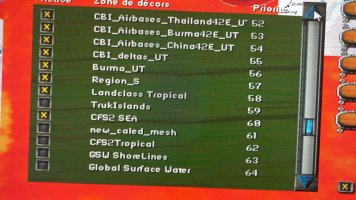
I don't usually ask for help with CFS2, but I'm currently stuck on the Java ports. The island's coastline doesn't match the ports in the OG_NEI scenery, which is otherwise very realistic. I've tried with and without Global Surface Water and CFS2_Watermasking, but without success. Is there a solution? Thanks in advance
 

Attachments

  • snap89735.jpg
    snap89735.jpg
    963 KB · Views: 18
  • snap89726.jpg
    snap89726.jpg
    643.7 KB · Views: 17
  • 20260412_145750.jpg
    20260412_145750.jpg
    5.5 MB · Views: 16
  • 20260412_145816.jpg
    20260412_145816.jpg
    4.6 MB · Views: 18
Hi Dombral,

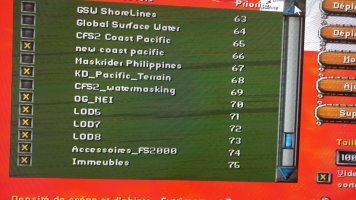
I can see from your screengrab that you still have "new coast pacific" active & sitting above OG_NEI. This means the OG_NEI land polys will be overwritten by what you have in the "new coast pacific" scenery layer

I would move OG_NEI until it sits above any coast, shoreline or watermask scenery layers.

Hope this helps.
 
Bonsoir Dombral,

What is your CFS2 SEA layer? Is it Rhumba's Africa/South Asia Water? If so, that's fine. You need those water files active for OG's Dutch East Indies. OG_NEI needs to be above the water files - I would move it up to layer 58.

Is the new coast pacific layer Rhumba's coastal flattens? If so, that's also fine - you need those files active.

Cheers,
Kevin
 
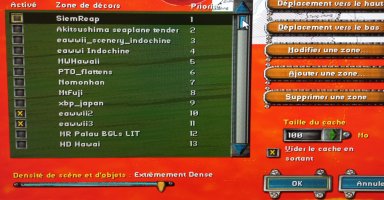
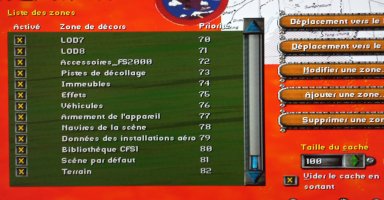
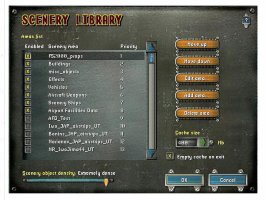
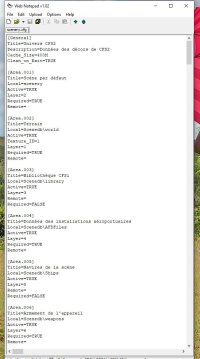
Hello, thank you for your replies. Unfortunately, your solutions were ineffective. I had already tried moving the scenery by placing it above or below each other, but without success. I tried the different ocean and coastal scenery from the region. While I had good results for the other Indonesian islands, this wasn't the case for the Surabaya and Batavia regions. Comparing the scenery libraries of the English and French versions of CFS2, I noticed that they are very different and, in fact, vertically reversed. I'm sending you photos of the French version's library. I should mention that until now, I've never had any problems with my scenery.

Best regards and thank you, Dombral
 

Attachments

  • 20260414_092211.jpg
    20260414_092211.jpg
    1.5 MB · Views: 5
  • 20260414_092220.jpg
    20260414_092220.jpg
    1 MB · Views: 5
  • snap89755.jpg
    snap89755.jpg
    159.2 KB · Views: 5
  • snap89758.jpg
    snap89758.jpg
    140.3 KB · Views: 5
  • snap89760.jpg
    snap89760.jpg
    157.4 KB · Views: 4
Dombral,

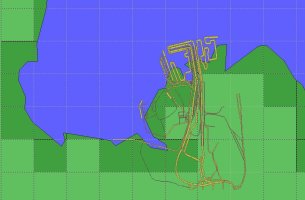
I did some investigating using Jim Kier's LWM Viewer & I have an idea what might be causing this issue.

The Surabays area in Onnogras' Java ports package contains 2 bgls of interest.

Surabaya2_3.bgl - this draws the land & watermask

Surabay2_8.bgl - this draws the roads etc.

In LWM Viewer they look like this:
1000005342.jpg

So long as these files are present, & no other scenery has higher priority, the coast & land should match up well.

I checked the download here at SOH, & they are both present.

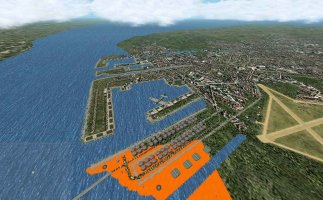
This means Surabaya should display looking something like this:
1000005340.jpg
1000005341.jpg

Your's obviously doesn't, so some other scenery bgl must be drawing over Onno's surabay2_3.bgl because it's higher up the priority (Sim loads & draws it later).

The only combination I can think of is either the surabaya2_3.bgl file is missing from your NEI scenery, in which case getting a fresh download should solve your issue

or...
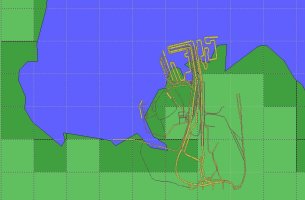
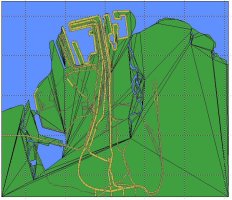
1000005343.jpg

The view above is taken from LWM Viewer. It shows Onno's surabaya2_8.bgl and cst4920.bgl from CFS2/SCENEDB/WORLD/SCENERY. This folder contains the default scenery for CFS2.

Your default scenery is loading AFTER Onno's, which means it's higher in the priority listing. Move the default CFS2 scenery to somewhere much lower in your scenery priority listing, so add-on scenery is loaded after the default scenery.

I hope this helps.

 

Attachments

  • 1000005343.jpg
    1000005343.jpg
    90.7 KB · Views: 4
In addition, the scenery layer order in the scenery.cfg file is the reverse of what you see in the Scenery Library after starting the sim. This is normal. It would not make any difference what language version you have.

Would you mind posting your scenery.cfg file here? We should be able to sort it out.
 
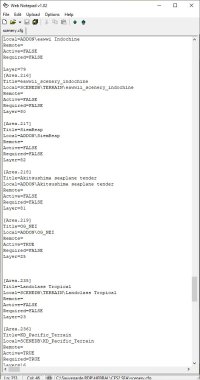
Thank you for your help. I finally solved the problem by manually editing the scene.cfg file. I manually changed the layer of OG_NEI, which was 25, located the scenery with the number 58, and swapped them. And it worked! The problem actually stems from a corrupted scene.cfg file, perhaps due to being overloaded or frequently modified. In any case, thank you for your help.
Sincerely, Dombral
 
Upon re-examining my scenery.cfg file, I realized that after organizing it—that is, after reclassifying the scenery files to (area.xxx)

title=
local=
active=
required=
remote=
layer=
all my scenery files were fixed.

Consequence: when a scene doesn't work correctly, you need to check the sceney folder structure and repair it manually. What do you think?
Sincerely, Dombral
 
Dom, here is a handy little program which tidies up your scenery.cfg file.

After extracting it, place it in the main CFS2 directory.
 

Attachments

  • fsscenery.zip
    7.1 KB · Views: 2
Back
Top