
-
Please see the most recent updates in the "Where did the .com name go?" thread. Posts number 16 and 17.
-
IMPORTANT DOWNLOADING INFORMATION - ALL MEMBERS PLEASE READ
Please see this thread for updates. Update Thread
SOH ADMINISTRATION
You are using an out of date browser. It may not display this or other websites correctly.
You should upgrade or use an alternative browser.
You should upgrade or use an alternative browser.
Craig and Matt's Sopwith Camel Released 12th
- Thread starter MDIvey
- Start date

1. The Sopwith had a twin magneto ignition system. One magneto was used by pressing a button on the stick and would engage all nine cylinders or cut the power to that magneto. it was called the "blip" switch. The other magneto had a three position selector switch which allowed you to use either three, six, or all nine cylinders. there was no throttle as we know them today. The closest we can mimic this in FSX is to suggest that you fly withyour throttle at either 33%, 66% or 100% settings. You can also set up FSUIPC to create a type of "blip" switch too.
Love you all..
Pam
Pam, I understand the throttle setting simulating the 3, 6 or 9 cylinders, but what do you program into the blip switch?
I am guessing min throttle should be 33% not 0%?
Thanks,
Dave

warchild
Charter Member
I believe the blip switch was additive ( i could be wrong ). If the second magneto was set to 3 cylinders then the blip switch would kick in all nine cylinders and revert to the 3 cylinders when released. likewise if you were using 6 cylinders on the second magneto. of course, this is just my supposition. i truly do not know how else it may have worked.
In FSX Paul set up a sort of blip switch using fsuipc, but i simply set my throttle at the percentage that would provide approximates for the three magneto settings.
In FSX Paul set up a sort of blip switch using fsuipc, but i simply set my throttle at the percentage that would provide approximates for the three magneto settings.
jetstreamsky
Charter Member
In FSX Paul set up a sort of blip switch using fsuipc.
and there's a good reason to get the full deal

full
Developer
Ok guys I've been looking into the sound issue after landing a can confirm that is the tail skid causing the problem.
You can get the new sound.cfg here ----> http://www.classicwings.net/freeplanes/Sopwith_Camel/sound.cfg
Please let me know if this fix's the issue. BTW nice screen shots everyone ! keep them coming
You can get the new sound.cfg here ----> http://www.classicwings.net/freeplanes/Sopwith_Camel/sound.cfg
Please let me know if this fix's the issue. BTW nice screen shots everyone ! keep them coming

Bomber_12th
SOH-CM-2025
I've written a simple gauge that can be easily installed that mimics the blip switch. It is tied to the brake switch, so holding the brake switch on your controller will hold the blip switch on, and cuts the fuel to the engine until you release the brake switch and the fuel line is opened again. As a result, however, I have removed the gun effects and lowered the brake scaler to the point that the brakes themselves have no effect. I believe it was Bill Lyons who wrote such a gauge for the Dave Eckert model years ago, with the same principle, which I don't believe is available anywhere any longer (at least I couldn't find it), and that is what inspired me to try and do the same now. It needs more testing, as it requires also that the prop continues spinning longer after the fuel is cut (the prop on the Camel actually spins quite a while after the ignition is off), otherwise the RPM will often dip too low, even with a momentary 'blip', causing the engine to fully cut out too early before it can get going again.
If when after more testing/adjustments I'm happy with the results, I'll put up the gauge and info about any modifications needed in order to make it all function the best.
If when after more testing/adjustments I'm happy with the results, I'll put up the gauge and info about any modifications needed in order to make it all function the best.
I can't get it to download? Probably because I'm only a blue member.
It's also over at flightsim.com.
fleurdelys
Charter Member
Ok guys I've been looking into the sound issue after landing a can confirm that is the tail skid causing the problem.
You can get the new sound.cfg here ----> http://www.classicwings.net/freeplanes/Sopwith_Camel/sound.cfg
Please let me know if this fix's the issue. BTW nice screen shots everyone ! keep them coming
Merci beaucoup ...

You have found a cure to the "bumpsy daisy"...

Cheers,
Fleurdelys
full
Developer
The aircraft.cfg goes into the main folder and the sound.cfg in the sound folder of the Sopwith Camel.
I've only made adjustments to the brakes section in the aircraft.cfg to have a scaler of 0.1 so you may not need this file.
http://www.classicwings.net/freeplanes/Sopwith_Camel/cfg_updates.zip
I've only made adjustments to the brakes section in the aircraft.cfg to have a scaler of 0.1 so you may not need this file.
http://www.classicwings.net/freeplanes/Sopwith_Camel/cfg_updates.zip

Bruce Thompson
Charter Member
full (Craig)
Thank you for the two files for the sound fix after landing, it works,
This is a wonderful aircraft, enjoying every second of time flying it, thanks again for the quick response.
Bruce.
Thank you for the two files for the sound fix after landing, it works,
This is a wonderful aircraft, enjoying every second of time flying it, thanks again for the quick response.
Bruce.
Bomber_12th
SOH-CM-2025
Here's the 'blip switch' gauge and minor mods that I described earlier. Make sure to back-up your original Aircraft.cfg file and Panel.cfg file if you decide to try this out, incase you want to revert back to how it was, and don't want to have to re-download the aircraft all over again. The included Aircraft.cfg file is the latest version that Craig has provided in his last post. In the Aircraft.cfg file I have just increased the propeller MOI (so that it spins longer after the power is off) and decreased the brake scaler further. In the Panel.cfg file I have replaced the gun effects gauge with the blip switch gauge.
As mentioned earlier, this is meant to simulate the blip switch in FSX. The blip switch gauge ties your brake switch to the fuel cutoff - so as long as you hold the brakes switch on, the fuel will be cutoff, simulating the effect of pressing the blip switch. When you let go of the brake switch (the brakes themselves have no effect), the fuel will run again, and as long as the RPM's are high enough the engine will come back on. It's not exactly perfect - for instance, on my joystick, the brake switch has a bit of a lull in it, so that even after I release the switch the brakes still stay on for an extra second or so (not so great). You can feel how it should work, at its best, when you use the keyboard command for the brakes, as there is far less delay between brakes on/off.
I also want to add that this is open to anyone who would like to take it and see if it could be further improved upon.
As mentioned earlier, this is meant to simulate the blip switch in FSX. The blip switch gauge ties your brake switch to the fuel cutoff - so as long as you hold the brakes switch on, the fuel will be cutoff, simulating the effect of pressing the blip switch. When you let go of the brake switch (the brakes themselves have no effect), the fuel will run again, and as long as the RPM's are high enough the engine will come back on. It's not exactly perfect - for instance, on my joystick, the brake switch has a bit of a lull in it, so that even after I release the switch the brakes still stay on for an extra second or so (not so great). You can feel how it should work, at its best, when you use the keyboard command for the brakes, as there is far less delay between brakes on/off.
I also want to add that this is open to anyone who would like to take it and see if it could be further improved upon.
Can't try this out until I get my FS PC up and running but looks like a great model!
I caught up with Peter Jackson's Camel at Warbirds over Wanaka in 2006. I was standing behind it when they were about to start it. Gene DeMarco suggested to a crowd of us that we should move away from behind it. Having never heard or seen a WW1 fighter before, I was thinking it's only a WW1 fighter what sort of wind blast would it have? Once it was underway I had a better understanding! The blast from the prop and noise from the un-mufflered Rotary was incredible. Was fantastic to see it in flight too with the blipping throttle with Gene at the controls. Soundwise it's up there with Merlin & Alison powered warbirds as one of my favourites.
Here's some snaps.
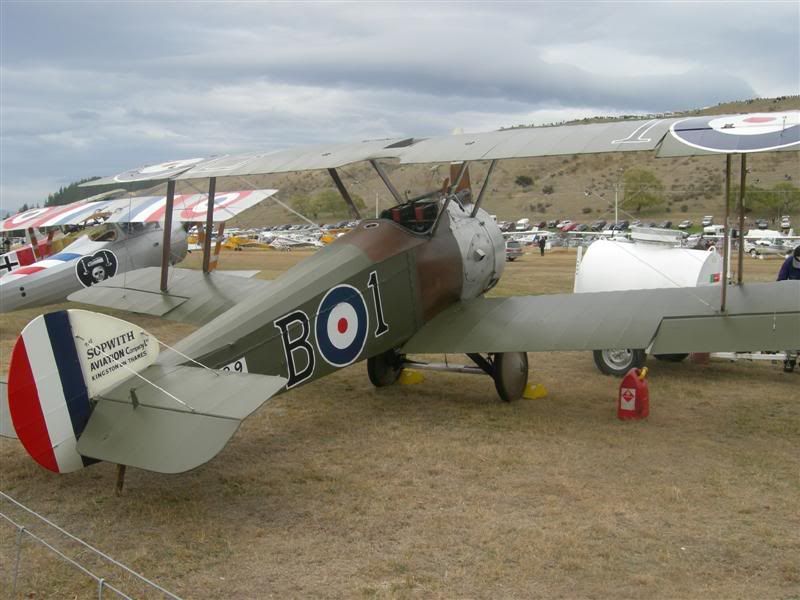
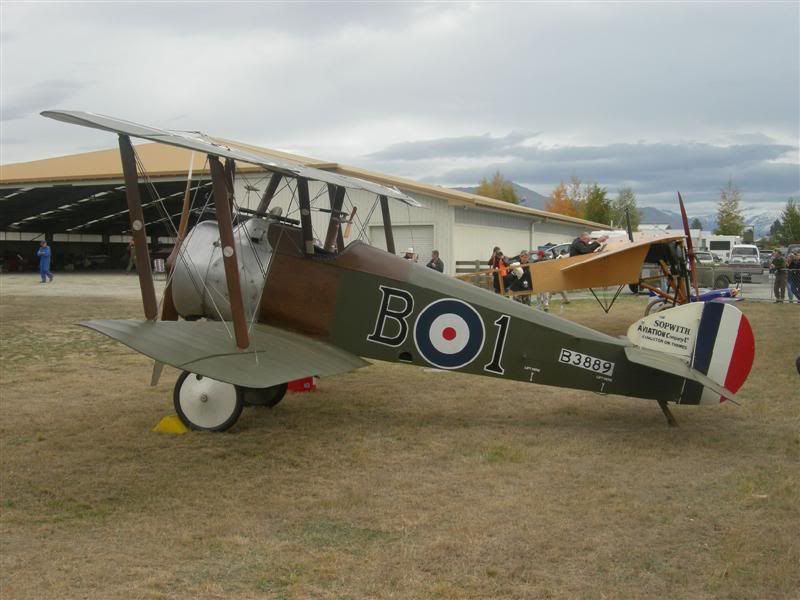
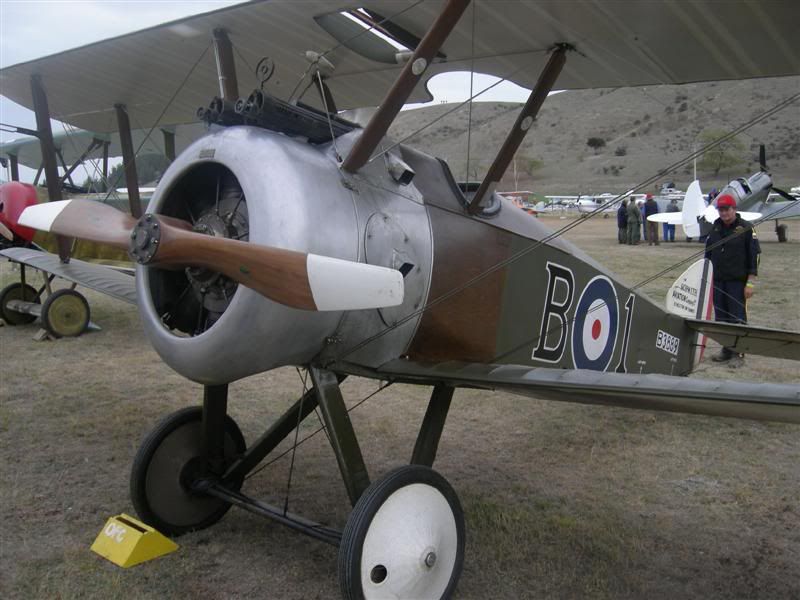
I caught up with Peter Jackson's Camel at Warbirds over Wanaka in 2006. I was standing behind it when they were about to start it. Gene DeMarco suggested to a crowd of us that we should move away from behind it. Having never heard or seen a WW1 fighter before, I was thinking it's only a WW1 fighter what sort of wind blast would it have? Once it was underway I had a better understanding! The blast from the prop and noise from the un-mufflered Rotary was incredible. Was fantastic to see it in flight too with the blipping throttle with Gene at the controls. Soundwise it's up there with Merlin & Alison powered warbirds as one of my favourites.
Here's some snaps.
Bruce Thompson
Charter Member
Here's the 'blip switch' gauge and minor mods that I described earlier. Make sure to back-up your original Aircraft.cfg file and Panel.cfg file if you decide to try this out, incase you want to revert back to how it was, and don't want to have to re-download the aircraft all over again. The included Aircraft.cfg file is the latest version that Craig has provided in his last post. In the Aircraft.cfg file I have just increased the propeller MOI (so that it spins longer after the power is off) and decreased the brake scaler further. In the Panel.cfg file I have replaced the gun effects gauge with the blip switch gauge.
As mentioned earlier, this is meant to simulate the blip switch in FSX. The blip switch gauge ties your brake switch to the fuel cutoff - so as long as you hold the brakes switch on, the fuel will be cutoff, simulating the effect of pressing the blip switch. When you let go of the brake switch (the brakes themselves have no effect), the fuel will run again, and as long as the RPM's are high enough the engine will come back on. It's not exactly perfect - for instance, on my joystick, the brake switch has a bit of a lull in it, so that even after I release the switch the brakes still stay on for an extra second or so (not so great). You can feel how it should work, at its best, when you use the keyboard command for the brakes, as there is far less delay between brakes on/off.
I also want to add that this is open to anyone who would like to take it and see if it could be further improved upon.
Thanks Bomber_12th,
It works a treat but what did you program the guns to, they were set to the brake before so how have you set them now?
Regards
Bruce
John,
Thanks a bundle for the blip switch gauge. What a neat bit of period functionality. I can't wait to try it out.
Bruce,
I think the compromise is that the gun effects no longer work. From a few posts ago on this page:
Thanks a bundle for the blip switch gauge. What a neat bit of period functionality. I can't wait to try it out.
Bruce,
I think the compromise is that the gun effects no longer work. From a few posts ago on this page:
As a result, however, I have removed the gun effects and lowered the brake scaler to the point that the brakes themselves have no effect.
Bomber_12th
SOH-CM-2025
Well that was the catch with those files I provided, as the gun effects were canceled out.
Here is a better, alternative option that allows you to keep both the gun effects and the blip switch, and they will operate on different controls. With these files attached to this post installed, the gun effects remain tied to the brake switch, and the blip switch is now tied to the primer code (you see, the 'blip switch' should be tied to a FSX key that operates as a spring-loaded key, so that the blip switch is only on as long as you are holding the switch in).
You will need to assign a key on your controller to the primer command in the FSX controls menu, and make sure that the slider is on repeat, so that as long as you are holding the switch down, FSX will recognize that. Despite the fact that the gauge is linked to the primer control, it will have no effect other than to turn the fuel on/off with whatever key you assigned to the primer command.
There is no need to download the files in my previous post, if you haven't already.
BTW, when operating the aircraft with the 'blip switch', you might find that it sounds more authentic if you remove the shutdown sounds. If you know your way around adding gauges to other aircraft, this 'blip switch' gauge should work just as a well on any of your other rotary engined aircraft.
Here is a better, alternative option that allows you to keep both the gun effects and the blip switch, and they will operate on different controls. With these files attached to this post installed, the gun effects remain tied to the brake switch, and the blip switch is now tied to the primer code (you see, the 'blip switch' should be tied to a FSX key that operates as a spring-loaded key, so that the blip switch is only on as long as you are holding the switch in).
You will need to assign a key on your controller to the primer command in the FSX controls menu, and make sure that the slider is on repeat, so that as long as you are holding the switch down, FSX will recognize that. Despite the fact that the gauge is linked to the primer control, it will have no effect other than to turn the fuel on/off with whatever key you assigned to the primer command.
There is no need to download the files in my previous post, if you haven't already.
BTW, when operating the aircraft with the 'blip switch', you might find that it sounds more authentic if you remove the shutdown sounds. If you know your way around adding gauges to other aircraft, this 'blip switch' gauge should work just as a well on any of your other rotary engined aircraft.

FentiFlier1
Charter Member
John, I'm seriously enjoying your gauge - thanks! :ernae:
What sound does fsx play when the fuel is cut? Does it go straight to the shutdown sound or is the non-combustion sound played before that?
I was wondering if it would be possible to somehow link the Rpm1 sound to the blip (in fact fuel cutoff)...
And another question: Do you know if the Fokker Dr.1 have the same system? In that case I'll install your gauge with that plane too.
Owen
What sound does fsx play when the fuel is cut? Does it go straight to the shutdown sound or is the non-combustion sound played before that?
I was wondering if it would be possible to somehow link the Rpm1 sound to the blip (in fact fuel cutoff)...
And another question: Do you know if the Fokker Dr.1 have the same system? In that case I'll install your gauge with that plane too.
Owen
Bomber_12th
SOH-CM-2025
Owen, I just tested it out on the Neoqb Fokker Dr.1, and it works just fine with it as well - all you have to do is just slip the gauge into the Panel folder and add the gauge entry into the VC panel section, nothing else. With the Neoqb Dr.1 as well, it seems to sound more authentic to have the shutdown and non combustion sounds removed, so that all you should hear when the power is off is the prop spinning down.
Bruce Thompson
Charter Member
Thank you John for your help with this, I will try the V2 blip switch this evening.
I will also try it in the DR1.
Many thanks John.
Bruce.
p.s. It work s great in both the Camel and the DR1. thanks again John.
I will also try it in the DR1.
Many thanks John.
Bruce.
p.s. It work s great in both the Camel and the DR1. thanks again John.