• There seems to be an uptick in Political comments in recent months. Those of us who are long time members of the site know that Political and Religious content has been banned for years. Nothing has changed. Please leave all political and religious comments out of the forums.

    If you recently joined the forums you were not presented with this restriction in the terms of service. This was due to a conversion error when we went from vBulletin to Xenforo. We have updated our terms of service to reflect these corrections.

    Please note any post refering to a politician will be considered political even if it is intended to be humor. Our experience is these topics have a way of dividing the forums and causing deep resentment among members. It is a poison to the community. We appreciate compliance with the rules.

    The Staff of SOH

  • Please see the most recent updates in the "Where did the .com name go?" thread. Posts number 16 and 17.

    Post 16 Update

    Post 17 Warning

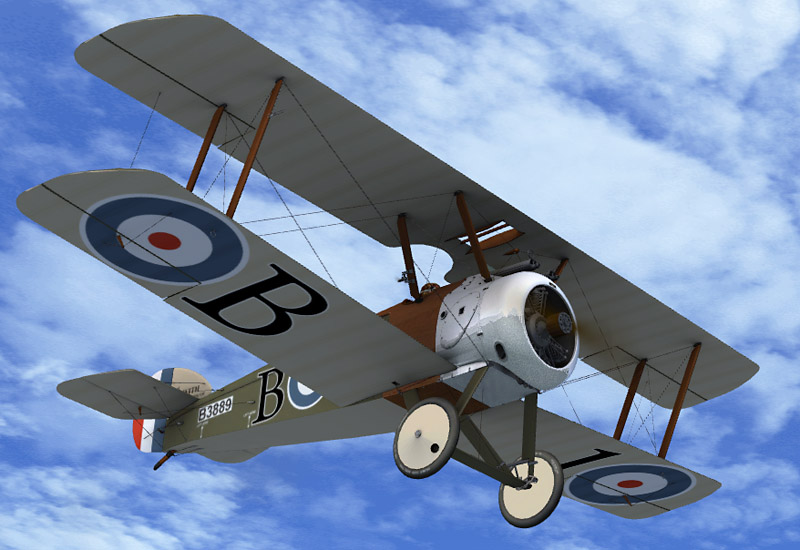
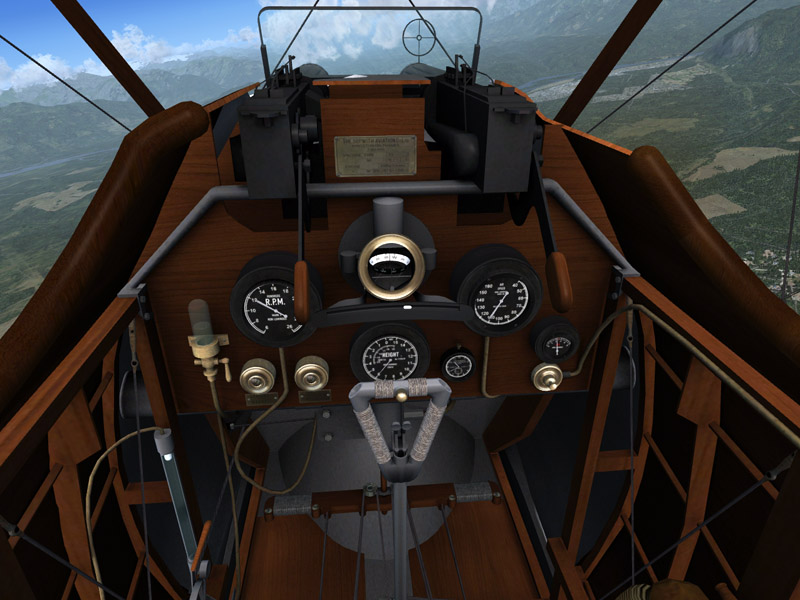
Craig and Matt's Sopwith Camel Released 12th

Thanks John. Flying the camel by switching between 1/3, 2/3 and 3/3 throttle and using the blip gives a new experience in FS. It's fun and feels "vintage" alright!

What do you guys think of this idea (is it daft?): If I have understood correctly, the Camel has three power settings (3cyl, 6cyl, 9cyl). The blip switch can be used to momentarily to go from 9 to 3 or from 6 to 3. It has no use when you are already down to 3.

Would it be possible to duplicate the Rpm1 sound and rename it noncombust, thus obtaining lower power sounds when engaging the blip?
Would the loss of non-combustion sounds be problematic?

Just a thought.
 
Actually the Gnome engine, for which you are describing, ran on four settings. Through the selector mag, you could run it at 1/8-speed (1 cylinder will fire every revolution, but always a different cylinder), 1/4-speed, 1/2-speed, and full-speed (when in flight, if you want to slow down with the Gnome, you would often not use the blip switch, but you would flip the selector mag back and forth between full speed and 1/2 speed, or full speed and 1/4-speed, etc.). Because of running it off of a selector mag setup like this, and not a conventional throttle, the Gnome has the destinctive 'popping' and 'blurp' sounds when switching to lower speeds or between speeds. The other, more common rotary engines of that period (Le Clerget, Le Rhone, Bentley) didn't have a selector mag, and you controlled the speed via a conventional throttle. As a result, with those engines (the Camel actually really didn't see much operation during WWI with the Gnome, but rather with the other engines mentioned), you don't get those types of sounds.

I made a Gnome 9N engine sound set years ago for the Dave Eckert model, but it was lost from the SOH server a few years ago. If anyone still happens to have a copy of that sound set, it would be awesome to have in re-uploaded, but I can't believe anyone would still have it. In that sound set, for the four different engine sound states, I used sound clips from the four different mag selector switch states, so you get the various levels of popping as you lower/increase the throttle. All other rotary engine sound sets that have been made, including the one incorporated with this release, depict an engine like the Clerget, which runs off of a conventional throttle and blip switch, and doesn't have the unique 'popping' that the Gnome does. I still have the original Gnome 9N sounds that I used to make the sound set originally, and I'll work on putting a sound set together again.
 
I always liked the Camel since I first flew her in Flight Simulator 5.1. Therefore it's just great to now also have a Camel for FSX! And especially when it's such an excellent one :jump:

l3azoepu.jpg


sslx7woa.jpg


8vg2ypdv.jpg


Thanks a lot for this beautiful aircraft! :applause:

Greetings
Tim
 
I checked all of the CD's and DVD's I have burned since 2005 ( I burn everything I downloaded starting in 2005 when I first got into FS9). I know I had a Gnome-Rhone sound set, but I failed to find it! I will keep looking.:isadizzy:
 
Thank you Dandog! Tim-HH actually found the soundset within his files and sent it to me a littler earlier today.

Tim also located in his files that original blip switch gauge that I remembered was created way back at the time that the Dave Eckert model came out for FS2004, and going by memory, I believe was written by Bill Lyons. I tested it out, having re-written a bit of it so that the function would remain tied to the primer key, and it works much better than the code I had. Now, the power will turn off/on the very instant that you press/release your controller key, rather than the problematic delay that there was in my previous blip switch code, in which the power wouldn't turn back on until about a second or more after releasing the key. In this case, it is the mixture that is being controlled to turn the engine on and off when pressing/holding/releasing the key.

Here's 'V3', which I have to think will be the last version. Tomorrow I'll upload the gauge file and the old Gnome soundset to the library, combined together. (Thanks again Tim!)
 
Thanks, John! V3 works perfectly. As someone else noted on here, it makes a great addition to the Dr1, too. Good stuff...
 
Thank you John, V3 in both aircraft is working great, I look forward to your Gnome sound file,
this will complete an already wonderful aircraft.


Bruce.
 
I am so enjoying this model! I wonder though if anyone knows how to activate elevator trim? I've looked at the aircraft.cfg file and all the usual entries are there but ajusting the values makes no difference, there is no trim. I just want to make it a little easier to control.
 
I am so enjoying this model! I wonder though if anyone knows how to activate elevator trim? I've looked at the aircraft.cfg file and all the usual entries are there but ajusting the values makes no difference, there is no trim. I just want to make it a little easier to control.


Aching legs too, Roger? :) It really is flown on the rudder isn't it?

Owen.
 
I am so enjoying this model! I wonder though if anyone knows how to activate elevator trim? I've looked at the aircraft.cfg file and all the usual entries are there but ajusting the values makes no difference, there is no trim. I just want to make it a little easier to control.

afraid the trim settings are completely zeroed out.. As it sits, it constantly needs a bit of down elevator to keep her level.. With Pauls viewpoint setting though, its just a matter of keeping the "ball" ( wire stay keeper in front of the pilot ) just touching the horizon to keep it level.
However. if you can allow me a couple days, I'll quick turn the trim back on :)..
 
Just my 2 cents plain, but this a challenging, yet rewarding plane to virtually fly. Seems to handle like the real deal. However, it "appears" to get airborne almost too soon. All of the video I watched showed it did have some decent ground roll prior to being airborne (longer than I am experiencing). Otherwise, at altitude it's almost hands-off flying. It is a handful on the ground, but quite manageable if you remember to add some right rudder and right aileron when taking off or landing. Juice it a little on touch down if you feel a ground loop coming on, and she straightens right out. Bravo, in my humble opinion. Now off to Lukla :icon_eek:.

It's not your father's C150, but that's a good thing.

Daniel
 
afraid the trim settings are completely zeroed out.. As it sits, it constantly needs a bit of down elevator to keep her level.. With Pauls viewpoint setting though, its just a matter of keeping the "ball" ( wire stay keeper in front of the pilot ) just touching the horizon to keep it level.
However. if you can allow me a couple days, I'll quick turn the trim back on :)..

Thanks Pam it might give me some edge with my hands full, lol:ernae:
 
With regard to the ground roll on take off, we used several videos (as we did with much of the flight model) to give us an idea of what we would be aiming for. Generally, the run would be in the region of six seconds, with full right stick until you lift off and only a couple of dabs of rudder just to keep the aircraft going in a straight line.
These were the main two videos which gave us that, both being the 160hp Gnome engine:

http://www.youtube.com/watch?v=kf0IleR8l-M (40 seconds in)

and

http://www.youtube.com/watch?v=rFZ6hTvSpbQ
 
Some scenery you might consider

Absolutely love flying this plane . It is a hand full as the real one I'm sure . Talk about " stick and rudder". Can you imagine what these young men must have gone through not only just trying to handle it but the conditions(No CHUTES !). Anyway , stumbled across some WWl scenery at a site that a lot of you are probably already aware of but new to me ; http://taskforcefsx.com/Escadrille.html Scenery is at the bottom of the page . Also there is a FSX version of "The Old Rhinebeck Aerdrome" at flightsim.com "rhinebeck.zip . Joe Binka(I hope I have his name right) put out an excellent Old Rhinebeck scenery for FS9 that was two or three parts and an AI file that went with it but I've never tried it in FSX . (I should say Prepar3D---I no longer have FSX loaded anymore)

Thanks Craig and Matt for this excellent release :applause:

Rich
 
Now, let's give the rocking chairs a break... :sleep:

Remember that these were flown by kids still wet behind their ears... :icon_lol:

Fleurdelys


lol :icon_lol:

Want shapely legs? Forget crappy wii workouts, fly the camel!

Camel pilots must have been recognisable by their massive right thighs.
 
Well that was the catch with those files I provided, as the gun effects were canceled out.

Here is a better, alternative option that allows you to keep both the gun effects and the blip switch, and they will operate on different controls. With these files attached to this post installed, the gun effects remain tied to the brake switch, and the blip switch is now tied to the primer code (you see, the 'blip switch' should be tied to a FSX key that operates as a spring-loaded key, so that the blip switch is only on as long as you are holding the switch in).

You will need to assign a key on your controller to the primer command in the FSX controls menu, and make sure that the slider is on repeat, so that as long as you are holding the switch down, FSX will recognize that. Despite the fact that the gauge is linked to the primer control, it will have no effect other than to turn the fuel on/off with whatever key you assigned to the primer command.

There is no need to download the files in my previous post, if you haven't already.

BTW, when operating the aircraft with the 'blip switch', you might find that it sounds more authentic if you remove the shutdown sounds. If you know your way around adding gauges to other aircraft, this 'blip switch' gauge should work just as a well on any of your other rotary engined aircraft.

Just a quick note - This works but if you modify the primer key control as suggested here and forget to restore it when you finish (as I did), you will lose your ability to start MilViz's F-86 Sabre. Removing the primer control repeat setting, however, will quickly restore the F-86 functionality.
 
With regard to the ground roll on take off, we used several videos (as we did with much of the flight model) to give us an idea of what we would be aiming for. Generally, the run would be in the region of six seconds, with full right stick until you lift off and only a couple of dabs of rudder just to keep the aircraft going in a straight line.
These were the main two videos which gave us that, both being the 160hp Gnome engine:

http://www.youtube.com/watch?v=kf0IleR8l-M (40 seconds in)

and

http://www.youtube.com/watch?v=rFZ6hTvSpbQ

also just for the sake of it, some original footage from ww1 (50 secs in) :)

https://www.youtube.com/watch?v=NDz5Yoh6E9I
 
Back
Top