• Please see the most recent updates in the "Where did the .com name go?" thread. Posts number 16 and 17.

    Post 16 Update

    Post 17 Warning old domain name stealing credentials

  • Special Server Maintenance

    Just when you think you have everything running some what better...

    You get a message from the Hosting company. Short story they need to move us to a new server. I have been working with them to plan a good date for all concerned. Here is what we have come up with as a schedule.

    1. November 4th 17:00 -5UTC shut off the forums and start backup proceedures. During this time there will be no access to the forums or the Resource Section.
    2. November 5th Continue with Backups and download same until complete.
    3. November 6th 7:00 turn over server to hosting company to move system to new server
    4. November 7th - 8th restore backups and upgrade forum software.

    If all goes well we should be back online on November 8th.

    To keep you updated we will post updates on AVSIM forums.

    Thank you for your support.
default aircraft

Hi,

Yes.
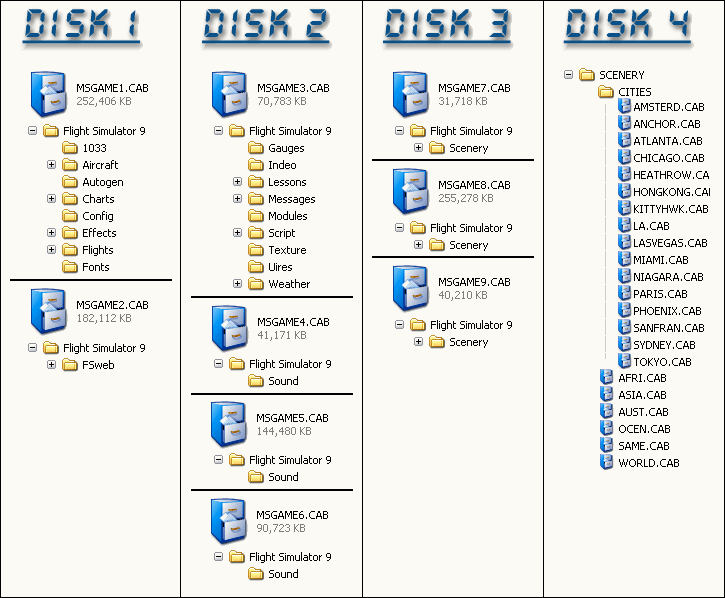
All the default aircrafts are in one of the 4 FS2004 CD's
disk-directory.gif

Do what you would normally do
 
Think your questions been answered but if you mean get the MD-80 flyable then this file

FS2004 (ACOF) - FS2004 Panels FS2004 Complete MD-80 Panel
[SIZE=-1] [ Download | View ] [/SIZE]
Name: com_md80.zip Size: 6,582,269 Date: 11-27-2003 Downloads: 8,943
[SIZE=-1]
com_md80.gif
FS2004 Complete MD-80 Panel. Surrounding cockpit views added to Marco Spada's McDonnell Douglas MD80 panel. Includes checklist and files to make the default MD-80's flyable. Files combined by Andrew Pritchard. (See also COM80FIX.ZIP)

from flightsim.com will do that for you just remember to make a copy of ur AI MD-80 so you dont lose traffic

Matt
[/SIZE]
 
If the aircraft title lines aren't changed, making the AI MD-80 flyable won't change the AI traffic. But I think you may be disappointed when you see that model up close. There's almost no detail.

Go to www.flightsim.com and register if you haven't been there already. (Do the free registration - you don't have to pay...) Then go to the File Search page and click on the Advanced Search at the top. Select FS2004 Jetliners, then enter Eric Cantu into the first search field. Then check the second box that says "Aircraft base model from original designer" and hit the search button. Toward the bottom of the next page and more on the one after that, you'll find just about every variant of that airframe you could want.

Sorry if all this sounds a little basic, but I'm guessing you're new to FS. It's just the teacher in me coming out! I've owned FS9 since Dec, '03 and I'm still adding, removing, tweaking, fiddling, and everything else!
 
Back
Top
