@leuen perhaps give the following a whirl :
Step 1: save/back-up your default.xml file in your root FS9/Autogen folder
Step 2: download Arno Gerretsen's AutoGen Macros file, and which features preview bitmaps of all default autogen objects in FS9 - make a note of the file name of all autogen objects you wish to disable within the sim
Flight simulators premier web site. Freeware, forums, community; it all comes together at AVSIM.

library.avsim.net
Step 3: refer to the FS9 autogen SDK document, in particular the section <Region><Code> - per the table included therein, the potential regions of interest to you are: E - Africa, except Sahara and J - Saharan Africa and Middle East
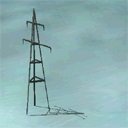
Step 4: by way of example, as you wish to disable the bigger autogen electricity poles in the Middle East - I will presume it to be the autogen object: ag_HighPower (preview attached - source : Arno). Accordingly, open the default.xml file in your autogen folder in notepad, and navigate to the section '<CODE>J</CODE>' and next scroll further down to
<CLASS>
<NAME>Urban Small</NAME> and scroll further until you reach:
"
<LIBRARYOBJECT>
<NAME>ag_HighPower</NAME>
<GUID>0b5dfe7540913c87701d68856e064a73</GUID>
</LIBRARYOBJECT>" ----> delete this entire entry, i.e. everything within the quotes
Step 5: Hit save and you should be good to go and by the way, the spreadsheet in the BGLComp SDK is highly relevant if you wish to have the complete listings of all the FS2004 LibraryObjects and their GUIDs
Anyhow, do note that the above procedure will delete the pertinent library object throughout the region; if you only wish said object removed from only specific areas within a region, but not the entire region code as specified in the FS9 Autogen SDK, then excludes are your best bet as
@Shessi pointed out earlier
Hope the above helps!
cheers!
P.S. if you remove/disable gen_powertower_01 GUID 54382ec54a43b1bd5f4f1aaac3569352 from the generic objects library, then you will have removed it in entirety; it will cease to exist anywhere in the sim world; excludes as
@Shessi pointed out are again your best bet; perhaps also noteworthy to check the object OB*.bgl files within the specific Middle East / Africa regions in the root scenery folder for the relevant entry after decompiling said OB*.bgl, and thereafter, if found, delete said entry, and recompile with BGLComp??