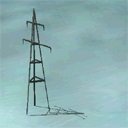
Default power line masts

leuen

Members +
Does anyone eventually knows whether it would possible to remove the bigger electricity poles? While flying in vintage eras, it would be nice to have hem deleted. Especially in large desert areas in North Africa and Middle East. Of course, excluding rectangles would do the job. But my W11 would be out of duty, before I have done just a little part!

Thanks for any advice.

Bernard
 
Hi Bernard,
You could make a giant area exclude, and possibly exclude just the pylons. These pylonsare autogen scenery, if you find out which .agn file they are, either rename it/them or move somewhere else, and the pylons will be gone. I got fed up with so many autogen buildings being generated, whilst flying in the WWII era, I found the right .agn files and removed them.

Cheers

Shessi
 
Hi Shessi,

Thanks for your reply and tip. Meanhwile I could localize the object. It's part of generic objects and named "gen_powertower_01". Now I should open the generic file with ModelConverterX and remove the power mast. I downloaded the tool, but for unkown reasons the setup doesn't work.

Bernard
 
I believe those power lines are among all the anachronistic stuff that Bill Lyons deleted from Golden Wings, along with things like nuclear power plants and such.
 
@leuen perhaps give the following a whirl :
Step 1: save/back-up your default.xml file in your root FS9/Autogen folder

Step 2: download Arno Gerretsen's AutoGen Macros file, and which features preview bitmaps of all default autogen objects in FS9 - make a note of the file name of all autogen objects you wish to disable within the sim


Step 3: refer to the FS9 autogen SDK document, in particular the section <Region><Code> - per the table included therein, the potential regions of interest to you are: E - Africa, except Sahara and J - Saharan Africa and Middle East

Step 4: by way of example, as you wish to disable the bigger autogen electricity poles in the Middle East - I will presume it to be the autogen object: ag_HighPower (preview attached - source : Arno). Accordingly, open the default.xml file in your autogen folder in notepad, and navigate to the section '<CODE>J</CODE>' and next scroll further down to
<CLASS>
<NAME>Urban Small</NAME> and scroll further until you reach:
"<LIBRARYOBJECT>
<NAME>ag_HighPower</NAME>
<GUID>0b5dfe7540913c87701d68856e064a73</GUID>
</LIBRARYOBJECT>
" ----> delete this entire entry, i.e. everything within the quotes

Step 5: Hit save and you should be good to go and by the way, the spreadsheet in the BGLComp SDK is highly relevant if you wish to have the complete listings of all the FS2004 LibraryObjects and their GUIDs

Anyhow, do note that the above procedure will delete the pertinent library object throughout the region; if you only wish said object removed from only specific areas within a region, but not the entire region code as specified in the FS9 Autogen SDK, then excludes are your best bet as @Shessi pointed out earlier

Hope the above helps!

cheers!
P.S. if you remove/disable gen_powertower_01 GUID 54382ec54a43b1bd5f4f1aaac3569352 from the generic objects library, then you will have removed it in entirety; it will cease to exist anywhere in the sim world; excludes as @Shessi pointed out are again your best bet; perhaps also noteworthy to check the object OB*.bgl files within the specific Middle East / Africa regions in the root scenery folder for the relevant entry after decompiling said OB*.bgl, and thereafter, if found, delete said entry, and recompile with BGLComp??

 

Attachments

  • ag_HighPower.jpg
    ag_HighPower.jpg
    5.1 KB · Views: 2
Last edited:
Thanks for your ample reply. I will go through your described steps and see whether I would manage it. A bit complicate for just a stupid object! Deleting OB*.files could be an eventual option, as Asia will not be affected too much. No pyramids or other relevant landclass of vintage era.

The mast shown in the attachment is another item. Is part of generic file too.

Bernard
 
The mast shown in the attachment is another item. Is part of generic file too.

Bernard
the attachment is the autogen library object ag_HighPower, while what you mention gen_powertower_01 is a generic library object; the latter is not autogen; autogen objects, the complete set as called by default xml is listed with preview bitmaps in Arno's AutoGen Macros file as found @ avsim, are more numerous and easier to disable

you may also find this relevant for a preview of the complete listing of default FS9 Library Objects: https://flyawaysimulation.com/downloads/files/1241/visual-index-for-fs2004-scenery-objects/

Deleting OB*.files could be an eventual option, as Asia will not be affected too much. No pyramids or other relevant landclass of vintage era.
That would be an overkill; instead decompile the relevant OB*.bgl files and search for the gen_powertower_01 GUID entry: 54382ec54a43b1bd5f4f1aaac3569352 --> delete that found GUID entry at all the relevant geo-locations - Middle East / North Africa, and then recompile the modified OB*. bgl files - I can also recommend to check with Arno @ FSDeveloper - he may be able to offer your the requisite guidance; the above is necessarily akin to a nigh surgical approach to what you want removed, and thus somewhat more cumbersome
 
Back
Top