El Adem

jwh

Members +
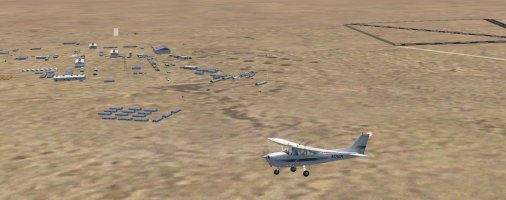
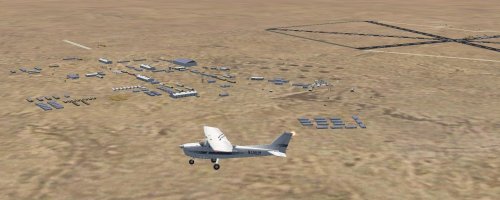
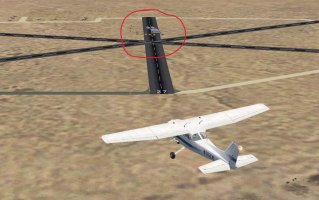
Have just installed the new El Adem scenery and my runways are several hundred yards away from the main buildings and control tower, plus I have some buildings sitting on one of the runways. e.g. There is no tarmac area in front of the hangar and control tower.

As far as I can see I've done everything correctly and I am wondering if anyone else has had this problem. Also, should there be a texture folder or just the Scenery one? The AI aircraft are appearing as they should be.

Any help greatly appreciated.

John
 
This is an odd one. El Adem has an unusual layout and the main runway is several hundred yards away from the main buildings and control tower. Buildings on runway is strange, El Adem is in the middle of nowhere, i tested it with Autogen on extremely dense but the really isnt anything there except sand.
As for a texture folder, we didnt include one as all the objects needed are in previous release's or Kalle object pack which was the first file uploaded
 
Hi Ian
It has me mystified as well. I have the Kalle object packs in their correct position, way below any scenery.
Could it be a Mesh Scenery file causing this? What I seem to be missing is all the tarmac areas in front of the buildings. The wayward buildings sitting on the runway has me totally perplexed. And I can't think of any nearby scenery installation that could be interfering.
 
Hi Ian
Attached are what I'm seeing after downloading the scenery. Like most FS glitches there is usually a simple solution. Feel it has to be a program or the like that I have installed as others have downloaded successfully. Hopefully the screenshots may help.

John
 

Attachments

  • El Adem 1.JPG
    El Adem 1.JPG
    212.1 KB · Views: 8
  • El Adem 2.JPG
    El Adem 2.JPG
    227.6 KB · Views: 10
  • El Adem 3.JPG
    El Adem 3.JPG
    193.2 KB · Views: 11
Hi Ian
Could it be an elevation problem?

John
Can’t be an Elevation issue, it is more like an AFCAD Issue… as the Runways and taxiways seem to be shifted way off to the side…
but thei’re all there at one elevation… so thats correct… it just seems like, you've got a wrongly placed afcad… which seperates the Runways and taxiways from the Buildings… and shift them off to the side…

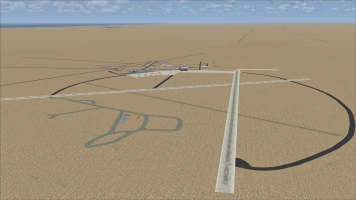
Also if i look at your third shot, your Layout is a complete different as the one in ian's scenery...

check out my layout and compare it to your third shot...
Question: do you have another EL ADEM Scenery installed as well? as it seems that there's another one available as well... you may have the afcad from the second available scenery of EL ADEM Airfield installed... you may delete that one and check again...

1784858084404.png
 
Last edited:
If you have AFCAD2 installed, try looking up the ICAO code for El Adem in Afcad and see what shows up. (y)
I haven't checked if its a default airport in FS9 but if you see the default, Ian's scenery PLUS something else, I think you've found your problem.
You can also use the PROPERTIES tab in Afcad to track down the actual locations for the add-on scenery(s).
 
Hi Ian
Finally found the problem. You were quite correct about it being an AFCAD issue. So I unticked the new El Adem scenery to see what I had and sure enough those runways were there along with some RAF AI aircraft. It was just a basic scenery with no buildings or anything else. Obviously from somewhere else.

Started going through everything remotely related to Africa to see if I could find an AF2_HL0L.bgl file somewhere. Took a while but eventually found it the "Flying Boat Bases 1945" folder, which seemed a strange place to have an inland airfield. Once I negated that and reticked the El Adem 1962 scenery everything was perfect. Never ceases to amaze me that a file in an obscure folder can cause the issues that it did. If anyone else gets the same issue I have had and they have the Flying Boat Bases installed have a look in there for that .bgl file.

However, all is good now and I would like to thank everyone for their help and suggestions. Very much appreciated.

John
 
Back
Top