
-
Please see the most recent updates in the "Where did the .com name go?" thread. Posts number 16 and 17.
-
IMPORTANT DOWNLOADING INFORMATION - ALL MEMBERS PLEASE READ
Please see this thread for updates. Update Thread
SOH ADMINISTRATION
You are using an out of date browser. It may not display this or other websites correctly.
You should upgrade or use an alternative browser.
You should upgrade or use an alternative browser.
ETO 1.50 Update Shaders
- Thread starter rcafmad
- Start date

MajorMagee
SOH-CM-2022
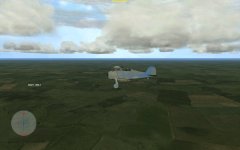
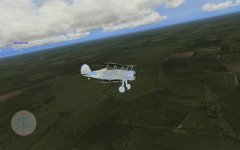
Does that happen to every model or just the one you're showing?
MajorMagee
SOH-CM-2022
Okay, so it's rendering every aircraft as if it is at max reflectivity. Probably not a problem with the aircraft models, or dds files.
The next most likely candidate is your shaders.xml file since it would effect every airplane the same.
Check to see if you have a section near the top that looks like this:
ModelSpecularGloss Desc="Vertex lighting w/ Specular modulated by Gloss map"
Lighting="True" SpecularEnable="True"
SrcBlend="One" DestBlend="Zero"
ZEnable="True" ZFunc="[ZFunc]" ZWriteEnable="True" ZBias="0" FogEnable="True"
AlphaBlendEnable="true" AlphaTestEnable="true" AlphaRef="8" MultiSample="True"
ColorArg10="Texture" ColorOp0="Modulate" ColorArg20="Diffuse"
AlphaArg10="Texture" AlphaOp0="SelectArg1" AlphaArg20="Current"
Texture0="0"
ColorArg01="Current" ColorArg11="Specular" ColorOp1="MultiplyAdd" ColorArg21="Texture"
AlphaArg11="Current" AlphaOp1="Modulate" AlphaArg21="TFactor"
Texture1="3" TexCoordIndex="0"
The next most likely candidate is your shaders.xml file since it would effect every airplane the same.
Check to see if you have a section near the top that looks like this:
ModelSpecularGloss Desc="Vertex lighting w/ Specular modulated by Gloss map"
Lighting="True" SpecularEnable="True"
SrcBlend="One" DestBlend="Zero"
ZEnable="True" ZFunc="[ZFunc]" ZWriteEnable="True" ZBias="0" FogEnable="True"
AlphaBlendEnable="true" AlphaTestEnable="true" AlphaRef="8" MultiSample="True"
ColorArg10="Texture" ColorOp0="Modulate" ColorArg20="Diffuse"
AlphaArg10="Texture" AlphaOp0="SelectArg1" AlphaArg20="Current"
Texture0="0"
ColorArg01="Current" ColorArg11="Specular" ColorOp1="MultiplyAdd" ColorArg21="Texture"
AlphaArg11="Current" AlphaOp1="Modulate" AlphaArg21="TFactor"
Texture1="3" TexCoordIndex="0"
I reviewed the Shaders.xml in the ETO 1.50 update and original Shaders.xml
The only difference was the following: Lighting="True" SpecularEnable "True" in ETO 1.50 Update
The original Shaders.xml read as follows: Lighting="True" SpecularEnable "False"
I used the Winmerge to compare them and then the XML Wrench programs to check the Shaders.xmls
I hope this is what you wanted
Rcafmad
Mel
The only difference was the following: Lighting="True" SpecularEnable "True" in ETO 1.50 Update
The original Shaders.xml read as follows: Lighting="True" SpecularEnable "False"
I used the Winmerge to compare them and then the XML Wrench programs to check the Shaders.xmls
I hope this is what you wanted
Rcafmad
Mel
MajorMagee
SOH-CM-2022
SpecularEnable "True" is the setting I always use.
Do you have HighResolutionZBuffer turned on in cfs3config.exe? I don't think having it turned off it would cause the excessive reflectivity, but I'm running out of possibilities to check.
p.s. I just tried turning HighResolutionZBuffer off and it did not create the mirror effect you're experiencing. I've not seen this problem before except occasionally when an aircraft has one of its files was missing or corrupted. I'm having trouble diagnosing the source of your problem since I can't reproduce it as a general effect that happens to all aircraft at the same time.
Do you have HighResolutionZBuffer turned on in cfs3config.exe? I don't think having it turned off it would cause the excessive reflectivity, but I'm running out of possibilities to check.
p.s. I just tried turning HighResolutionZBuffer off and it did not create the mirror effect you're experiencing. I've not seen this problem before except occasionally when an aircraft has one of its files was missing or corrupted. I'm having trouble diagnosing the source of your problem since I can't reproduce it as a general effect that happens to all aircraft at the same time.


sixstrings5859
Charter Member
Will definitely stay away from modding the shaders in CFS3 unless the installation requires it. Graphics are fine enough and sim has good fps. Not wanting to mess a good thing. Seems it's not worth the gamble. Sure that there are those who love it though. Just waiting on a fully patched version to be released then try it out....

BorekS
Members +
Will definitely stay away from modding the shaders in CFS3 unless the installation requires it. Graphics are fine enough and sim has good fps. Not wanting to mess a good thing.
should be set in stone.