-
Please see the most recent updates in the "Where did the .com name go?" thread. Posts number 16 and 17.
-
Special Server Maintenance
Just when you think you have everything running some what better...
You get a message from the Hosting company. Short story they need to move us to a new server. I have been working with them to plan a good date for all concerned. Here is what we have come up with as a schedule.
- November 4th 17:00 -5UTC shut off the forums and start backup proceedures. During this time there will be no access to the forums or the Resource Section.
- November 5th Continue with Backups and download same until complete.
- November 6th 7:00 turn over server to hosting company to move system to new server
- November 7th - 8th restore backups and upgrade forum software.
If all goes well we should be back online on November 8th.
To keep you updated we will post updates on AVSIM forums.
Thank you for your support.
You are using an out of date browser. It may not display this or other websites correctly.
You should upgrade or use an alternative browser.
You should upgrade or use an alternative browser.
Flight Réplicas Douglas Dc-4 and B-24 free Released
- Thread starter diegoxs
- Start date


FlakNine
Members +
Let me check on this, we did some restructuring of the project in the SDK, which may have updated some path names. The intention was to ensure we did NOT break any 3rd party liveries, but it sounds like something may have gone wrong. Please don't update or "fix" any 3rd party liveries to chase this issue, we'll get it back to how it was.Gentlemen, does anyone have problems with custom liveries after the upgrade v22.0.0? I don't see in sim the livery that I made myself, and the liveries from jankees either.
FlakNine
Members +
OK, I fixed it and just published v22.0.1 on fs.to. Root cause: we forgot to rename the simobject folder back to its long-established value after the SDK build.
However, fixing that revealed an important and unavoidable issue related to 3rd party liveries. Because we are starting to overhaul cockpit textures, we have (where possible) moved to using shared textures for generic components that are common between the D and J variant. This keeps the package size down, and also makes updates and maintenance easier from the development side.
However - it does mean that any existing 3rd-party liveries are going to show some pink missing cockpit textures until the path ..\..\B-24 Liberator\texture.common is added as the last texture fallback in texture.cfg. Sorry about this change @Meridien , @jankees and any other livery creators.
Here's an example of what needs to be added to texture.cfg.

However, fixing that revealed an important and unavoidable issue related to 3rd party liveries. Because we are starting to overhaul cockpit textures, we have (where possible) moved to using shared textures for generic components that are common between the D and J variant. This keeps the package size down, and also makes updates and maintenance easier from the development side.
However - it does mean that any existing 3rd-party liveries are going to show some pink missing cockpit textures until the path ..\..\B-24 Liberator\texture.common is added as the last texture fallback in texture.cfg. Sorry about this change @Meridien , @jankees and any other livery creators.
Here's an example of what needs to be added to texture.cfg.
Last edited:

lagaffe
SOH-CM-2026
Hello,
Trying to flight with "this bird" (B-24D) I have found some glitches ...
a) on the "NAV-OBS" gauge on the left: the knob cannot be selected (cursor don't change over the knob) and the XML code is incorrect, (A:NAV1 OBS, degrees) is an old syntax, under MSFS the new variable is (A:NAV OBS:1, degrees)
b) the "gyro rotating knob" and the "nav radial" knob of the B-24D which cannot be selected/controlled with the mouse.
Since I am currently programming identical gauges on the DC-4 and its vintage VC, I am taking the liberty of posting the code that I am using and that works:
a) first bug:
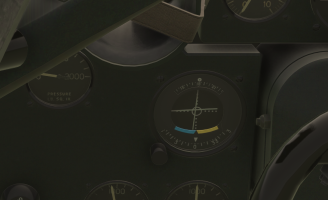
In addition, this code makes it possible to highlight the knob and effectively control the internal graduated crown on the gauge.
b) second and third glitches :
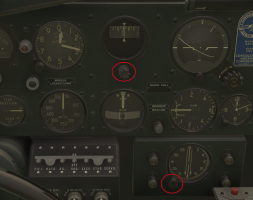
During export by MCX, some old code (FS9 or FSX format) is still formatted according to the MSFS standard.
Generally, you have to look for the xml files (the XML files provided in the first package: b-24-liberator-fsxp3d-conv-to-msfs) at the end, where you will find these codes, generally under <MouseRect> instructions ... .
Theses codes are not perfect, but it provides a starting point for writing a more suitable and functional Behavior model.
For the first button, this behavior is here :
And for the "nav radial", I think it is this one:
Trying to flight with "this bird" (B-24D) I have found some glitches ...
a) on the "NAV-OBS" gauge on the left: the knob cannot be selected (cursor don't change over the knob) and the XML code is incorrect, (A:NAV1 OBS, degrees) is an old syntax, under MSFS the new variable is (A:NAV OBS:1, degrees)
b) the "gyro rotating knob" and the "nav radial" knob of the B-24D which cannot be selected/controlled with the mouse.
Since I am currently programming identical gauges on the DC-4 and its vintage VC, I am taking the liberty of posting the code that I am using and that works:
a) first bug:
Code:
<!-- ================================================================================= -->
<!-- NAV1 OBS -->
<Component ID="VINTAGE_NAV1_OBS" Node="nav1_obs">
<UseTemplate Name="ASOBO_GT_Anim_Code">
<ANIM_NAME>nav1_obs_anim</ANIM_NAME>
<ANIM_LENGTH>360</ANIM_LENGTH>
<ANIM_CODE>(A:NAV OBS:1, degrees) 1 * dnor </ANIM_CODE>
</UseTemplate>
</Component>
<Component ID="KNOB_NAV1_OBS_ID" Node="knob_nav1_obs">
<Parameters Type="Default">
<TOOLTIP_COURSE_TITLE></TOOLTIP_COURSE_TITLE>
</Parameters>
<Parameters Type="Override">
<TOOLTIP_TITLE></TOOLTIP_TITLE>
<TOOLTIP_ENTRY_0>INSTRUMENT_Course_1</TOOLTIP_ENTRY_0>
</Parameters>
<UseInputEvent ID="INSTRUMENT">
<CRS_ID>1</CRS_ID>
<ON_AFTER_INC_EXTERNAL_CODE>(O:_KnobAnimVar) 10 + dnor (>O:_KnobAnimVar)</ON_AFTER_INC_EXTERNAL_CODE>
<ON_AFTER_DEC_EXTERNAL_CODE>(O:_KnobAnimVar) 10 - dnor (>O:_KnobAnimVar)</ON_AFTER_DEC_EXTERNAL_CODE>
</UseInputEvent>
<UseTemplate Name="ASOBO_GT_Knob_Infinite">
<HIGHLIGHT_NODE_ID>knob_nav1_obs</HIGHLIGHT_NODE_ID>
<ANIM_NAME>knob_nav1_obs_anim</ANIM_NAME>
<CLOCKWISE_CODE_DEFAULT_IM>1 (>B:INSTRUMENT_Course_1_Inc)</CLOCKWISE_CODE_DEFAULT_IM>
<ANTICLOCKWISE_CODE_DEFAULT_IM>1 (>B:INSTRUMENT_Course_1_Dec)</ANTICLOCKWISE_CODE_DEFAULT_IM>
<CLOCKWISE_CODE_DRAG_IM>1 (>B:INSTRUMENT_Course_1_Inc)</CLOCKWISE_CODE_DRAG_IM>
<ANTICLOCKWISE_CODE_DRAG_IM>1 (>B:INSTRUMENT_Course_1_Dec)</ANTICLOCKWISE_CODE_DRAG_IM>
<ANIM_CODE> (A:NAV OBS:1, degrees) 10 * </ANIM_CODE>
</UseTemplate>
</Component>In addition, this code makes it possible to highlight the knob and effectively control the internal graduated crown on the gauge.
b) second and third glitches :
During export by MCX, some old code (FS9 or FSX format) is still formatted according to the MSFS standard.
Generally, you have to look for the xml files (the XML files provided in the first package: b-24-liberator-fsxp3d-conv-to-msfs) at the end, where you will find these codes, generally under <MouseRect> instructions ... .
Theses codes are not perfect, but it provides a starting point for writing a more suitable and functional Behavior model.
For the first button, this behavior is here :
Code:
<Component ID="node165_MouseRect_custom_mrec_Event_04" Node="node165">
<MouseRect>
<Cursor>Hand</Cursor>
<TooltipText>Gyro Drift Adjust</TooltipText>
<MouseFlags>WheelDown+WheelUp+DownRepeat+LeftSingle+RightSingle</MouseFlags>
<CallbackCode>
(M:Event) 'RightSingle' scmp 0 == if{ (L:gyro_rotating_knob, enum) -- -50 max (>L:gyro_rotating_knob, enum) }
(M:Event) 'LeftSingle' scmp 0 == if{ (L:gyro_rotating_knob, enum)) ++ 50 min (>L:gyro_rotating_knob, enum)) }
(M:Event) 'WheelUp' scmp 0 == if{ (L:gyro_rotating_knob, enum) -- -50 max (>L:gyro_rotating_knob, enum) }
(M:Event) 'WheelDown' scmp 0 == if{ (L:gyro_rotating_knob, enum)) ++ 50 min (>L:gyro_rotating_knob, enum)) }
</CallbackCode>
</MouseRect>
</Component>And for the "nav radial", I think it is this one:
Code:
<Component ID="node309_MouseRect_custom_mrec_Event_24" Node="node309">
<MouseRect>
<Cursor>Hand</Cursor>
<TooltipText>Course Setting</TooltipText>
<MouseFlags>WheelDown+WheelUp+LeftDrag+LeftSingle</MouseFlags>
<CallbackCode>
(M:Event) 'LeftSingle' scmp 0 == if{ (M:X) (>L:Calibration mouse position, number) }
els{ (M:Event) 'LeftDrag' scmp 0 == if{ (L:Calibration mouse position, number) (M:X) - 180 + 0 max 360 min (>L:course_bug, number) } }
(M:Event) 'WheelUp' scmp 0 == if{ (L:course_bug, number) 10 + (>L:course_bug, number) }
(M:Event) 'WheelDown' scmp 0 == if{ (L:course_bug, number) 10 - (>L:course_bug, number) }
</CallbackCode>
</MouseRect>
</Component>
Last edited:
FlakNine
Members +
A request for help. In addition to the cockpit model/texture overhaul, I'd like to update some portions of the exterior model providing they don't break any 3rd party liveries. I've started playing around with a new tyre model in Blender - just nose wheel so far but I'll likely do main gear too. I want to add details like logo (e.g. Good Year), and any other molded text and markings They'll be baked into the normal map, rather than 3D mesh.
However I'm struggling to find good reference material. Does anyone have any good images showing B-24 tyres? I gather there are several tread patterns, and several manufacturers. I picked the tread below because it's already in the B24J Flight Replicas model, but I've no idea what other molding details I can add to the textures to improve realism.
Best I can find so far is this, however some authentic photos would be a more reliable reference.
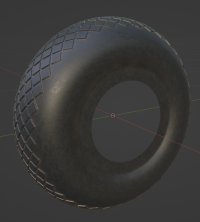
However I'm struggling to find good reference material. Does anyone have any good images showing B-24 tyres? I gather there are several tread patterns, and several manufacturers. I picked the tread below because it's already in the B24J Flight Replicas model, but I've no idea what other molding details I can add to the textures to improve realism.
Best I can find so far is this, however some authentic photos would be a more reliable reference.
Last edited:

Snuffy
Happiness Consultant
You might want to try this:
United States Consolidated B-24 Heavy Bomber WING PARTS
United States Consolidated B-24 Heavy Bomber WING PARTS B-24 Main Landing Gear Tire with Hub Cap, left photo.The B-24 Liberator used a 56 Inch S.C. 16 ply tire with tube for the Main Landing Gear. This example was made by theRoyal Aircraft Tire Company. B-24 Main Landing Gear Tire with Hub ...
questmasters.us
B-24 AIRCRAFT TIRE CHECK, BALANCE AND INSTALLATION 79064 : Free Download, Borrow, and Streaming : Internet Archive
This rare aircraft ground crew training film shows some of the care and maintenance issues affiliated with aircraft tires, including the B-24. Some of the...
archive.org
Last edited:
FlakNine
Members +
Amazing! I think I stumbled across that site before but never reached page 7. That's exactly what I was looking for - thanks!You might want to try this:
United States Consolidated B-24 Heavy Bomber WING PARTS
United States Consolidated B-24 Heavy Bomber WING PARTS B-24 Main Landing Gear Tire with Hub Cap, left photo.The B-24 Liberator used a 56 Inch S.C. 16 ply tire with tube for the Main Landing Gear. This example was made by theRoyal Aircraft Tire Company. B-24 Main Landing Gear Tire with Hub ...questmasters.us
Edit - it definitely covers the main gear at least. And I can infer what the nose wheel details should look like from that.