• Please see the most recent updates in the "Where did the .com name go?" thread. Posts number 16 and 17.

    Post 16 Update

    Post 17 Warning old domain name stealing credentials

  • Special Server Maintenance

    Just when you think you have everything running some what better...

    You get a message from the Hosting company. Short story they need to move us to a new server. I have been working with them to plan a good date for all concerned. Here is what we have come up with as a schedule.

    1. November 4th 17:00 -5UTC shut off the forums and start backup proceedures. During this time there will be no access to the forums or the Resource Section.
    2. November 5th Continue with Backups and download same until complete.
    3. November 6th 7:00 turn over server to hosting company to move system to new server
    4. November 7th - 8th restore backups and upgrade forum software.

    If all goes well we should be back online on November 8th.

    To keep you updated we will post updates on AVSIM forums.

    Thank you for your support.

Floating buildings in Orbx scenery

Navy Chief

Senior Member
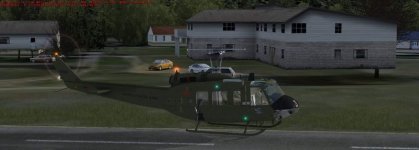
Had not loaded a flight in any orbx sceneries for a while, and tried one at Falls City this evening, as i had bought the Milviz Huey. I noticed a obvious problem with some buildings "floating" several feet above the ground. Tried finding answers on Orbx forums, but navigating those forums is damn near impossible. Nc
ed
attachment.php
 

Attachments

  • received_1625208540826734.jpg
    received_1625208540826734.jpg
    38.3 KB · Views: 2
Yep, I see that with Orbx as well Pete. I'm guessing (as you probably have) that there's either another addon mesh at work here or it's an area where the elevation needs to be adjusted slightly by Orbx in order to correct it. They do a ton of elevation corrections for their scenery and this may be an area they're unaware of. I have entire housing developments floating from time to time, some as high as 500 ft. I just fly on past and keep truckin', lol
 
Yep, I see that with Orbx as well Pete. I'm guessing (as you probably have) that there's either another addon mesh at work here or it's an area where the elevation needs to be adjusted slightly by Orbx in order to correct it. They do a ton of elevation corrections for their scenery and this may be an area they're unaware of. I have entire housing developments floating from time to time, some as high as 500 ft. I just fly on past and keep truckin', lol

Thanks Ed. I will just pretend i don't see them floating!! NC
 
Take scenery option and push OK again to force reload whole sceneries.
Will be ok.
 
I've had this too, often after switching views to look at AI etc. It usually clears on the next load.
 
Is that not what their Vector program is for - another purchase on top of everything else of course.
 
orbx says in all its manuals to set your mesh to 10m,

its a bit of a downer if you purchase mesh thats better than 10m
 
Take scenery option and push OK again to force reload whole sceneries.
Will be ok.
That is one of several options, but it doesn't work across the board. Worth trying of course but it goes with what is repeated here many times. . .what works for one (or several) will not always work for the majority. As others have already mentioned, Orbx suggests their own settings for addon mesh, but if it doesn't fit the desired settings for mesh you just spent money on to purchase, then you may run into the very problem Pete has or that I've seen from time to time. To be honest I have no desire to change mesh settings every time I want to fly into another area that requires a change of settings just to get the optimal effect. Unless you're going to sit a stare at a building that's floating and ponder what can be done about it, just keep on taxiing. . . .or fly right on past it and keep on keepin' on.
 
As many here will attest, if scenery is important to you, especially if you fly low and slow, then ORBX is the way to go. I'm glad I bought all the essentials before I retired as some are quite expensive, but in my opinion there is nothing to compare.
 
http://www.orbxsystems.com/forum/to...-in-fall-city-1wa6-version-12/#comment-842334
And are you updated ?
http://www.orbxsystems.com/forum/topic/125638-updates-from-old-website-support-page/

The fix for floating buildings is to reset the flight, recommend you save it wherever you are, exit the flight, and choose it again.

Floating buildings are the result of autogen loading on to a different mesh than what is displayed. I don't entirely understand it but I presume that a coarse mesh is loaded into the RAM, prior to the later mesh. In this case the autogen has been placed by the sim prior to the final mesh being set.
 
Back
Top