• Please see the most recent updates in the "Where did the .com name go?" thread. Posts number 16 and 17.

    Post 16 Update

    Post 17 Warning old domain name stealing credentials

  • Special Server Maintenance

    Just when you think you have everything running some what better...

    You get a message from the Hosting company. Short story they need to move us to a new server. I have been working with them to plan a good date for all concerned. Here is what we have come up with as a schedule.

    1. November 4th 17:00 -5UTC shut off the forums and start backup proceedures. During this time there will be no access to the forums or the Resource Section.
    2. November 5th Continue with Backups and download same until complete.
    3. November 6th 7:00 turn over server to hosting company to move system to new server
    4. November 7th - 8th restore backups and upgrade forum software.

    If all goes well we should be back online on November 8th.

    To keep you updated we will post updates on AVSIM forums.

    Thank you for your support.

FPS Counter

Aircanuck

Charter Member
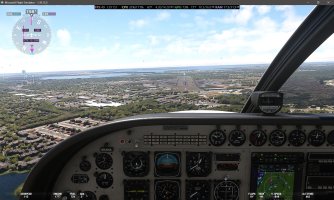
Sometime ago I installed a generic "FPS counter" from Fltsim.to so I have an idea where things are at. Just recently we went ahead and down loaded the Nvidia app which is also showing the "FPS" in the Sim but at a much greater value .... the Carenado C90 sitting on the ramp according to Fltsim.to is approx 39 fps, Nvidia is showing just over 70 fps ..... who should I believe ? ( running a RTX 5070Ti )

Cheers
 
this is a barrel of worms type of question. Withb the latest Nvidia App and GPU drivers, there is a way to really boost FPS related to the DLSS frame generation settings and scaling options.
You really have to parse through a couple of videos on YT from some experienced content creators for MSFS and Nvidia content to get good information - Island Sim Pilot on YT is one but there are a few others.
Don't just use the generic automatic settings though if you want to see (and I'm not exaggerating) 25-40 % higher frame rates if you just take the time to find review and implement just a few changes to the default settings.
Nvidia has really stepped up their AI and Deep Learning capabilities with the last three newest drivers and their Nvidia App
** these changes from Nvidia are really meant to boost performance of the 5xx series GPU's but I have a 2080Super and I'm getting terrific smoothness and pegging 60FPS with higher settings in MSFS than I expected.
 
Performance boost indeed ! Its like going from my dad's Impala ( RTX 3060 ) to a Maclaren. After surfing You tube for some direction with the app, I can honestly say most of the default settings have been changed and my screen time has doubled.

Cheers
 
What version of MSFS do you have Steam or Microsoft Store? If you have Steam version they have a Frame Counter and other stats built into the Steam overlay but you need to enable in the Steam options.
 

Attachments

  • FlightSimulator_CYvH3HvdhV.jpg
    FlightSimulator_CYvH3HvdhV.jpg
    650.9 KB · Views: 8
Have the Store bought version.
What version of MSFS do you have Steam or Microsoft Store? If you have Steam version they have a Frame Counter and other stats built into the Steam overlay but you need to enable in the Steam options.
Regards
 
Use ambitiouspilots - shiftzst .... 122kb , from FSX
 

Attachments

  • ambitiouspilots-shiftzstats-v114_v87Kl.zip
    122 KB · Views: 4
Back
Top