• Please see the most recent updates in the "Where did the .com name go?" thread. Posts number 16 and 17.

    Post 16 Update

    Post 17 Warning old domain name stealing credentials

  • Special Server Maintenance

    Just when you think you have everything running some what better...

    You get a message from the Hosting company. Short story they need to move us to a new server. I have been working with them to plan a good date for all concerned. Here is what we have come up with as a schedule.

    1. November 4th 17:00 -5UTC shut off the forums and start backup proceedures. During this time there will be no access to the forums or the Resource Section.
    2. November 5th Continue with Backups and download same until complete.
    3. November 6th 7:00 turn over server to hosting company to move system to new server
    4. November 7th - 8th restore backups and upgrade forum software.

    If all goes well we should be back online on November 8th.

    To keep you updated we will post updates on AVSIM forums.

    Thank you for your support.

FS9 in Win 11

papi75

Members +
I happen to love FS9 and its endless range of models and ease of painting and scenery building.
Of my two identical computers, one I upgraded to Win 11 for safety reasons (updates).
On the other one FS9 and FSX run smoothly, while under Win11 FS9 usually crashes at startup FSX works okay.
So I am very reluctant do upgrade the other one as well.
Has anyone experiences to share?
 
Fs9 work perfectly on my Win10 and win11 computers. Just don’t install in « program files », use Win XP or even Win7 compatibility mode and in admin mode (don’t required but can help)
 
Thank you, folks! I'll try. @lucb: I'll try just copying the entire FS to C:\, then after removing the files of the FS root,
use: FS_Registry_Repair.exe.
- I'd rather try first on the Laptop. Just hope my Switzerland Pro sceneries and all those airfields I built myself will follow suit. Else there iwll be some work for bad weather!
 
My Windows 11 laptop died on me, a few weeks ago.. a hardware/psu issue & the thing, being a laptop, is not really that economical to repair, anyway..
Luckily my sims were running off a portable usb drive, so I lost nothing. I had also backed up to the 'cloud'.
A friend donated his old Windows 10 i7 Lenovo laptop with 6(??)GB ram, but it works!
I plugged in the portable drive, did the usual run in compatibility mode & as 'Administrator', and all worked. - a bit slow to load, as it needs more RAM.

Having said that, I have not checked any payware stuff yet, as some refered to the registry, but I'm quite happy that it works.
 
I've just tested FS2004 / FS9 in Windows 11 2H26.

It works still like a charme and i even feel like it is somehow more stable than with the 2H25 Version.

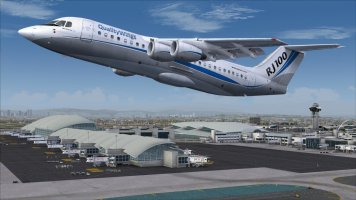
Tested here with Qualitywings Avro RJ-100 and FSDreamTeam Los Angeles Intl. V2. Two of the most complex addons i’ve installed in my Sim.

image.jpg
 
Last edited:
I understand the frustration. I reluctantly started over years ago with FSX, thinking I would never be able to get my aircraft and scenery files up to par, as I had in FS9.... Now I worry about how long I will be able to keep my FSX running strong.
 
Back
Top