• There seems to be an uptick in Political comments in recent months. Those of us who are long time members of the site know that Political and Religious content has been banned for years. Nothing has changed. Please leave all political and religious comments out of the forums.

    If you recently joined the forums you were not presented with this restriction in the terms of service. This was due to a conversion error when we went from vBulletin to Xenforo. We have updated our terms of service to reflect these corrections.

    Please note any post refering to a politician will be considered political even if it is intended to be humor. Our experience is these topics have a way of dividing the forums and causing deep resentment among members. It is a poison to the community. We appreciate compliance with the rules.

    The Staff of SOH

  • Server side Maintenance is done. We still have an update to the forum software to run but that one will have to wait for a better time.

FSX Blurries - Eureka!

rgatkinson

Charter Member
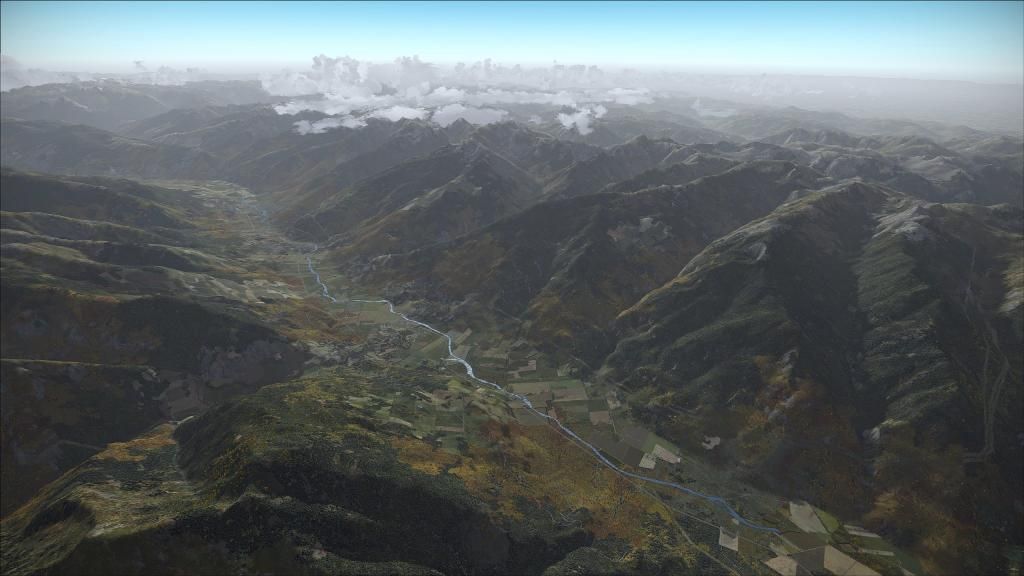
For many years now I have been tweaking the FSX.cfg file trying to achieve optimal performance and achieve my Holy Grail of eliminating scenery blurries - I never quite got there, until now! I just discovered this little tweak:

[DISPLAY.Device.AMD Radeon HD 7700 Series.0]
Mode=1920x1080x32
TriLinear=1
AntiAlias=0
MipBias=6

MipBias makes a huge improvement, so much so that I honestly couldn't believe my eyes!

Now the only downside, seems there's always a downside, is that the scenery can shimmer a bit but there's even a cure for that. ATI Radeon owner's like myself should download an app called 'Radeon Pro' that allows your to set your LOD (Level Of Detail) value to a minus value, I use -4, which virtually eliminates the shimmering. I believe nVidia owners need to 'clamp' their LOD settings via the nVidia GeForce Experience utility.

Hope this is of help.

Taff :jump:
 
Sharpness of texture is better but I see something like "shimmering" on textures of trees. I have ATI, not nVidia.

ATI Radeon owner's like myself should download an app called 'Radeon Pro' that allows your to set your LOD (Level Of Detail) value to a minus value, I use -4, which virtually eliminates the shimmering


Max of minus LOD is -3. Maybe You think about -0,4?

Screenshot104227_zps8386c4ce.jpg~original
 
Question, does this mod cause any OOM or VAS over-usage issues or that you've seen in testing?

I assume you mean OutOfMemory and VirtualAddressSpace issues? I've not done exhaustive testing, as I've only just started using the mod, but not that I've noticed.

Give it a go, you can always remove it if you don't like the results ;-)

Taff
 
Sharpness of texture is better but I see something like "shimmering" on textures of trees. I have ATI, not nVidia.


Max of minus LOD is -3. Maybe You think about -0,4?

Oops my mistake. I had mine set at -0.4 not -4 which seemed to produce acceptable results. Even more room for manoeuvre though :)

Also, you could try MipBias=5 to help eliminate shimmering if LOD changes don't totally fix it. As always, it appears to be a trade off.

Taff
 
As far as I understood, there are mainly two reasons for a ground texture to be blurry in FS:
1- the sim is loading a low resolution texture for the terrain tile
2- the video card is displaying a low resolution texture for the terrain tile (also valid for 3D objects)

Now, I would like to know which case is impacted by the MipBias tweak. Until now, I thought that only the second case was impacted by the MipBias, because even if the sim provides a high resolution texture to the video card, the card will decide if this texture should be displayed at full res or low res, depending on the texture filtering settings. However, the video card cannot display a texture at a higher resolution than what the sim provided. So if the sim has loaded a distant terrain tile with a low resolution texture, then the video card will only be able to display a low resolution texture.

I always though the MipBias was a kind of alternative to the "texture filtering" settings in the sim and the video card settings...
 
Bonus question: I took a look into NVidia Inspector, and I saw a setting which sounds similar to that LOD value in Radeon Pro. The name is LOD bias or something like that...
I didn't have the time to play with it this morning, so I have no idea about the effects of this setting in the sim. I don't even know if the sim will take it into consideration or totally ignore it.
Has anybody tried that ?
 
Bonus question: I took a look into NVidia Inspector, and I saw a setting which sounds similar to that LOD value in Radeon Pro. The name is LOD bias or something like that...
I didn't have the time to play with it this morning, so I have no idea about the effects of this setting in the sim. I don't even know if the sim will take it into consideration or totally ignore it.
Has anybody tried that ?

Yes - setting a negative lod bias in nvidia inspector is recommended in the DX10 user guide on this site in the DX10 forum
- it works for me
 
Interesting.... I might try this with P3D, I'm really curious to see the result.
Thanks for the explanation.
 
Hi,

I want to ask for some help regarding this mod! I can get it to work and the blurry ground textures disappears, but I cannot get rid of the shimmering. I'm running a GD 690 card, but I cannot find any Minus LOD setting in the NVidia Inspector. I'm using the 344.11 driver. Any advice?
 
Hi,

I want to ask for some help regarding this mod! I can get it to work and the blurry ground textures disappears, but I cannot get rid of the shimmering. I'm running a GD 690 card, but I cannot find any Minus LOD setting in the NVidia Inspector. I'm using the 344.11 driver. Any advice?

The thread started out to be about ATI / AMD graphics cards and now we have switched to nVidia graphics cards. You would be better served checking out some of the stuff in the DX10 area. Using the set-up instructions from that DX10 area I was able to get my nVidia card (GTX760) set up real nice. To answer your question directly, in nvidia inspector go to the Driver Version line. Click the little square with the tools. It opens a new dialog box...LOD stuff is adjustable there. (I should also add that I got SteveFX DX10 Fixer which has been a great tool to fix some of the DX10 issues I had with FSX.)
 
Thanks Jay, but I cannot find any such menu.. All I can find is the advanced 3D settings and it is just a lock/unlock option for the Negative LOD setting. No variables.
 
For many years now I have been tweaking the FSX.cfg file trying to achieve optimal performance and achieve my Holy Grail of eliminating scenery blurries - I never quite got there, until now! I just discovered this little tweak:

[DISPLAY.Device.AMD Radeon HD 7700 Series.0]
Mode=1920x1080x32
TriLinear=1
AntiAlias=0
MipBias=6

MipBias makes a huge improvement, so much so that I honestly couldn't believe my eyes!

Now the only downside, seems there's always a downside, is that the scenery can shimmer a bit but there's even a cure for that. ATI Radeon owner's like myself should download an app called 'Radeon Pro' that allows your to set your LOD (Level Of Detail) value to a minus value, I use -4, which virtually eliminates the shimmering. I believe nVidia owners need to 'clamp' their LOD settings via the nVidia GeForce Experience utility.

Hope this is of help.

Taff :jump:

I added that MipBias=6 to my Display:

[DISPLAY.Device.NVIDIA GeForce GTX 660 .0]
Mode=1024x768x32

And I don't think I saw any improvements. Then of course I don't have AMD Radeon HD 7700 Series like you have. Wonder if I could benefit using that MipBias setting?

 
Back
Top