
• There seems to be an uptick in Political comments in recent months. Those of us who are long time members of the site know that Political and Religious content has been banned for years. Nothing has changed. Please leave all political and religious comments out of the forums.

    If you recently joined the forums you were not presented with this restriction in the terms of service. This was due to a conversion error when we went from vBulletin to Xenforo. We have updated our terms of service to reflect these corrections.

    Please note any post refering to a politician will be considered political even if it is intended to be humor. Our experience is these topics have a way of dividing the forums and causing deep resentment among members. It is a poison to the community. We appreciate compliance with the rules.

    The Staff of SOH

  • Please see the most recent updates in the "Where did the .com name go?" thread. Posts number 16 and 17.

    Post 16 Update

    Post 17 Warning

FSX/Prepar3D Sim Launcher 6.2

stovall

Administrator
Staff member
Just found today a great program for launching FSX or in my case Prepar3D. It give you the option of which aircraft, airfield and weather before launching P3D. As it is without this program you can change you aircraft, place in the world, and weather once P3D is started but this program allows you to set this up before launch. You can even change your default flight with this program. Worth giving it a look. I tested and it works perfectly in P3D. Here is what the program screen looks like.
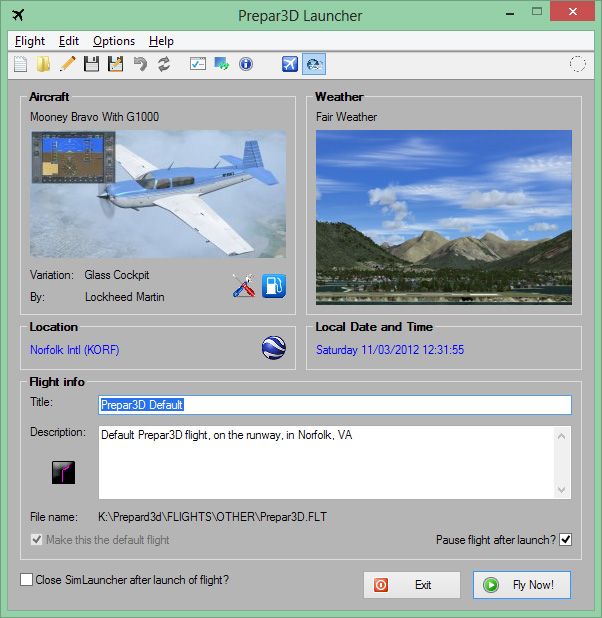
SimLauncher1_zpsa54f857f.jpg


It can be downloaded from Flightsim.com with the date December 26th. Download HERE.
 
Tried it out, its a pretty cool program, been hoping to see somthing like that. Don't know that it really speeds load times too much becaues the sim launcher takes a little bit to load if you have a large hangar. Still it has some neat features. I like the button that opens Google Earth so you can really see where you want to go. Some nice features loading aircraft state, for instance, now I can really have my flight start with the mags off.

Cheers

TJ
 
Never heard of the program "makerwy", but I had to find and run that program before it would launch as it initially said it couldn't find several files. I like it actually. Nice little utility..:applause:
 
It 'updated' this morning to 5.4. Now you can set your time to current 'local' time...ie if you are flying in a different timezone than your own, you can get current local time there which is very handy if you want the time of day to match the weather :)

Cheers
TJ
 
Thanks TJ, off to get it now. Don't use it for FSX but it is fantastic for P3D.
 
It works great for FSX, I have even replaced the FSX shortcut on my start menu with this :) It is very cool, I can have this up and running, then realize I need to switch FTX regions or somthing, do that, then launch the flight. You can keep it running while FSX is going, and 'relaunch' to another place/aircraft/time.
 
But if you are still using P3D 1.3 it won't work. :mad: Doesn't like P3D.exe from v1.3. Guess I'm going to have to go ahead and do the upgrade. (I do have it downloaded, just haven't gotten it installed, yet. :blind:
 
Updated to 5.5
More options in preferences, such as always showing 'all' aircraft on aircraft tab. Really cool feature too, you can change your FTX regions without opening FTX central:jump: This guy thinks of everything lol ;)
 
"so...its not usefull for FSX? at all?"

Thanks Ed, probably great in FSX also but I just use it for P3D. FSX seems to open with good interfaces allowing you to set your preferences. P3D just takes you directly to default Norfolk, Virginia. This little program in P3D gives you all kind of choices before you launch. Already up to version 5.5 and counting.
 
Good program, I use it, but...

Only thing that annoys me a little bit is the splash screen when it first starts up, and that it blocks you from doing anything else.
I would prefer that it could be minimized, so I could do other things, like checking the weather, etc, and not have it block my monitor view.
 
Hey Dain, you might suggest that to Maarten. He seems pretty cool about taking suggestions. I had asked about it saving preferences, such as the aircraft tab always displaying all aircraft. so the next update he added to the preferences page. He seems pretty active with it too, only a few days ago it was version 5.3, now it is 5.5.

Cheers
TJ
 
Good program, I use it, but...

Only thing that annoys me a little bit is the splash screen when it first starts up, and that it blocks you from doing anything else.
I would prefer that it could be minimized, so I could do other things, like checking the weather, etc, and not have it block my monitor view.
Actually, the 5.3 version was the only one that would stay up once I started it. With every subsequent update, once I click the icon, it loads everything then disappears and if I click the icon in the taskbar that shows it's open, it goes through the loading sequence a second time then drops down so that only the top of it is sticking up above the taskbar. I have to grab the top and drag it back into view.

Addendum: I looked again at the startup and really, it only stays up long enough to load the Airports and gates (less than 10 seconds) after that it can be minimized if need be.
 
Actually, the 5.3 version was the only one that would stay up once I started it. With every subsequent update, once I click the icon, it loads everything then disappears and if I click the icon in the taskbar that shows it's open, it goes through the loading sequence a second time then drops down so that only the top of it is sticking up above the taskbar. I have to grab the top and drag it back into view.

Addendum: I looked again at the startup and really, it only stays up long enough to load the Airports and gates (less than 10 seconds) after that it can be minimized if need be.

Wish it was that short for me.
My load time is longer than that initially.

As I said, for me the splash screen does not go away (Until it's done with it's loading).
Even clicking the icon as you suggest, just leaves the program suspended, with the splash screen graphic blocking everything.
Can't even close the program with Windows Task Manager, so I just have to wait for it to cycle.
 
Back
Top