
-
Please see the most recent updates in the "Where did the .com name go?" thread. Posts number 16 and 17.
-
IMPORTANT DOWNLOADING INFORMATION - ALL MEMBERS PLEASE READ
Please see this thread for updates. Update Thread
SOH ADMINISTRATION
You are using an out of date browser. It may not display this or other websites correctly.
You should upgrade or use an alternative browser.
You should upgrade or use an alternative browser.
FSX Screenshots Here!!
- Thread starter Walter
- Start date


gradyhappyg
Charter Member
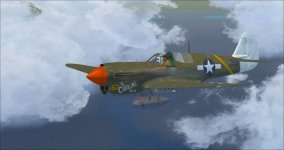
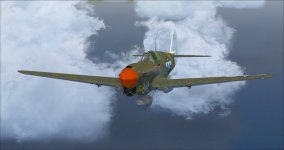
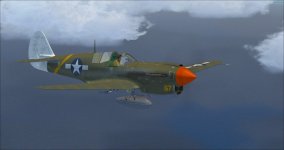
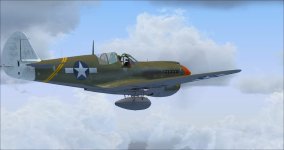


DaveQ
Charter Member

Bomber_12th
SOH-CM-2025
Dave, it's the one and only Flight Replicas P-40N. And a great repaint, Grady!


DaveSHQ
Charter Member
why was my pic deleted?? you have fsx, P3D, DCS, IL2 everything, in this thread. Why was my post deleted??
All pics should be FSX only. Care to point out the other games?

DaveQ
Charter Member
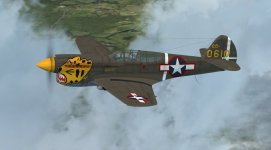
Thanks John. Have the A2A -B and the IRIS -E so may get it. Here's an Aleutian Tiger P-40E 40-610, from the 343rd FG, from a photo taken on Kiska Island, August/September 1943. The artwork is off a transfer sheet needless to say....Dave, it's the one and only Flight Replicas P-40N. And a great repaint, Grady!
 !
!DaveQ
Attachments

why was my pic deleted?? you have fsx, P3D, DCS, IL2 everything, in this thread. Why was my post deleted??
Pam,
When did you make this post? I have checked, as normally I can see when a post has been deleted. Here however there is nothing. So I assume something went wrong.
Although the thread is intended for FSX screenshots, in general screenshot made in other sims are not deleted.
Cheers,
Huub

ejoiner
Charter Member
Hi Jankees, another great one!!! How do I add shrouds? The one you did for me (Little Rebel) had shrouds in real life, but the version I have from you has none.
Am going to grab this bird above as soon as I can get home from this buisness trip!

DaveB
Charter Member
Eric..
Try using the spoiler key (/). On models that show the shrouds on loading.. using the spoiler key removes them. However.. the models that show without shrouds on loading don't appear to have this function. So.. pick a model close to the one you want which loads with shrouds as default and point the paint to that model in the aircraft.cfg
EDIT: I've downloaded and installed JK's Little Rebel and the shrouds will show if you hit the spoiler key Eric. Incidentally.. there's already a 'Little Rebel' paint in 'Restored part 2'. Didn't realise this until I loaded FSX and it spit out a warning telling me!! You won't have this problem Eric
ATB
DaveB
Try using the spoiler key (/). On models that show the shrouds on loading.. using the spoiler key removes them. However.. the models that show without shrouds on loading don't appear to have this function. So.. pick a model close to the one you want which loads with shrouds as default and point the paint to that model in the aircraft.cfg
EDIT: I've downloaded and installed JK's Little Rebel and the shrouds will show if you hit the spoiler key Eric. Incidentally.. there's already a 'Little Rebel' paint in 'Restored part 2'. Didn't realise this until I loaded FSX and it spit out a warning telling me!! You won't have this problem Eric
ATB
DaveB
Last edited:

dhazelgrove
Charter Member

Dave

Dutcheeseblend
Blenderer
May I put it here?


ejoiner
Charter Member
Resurrected Ghostrider Salutes Fallen Comrades over the Boneyard.....
/QUOTE]
The boneyard at AMARC is one scenery that really ought to be done professionally.
ejoiner
Charter Member
Eric..
Try using the spoiler key (/). On models that show the shrouds on loading.. using the spoiler key removes them. However.. the models that show without shrouds on loading don't appear to have this function. So.. pick a model close to the one you want which loads with shrouds as default and point the paint to that model in the aircraft.cfg
EDIT: I've downloaded and installed JK's Little Rebel and the shrouds will show if you hit the spoiler key Eric. Incidentally.. there's already a 'Little Rebel' paint in 'Restored part 2'. Didn't realise this until I loaded FSX and it spit out a warning telling me!! You won't have this problem Eric
ATB
DaveB
Jankees did one version for me for the WBS little friends II set, which I own. He also did another for a slightly different variant I dont own that is actually more accurate.
ejoiner
Charter Member
Martin
Martin, that T-28 paint is inaccurate. the top wing "NAVY" is upside down and facing the wrong way. The blue on the US roundel is also not dark enough. That could just be a tweak of the alpha channel though.