• Please see the most recent updates in the "Where did the .com name go?" thread. Posts number 16 and 17.

    Post 16 Update

    Post 17 Warning old domain name stealing credentials

  • Special Server Maintenance

    Just when you think you have everything running some what better...

    You get a message from the Hosting company. Short story they need to move us to a new server. I have been working with them to plan a good date for all concerned. Here is what we have come up with as a schedule.

    1. November 4th 17:00 -5UTC shut off the forums and start backup proceedures. During this time there will be no access to the forums or the Resource Section.
    2. November 5th Continue with Backups and download same until complete.
    3. November 6th 7:00 turn over server to hosting company to move system to new server
    4. November 7th - 8th restore backups and upgrade forum software.

    If all goes well we should be back online on November 8th.

    To keep you updated we will post updates on AVSIM forums.

    Thank you for your support.

Global AI Ship Traffic V2 question

Duckie

SOH-CM-2024
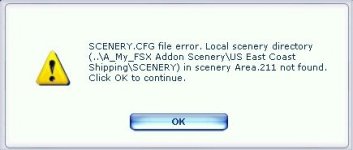
Downloaded from FlightsimNorway and installed per the readme. Although I do get boat traffic and so far no problems in sim. However, when the sim boots I do get 5 error messages. See the screen shot below for the first one up. I just click continue for all five and proceed to the sim.

The errors (using the screen shot below) are:

1...\US East Coast Shipping\Shipping...area 211
2...\US West Coast Shipping\Shipping...area 212
3...\US Atlantic Shipping\Shipping...area 213
4...\US Hawaii Shipping\Shipping...area 214
5...\US Caribbean and Gulf\Shipping...area 215

I made no other changes to any other files when doing this update. I've searched the named folder for any clues and so far come up with nada! The scenery.cfg file only goes to [area.120]. Any ideas on what happened and how to get rid of these errors?

attachment.php


Thanks

Steve
 

Attachments

  • -2019-nov-16-001.jpg
    -2019-nov-16-001.jpg
    19.7 KB · Views: 0
Last edited:
Downloaded from FlightsimNorway and installed per the readme. Although I do get boat traffic and so far no problems in sim. However, when the sim boots I do get 5 error messages. See the screen shot below for the first one up. I just click continue for all five and proceed to the sim.

The errors (using the screen shot below) are:

1...\US East Coast Shipping\Shipping...area 211
2...\US West Coast Shipping\Shipping...area 212
3...\US Atlantic Shipping\Shipping...area 213
4...\US Hawaii Shipping\Shipping...area 214
5...\US Caribbean and Gulf\Shipping...area 215

I made no other changes to any other files when doing this update. I've searched the named folder for any clues and so far come up with nada! The scenery.cfg file only goes to [area.120]. Any ideas on what happened and how to get rid of these errors?

attachment.php


Thanks

Steve

Hi Steve,
It seems like you are installing the traffic bgl files in fsx addon folders you have created and declared, and not in the standard scenery/world/scenery folder, which contains the default traffic. Is that correct? Are you trying just to install part of the routes or all the routes? The ones in your list all belong to the US area. The error you see normally occurs if you have declared an add-on scenery folder in the scenery cfg, but then removed it without changing the scenery.cfg in a proper way.

Br
Henrik
 
Delete the active scenery cfg found here C:\Program Data\Microsoft\FSX and let fsx create a new one.
Its a hidden folder by default
 
Delete the active scenery cfg found here C:\Program Data\Microsoft\FSX and let fsx create a new one.
Its a hidden folder by default

Thanks Henrik. I thought that might work but wanted to get some feedback before I tried it. Also, the these traffic files were always in the main scenery\world\scenery folder and all I did per the instructions was copy/paste and allow to overwrite, which is why I was really puzzled.

Thanks for your help,

Steve
 
Back
Top