
Ground & Road Texture Problem

Kalnon

Members +
I really need some help here. I am having a problem that is driving me crazy, and I just cannot figure out how to fix it. I use Orbx scenery including Base, Vectors, openLC packages and airports. The problem is that I installed some new airports that I just bought from Orbx Central and suddenly when I start a flight, all of the ground textures and road textures seem to be underneath the mesh layer. I've gone over my scenery library order and everything is in the order it is supposed to be. I asked an AI chatbot for help and it suggested deleting the terrian.cfg and replacing it with a new one and then using the Sync Simulator option in Orbx Central but this did not help. I've tried searching this problem on the internet but found nothing helpful.


I am really stuck here and at my wits end, I do not know what else to try.


I would greatly appreciate any help anyone can provide.


Thank you

Here's a screenshot of what I am talking about:
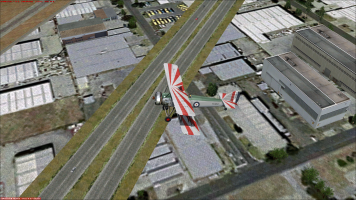
FSX Ground Textures and Roads Appearing Under Mesh.png

Notice how the roads and ground textures almost have a fuzzy quality to them.
 
Last edited:
I am sure that tech support at Orbx forums will be more than happy to help you. Your kind of question requires professional help and that would be from Orbx forums.

Regards,

Aharon
 
@Kalnon would you mind sharing the specs of your PC please? Your graphics settings would help too.

We need that at least to say something remotely intelligible.

Priller
 
Last edited:
@Kalnon would you mind sharing the specs of your PC please? Your graphics settings would help too.

We need that at least to say something remotely intelligible.

Priller
It says my specs in my signature, if you still need more info than that, I am happy to oblige, just let me know.
 
I am sure that tech support at Orbx forums will be more than happy to help you. Your kind of question requires professional help and that would be from Orbx forums.

Regards,

Aharon
I haven't asked them yet, but I will if no one else is able to help me. I'm skeptical that they can help because I have a mixed track record with them helping me with problems, sometimes they're able to help me, sometimes not.

I think it's because I use an old simulator and they don't seem to want to put in the effort to help me all the time.
 
Last edited:
I did ask about your graphics settings. Both in the sim and your in AMD Adrenalin
I'm not sure what my FSX graphics settings would have to do with this problem but here they are if it helps:
(I use DX10 mode with Steve's DX10 Fixer tool)

Target Frame Rate: Unlimited
Resolution: 2560x1440 (same as my monitor)
Filtering: Anisotropic
Anti-Aliasing: Enabled
Direct X 10 Preview Mode: Enabled
Global Texture Resolution: All the way to the highest setting
Aircraft Cast Shadows on the Ground: Disabled
Aircraft Cast Shadow on Itself: Enabled
Aircraft Landing Lights Illuminate Ground: Enabled
Level of Detail Radius: Max (4.5)
Mesh Complexity: 100
Texture Resolution: 7cm
Water Effects: High
Scenery Complexity: Extremely Dense
Autogen Density: Normal
Ground Scenery Shadows: Disabled
Special Effects Detail: Medium
Cloud Draw Distance: 100 mi
Thermal Visualizations: None
Cloud Coverage Density: Maximum
Airline Traffic: 0%
GA Traffic: 0%
Airport Vehicle Density: Low
Road Vehicles: 16%
Ships And Ferries: 40%
Leisure Boats: 40%

[AMD ADRENLAINE SETTINGS]
I have everything disabled except Chill to limit frame rates, and for that I set both the minimum and maximum settings to 32 fps
 
Last edited:
Your adrenalin settings should reflect those of the sim.
I do not use the anti-aliasing and anisotropic filtering settings in Adrenaline because it's' not necessary and does not work in DX10 mode. The only time I use those settings is when I have to run FSX in DX9 mode. I forgot to mention that I also have vsync enabled in Adrenaline.
 
Back
Top