• There seems to be an uptick in Political comments in recent months. Those of us who are long time members of the site know that Political and Religious content has been banned for years. Nothing has changed. Please leave all political and religious comments out of the forums.

    If you recently joined the forums you were not presented with this restriction in the terms of service. This was due to a conversion error when we went from vBulletin to Xenforo. We have updated our terms of service to reflect these corrections.

    Please note any post refering to a politician will be considered political even if it is intended to be humor. Our experience is these topics have a way of dividing the forums and causing deep resentment among members. It is a poison to the community. We appreciate compliance with the rules.

    The Staff of SOH

  • Please see the most recent updates in the "Where did the .com name go?" thread. Posts number 16 and 17.

    Post 16 Update

    Post 17 Warning

Hands up who likes making rivets?

Yep i love it its my fav part of Building a Redux package

Although we kind of work different than most ppl as we start with the normal and work everything else (dif/spec) based on that,i found that creating the dif first them bumping it gives over sized normal map details and way less control of the areas you want to pop out more

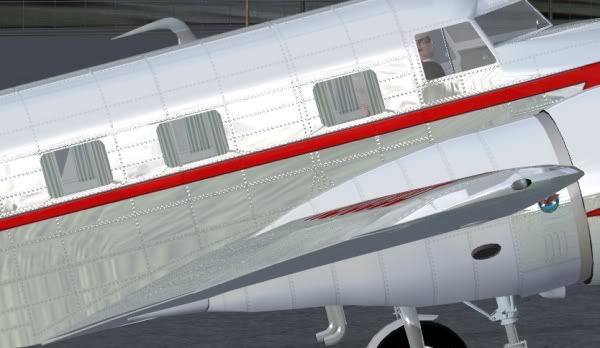
Heres some very WIP shots of the next Ozx Redux Package

Laters
steve

ok, I can handle a widow a wing and a beaver all at the same time :).. HD Redux strikes again ::lol::
 
Hey Guys

Thanks for the kind words :)

@HighGround22 : This is the default Beaver (AS has far less external detail and some very nasty UV mapping pulls)

@anthony31 : Depends on the UV density,Main problem with Re normal mapping other ppl's work is that you run into un-consistent UV pixeldensity causing you to have to alter brushes/spacing(not a problem you should having mapping your own work i guess),some of the rivets on the engine cowling are only 1 pixel insize,but playing with the normal hight/spec/dif you can make them look a little more round,when there's a higher density (like the beaver float mapping) i tend to keep them 3,5,7,9

One other thing is that i dont tend to define rivets hight in the diffuse map(just dirt/scum around the bump)but let the normal/spec do that work,i also dont make just one normal map but many at different heights and then cut/hack the layers together,this give much better control over the areas you want to pop out,it take a lot more work but i feel its well worth the effort,time and again ive see aircraft modellers pile on extra vertex/polys for useless details that a nice crisp Normal map could represent just as well,but what i hate even more than that is normal maps made from scheme/diffuse textures that are grey scaled and blasted back through a normal mapper (photo real schemes are the worst for this) ugh

Laters
Steve
 
but what i hate even more than that is normal maps made from scheme/diffuse textures that are grey scaled and blasted back through a normal mapper (photo real schemes are the worst for this) ugh

I agree. I'm using diffuse layers as base for heightmap, they are highly modified before I'll run normalmapper. There is another thing I hate - it's specular map made from desaturated diffuse. It looks as bad as wrong normalmap. And I think good diffuse shading is essential. Let it be baked ambient occlusion (also hand modified, not just slapped on basic colors) or lighting bake. Lighting in games is not that good to use just plain colors.
 
This is the default Beaver (AS has far less external detail and some very nasty UV mapping pulls)

As far as I am concerned the only advantage that the Aerosoft Beaver has over the default is that it includes more than just a floats only model. Way too many people put down the default FSX aircraft, whereas in reality some are every bit as good or better than the early FSX payware aircraft that were produced.
 
Spent the last week drawing rivets. It is sooo boooring!!

The worst thing is I've only done the bump drawing, I have to do it all again for the actual texturing :( .

Is there anyone who actually enjoys this aspect of FS development?


I like counting rivets!
 
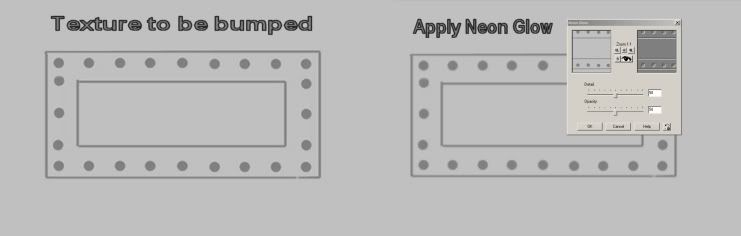
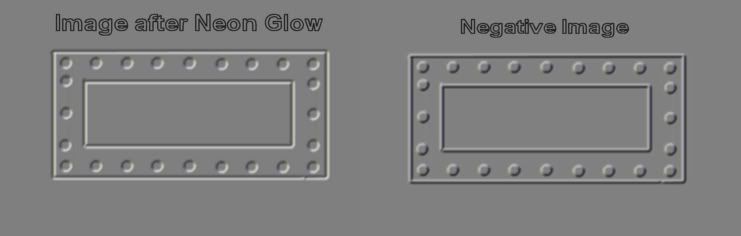
Bump mapping is easy in PSP7. I just make a line/rivet/panel layer using a copy of the final texture for a guide or I use my panel/line/rivet layer. Next I merge the layers and change it to grey scale so now I should have a grey background with all the lines, rivets and other things I want bumped (I use dark grey for bumped items and light grey for background). Next go into Effects/Artistic Effects and choose Neon Glow and adjust for correct look. Your lines and rivets now have a 3d bump look. Next you change it to a negative image and put it back to 24 bit color and color it to the correct shade. If the bump is to strong I use Soften to even it out some, if to weak I use Unsharpe Mask to amplify it.

1-5.jpg


3-3.jpg
 
I may be wrong but doesn't your method above totally defeat the purpose of the normal/bump map?

It looks great in 2D and appears that the rivets have height due to the shading/drop shadow effect but when used in game it will look like half of the rivet head is above the sheet and half below with the middle of the rivet at the same height as the main sheet.
 
No, but I have found some usefull tools in Photoshop to do it for me. I like doing the shader work (norm/spec/ref) as its when the aircraft truly starts to take shape. Im just about to get into that with the Seabee and im STOKED about it!
 
Futura or Gill sans bold. Line of full stops, size and kerned to whatever spacing you want. Colour to choice.

Copy and paste to two more layers. Middle layer normal, upper layer overlay or screen (for effect you want), bottom layer multiply. Vary the density etc of each to achieve the desired result. With a little gaussian blur on the multiply layer you can achive that flush riveted effect on modern warplanes quite easily. Shift the overlay layer a point or two and you get a natural highlight or sinkage.

Just use the normal layer, embossed a small amount and flatten for your normal map. Make a strip 2048 wide and you've got all the rivets you'll ever need.

Works every time for me.

Or, draw a circle and fill, add scratches , shade and shadow, add a multiply layer below and offset a point. Flatten, reduce to size and duplicate the layer for however many you need. Anorak's approach.

I have pre-prepared strips of rivets in all heights and depths, colours etc. I just hook them out and duplicate for the job in hand.:engel016:
 
Back
Top