BoeingvsAirbusNKL
Charter Member
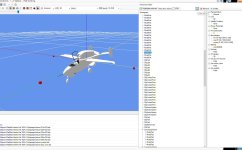
May I ask a question? Can anyone remove the highlighted part of this model in the screenshot?
Of course it needs permission... I acknowledge that.

Please see the most recent updates in the "Where did the .com name go?" thread. Posts number 16 and 17.
Just when you think you have everything running some what better...
You get a message from the Hosting company. Short story they need to move us to a new server. I have been working with them to plan a good date for all concerned. Here is what we have come up with as a schedule.
If all goes well we should be back online on November 8th.
To keep you updated we will post updates on AVSIM forums.
Thank you for your support.


What airplane is this (payware or freeware?) and are you saying you don't have FSX at all?I tried it myself... but there are certain files missing and/or couldn't be installed without a genuine copy of fsx.
. . . .
I have FSX... but all the required utilities could not be installed. It is the freeware Alphasim HE-162 converted to FSX. Sorry for the lack of clarification.
I have FSX... but all the required utilities could not be installed. It is the freeware Alphasim HE-162 converted to FSX. Sorry for the lack of clarification.

What are these "required utilities" you are talking about?
I wondered what he was talking about as well, but you're right, that must be it. What we/he needs is someone willing to do the conversion to native FSX. After that, removing the part he wants gone is a simple task, no more than a minute or two.BoeingvsAirbusNKL probably means the FSX SDK... Yes even with the original FSX CDs, it's quite hard to install the SDK properly, I tried, and failed... Without it, you can't export/compile your model with McX...
I found out you actually only need 2 files from the SDK, so no need for the complete (and bloated) SDK package: XtoMDL.exe and ModelDef.xml. Back in 2021 I found a trick to locate these 2 files, and use them with McX. Look here...
Maybe this trick is still valid... Maybe not... But I'm sure one of you McX guru can help BoeingvsAirbusNKL with this old CSF2 Heinkel HE-162 by Alphasim (to try it, locate ALPHA_He162_Salamander_FS02_CFS2.zip in the freeware section at Virtavia or here in the SOH library).
 He 162_Update_VC-2024-apr-4-001 by Ed Wells, on Flickr
 He 162_Update_VC-2024-apr-4-002 by Ed Wells, on Flickr
I had to do some finaggling to get my Salamander to show up in the plane preview window. When I did finally get mine to show up in the sim I had no VC (even though the textures and panel are in the folders.) I didn't get that far but if I do get my VC to show up and don't like the gauges I planned to populate my panel with gauges from my copy of FR's Me-262.Of course I had to do some updating of the VC, lol:
Just an FYI, I had to go looking quite a bit before I found it, but the rectangle in the center console is a sight window to view the nose gear.
Well, I pulled the Alphasim model into MCX and it is a very simple model. Fairly easy to convert.
What I can't tell from the screenshot that started this thread is what exactly is the part that needs to be removed.
. . . . .
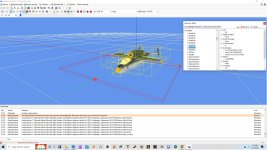
In the original image he posted above it shows the hierarchy and what line to remove. While the squares don't show in that one the red area shows the correct area that those squares represent. Remove that line in the hierarchy and that'll take care of them.In MCX you'll notice 3 (I think) squares around the nose of the airplane at ground level, that's what needs to be removed
In the original image he posted above it shows the hierarchy and what line to remove. While the squares don't show in that one the red area shows the correct area that those squares represent. Remove that line in the hierarchy and that'll take care of them.
Those red squares are simply displaying because he has Bounding Box display enabled in MCX, they are not actually parts of the model.
I have more parts in MCX that he is showing (probably because he imported with Collapse Model Parts enabled and I don't)
Gavin