• Please see the most recent updates in the "Where did the .com name go?" thread. Posts number 16 and 17.

    Post 16 Update

    Post 17 Warning old domain name stealing credentials

  • Special Server Maintenance

    Just when you think you have everything running some what better...

    You get a message from the Hosting company. Short story they need to move us to a new server. I have been working with them to plan a good date for all concerned. Here is what we have come up with as a schedule.

    1. November 4th 17:00 -5UTC shut off the forums and start backup proceedures. During this time there will be no access to the forums or the Resource Section.
    2. November 5th Continue with Backups and download same until complete.
    3. November 6th 7:00 turn over server to hosting company to move system to new server
    4. November 7th - 8th restore backups and upgrade forum software.

    If all goes well we should be back online on November 8th.

    To keep you updated we will post updates on AVSIM forums.

    Thank you for your support.

Help with Captain Sim download

jimjones

SOH-CM-2023
Help please with Captain Sim Download

I've been unable to download the C19 Hercules from CS in Win 11.
The last time I was successful in getting a CS product was for FSX in 2010.

Now when I download the file a message in the download box shows "Not commonly downloaded .. make sure you trust"
and the file shows up as an unconfirmed download. Choosing the ... 3 dot option in the download box allows marking the
link as Valid. I expected the next attempt to be successful. NOT. After several tries I discovered that each new link from CS had changed
and the end of the link was a computer generated 36 characters followed by _1100.exe. Also the file is automatically deleted
from the download folder

CS support was of no help as was the CS community.

Has anyone had success D/Ling and installing a CS product recently? If so would you share your experience?

I'm tired of jumping through loops just to receive my product and potentially loosing money in the process since CS does
not refund digitally D/L products.
 
Help please with Captain Sim Download

I've been unable to download the C19 Hercules from CS in Win 11.
The last time I was successful in getting a CS product was for FSX in 2010.

Now when I download the file a message in the download box shows "Not commonly downloaded .. make sure you trust"
and the file shows up as an unconfirmed download. Choosing the ... 3 dot option in the download box allows marking the
link as Valid. I expected the next attempt to be successful. NOT. After several tries I discovered that each new link from CS had changed
and the end of the link was a computer generated 36 characters followed by _1100.exe. Also the file is automatically deleted
from the download folder

CS support was of no help as was the CS community.

Has anyone had success D/Ling and installing a CS product recently? If so would you share your experience?

I'm tired of jumping through loops just to receive my product and potentially loosing money in the process since CS does
not refund digitally D/L products.

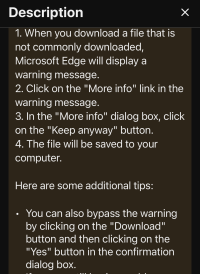
This happens with any “uncommon” executable file. It’s Windows making it hard for people to casually download dangerous files. The trick iOS to say “keep this file,” not to mark it as safe, which just tells Microsoft’s servers you think it shouldn’t be blocking this.

1774371797061.png

Not sure about the second part, buts steps 1-4 should fix you up. It’s the browser, nothing to do with antivirus.
 
Last edited:
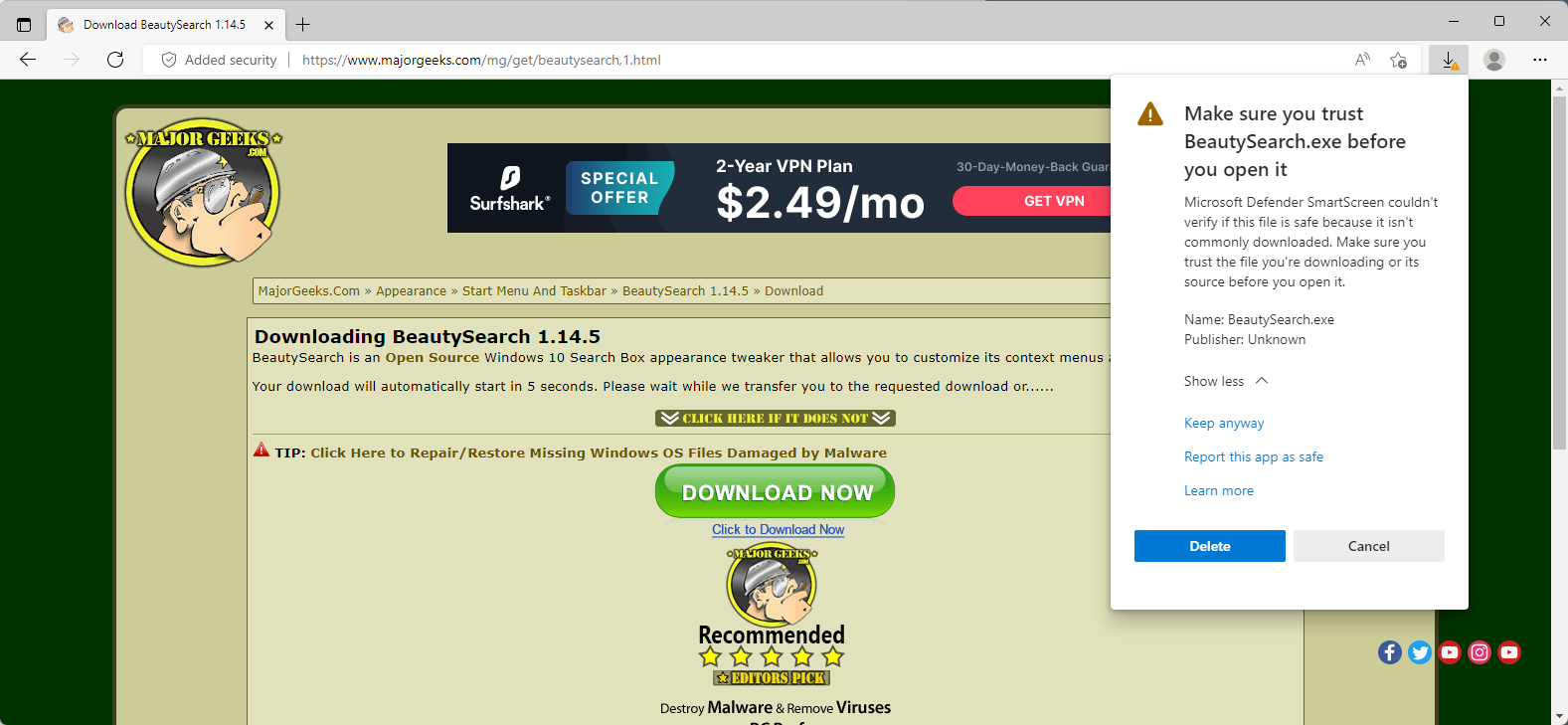
This is how the file looks when D/Led. It is unusable.

Windows and Edge may be the problem. Perhaps another browser will work. I have been using
Edge exclusively. As of now I kiss my $19.99 goodbye. Have spent too much time fooling with this. Caution to others.
Screenshot 2026-03-25 062038.jpg
 
Jim, this is just Windows doing what it does with every executable download that has a small audience. The instructions I posted just above will fix the issue, but here's a step-by-step.

Here is a detailed step-by-step:


All you have to do is click "Keep," then click "Show more" and choose "keep anyway." This is a security feature of Edge that's annoyingly designed and not related to FS, CaptainSim, etc. If you patiently follow the steps in the linked article, you will have your file.
 
Last edited:
Thanks, DennyA, for insisting I follow your instructions. I was successful in getting the .exe file.
Instead of getting the options listed in the link when pressing the ... 3 dots, My options displayed as:
1) Open the D/L page
2) Clear the D/L history
3 D/L settings
I chose option 1
That displayed another page that again showed my .exe file with the option to keep or delete.
Pressing "keep" finally stored the file in my D/L directory and went on to display :
Make sure you can trust CSM134.exe
with options to Report this ap as safe, Learn more, Cancel, Delete
The file had already been saved so I exited the screen.

Your patience with me is much appreciated. Thanks again!:)
Jim
 
Back
Top