• Please see the most recent updates in the "Where did the .com name go?" thread. Posts number 16 and 17.

    Post 16 Update

    Post 17 Warning old domain name stealing credentials

  • IMPORTANT INFORMATION - ALL MEMBERS PLEASE READ

    Due to an increase in the number of new members who are trying to systematically download our entire Resource Library (one new member yesterday tried to download 3,000+ files AT ONCE!) we are being forced to implement some changes regarding who can download what, how many files at a time and at what speed. As the forums and Resource Library share the same bandwidth when the Library gets overloaded with demand like that the forums fall over, as we have all seen recently. It's sad that greed has forced our hand in this way but we must do something for the benefit of all our legitimate members (many of whom paid money for the upkeep of the site) and to prevent the files stored here being used for nefarious purposes. Many of our uploads have specific conditions tied to them that forbid uploading to any other site or deny uploading to any site that has a 'paywall' (i.e. a pay to download policy). Due to the number of mass download attempts recently we can only assume that somebody, somewhere, is attempting to stock up a new file library with our files and we owe it to our up-loaders to protect their files and intellectual property especially as many (like my own LDR Development projects) are made available at SOH only and are specified as such in the 'read me' files.

    The forums and Resource Library will be taken offline as of 13:00 EDT with the forums coming back online shortly after without the resources library while we work on setting up permissions on the new Library module.

    We hope our members understand why we need to do this and will bear with us while we implement the changes.

    Thanks in anticipation, SOH ADMINISTRATION

    Downloads are now active. You may proceed with downloading as desired

    The download limits are a work in progress. Some settings are likely to need tweaking in the coming days.

Hurricane, Spitfire and Bf109 from Wings over the reich.

abitar

Members +
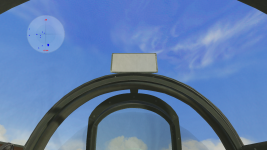
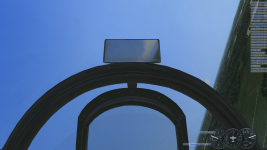
Hi everyone, I recently bought the Wings Over the Reich and really enjoyed the Hurricane Canopy, panel and modeling. It made me want to take it to the original CFS3 and other expansions like ETO and MAW. With some modifications in the Aircraft.cfg and xdp files I managed to get it to work satisfactorily, but I would also like to make the rearview work as it does in WOTR. Could someone tell me what I should do to make this work?
 
Don't look like too many people have done this. Do the mirrors actually work in WOTR ? Can you see other aircraft in them ? You can't have that in CFS3 so far that we have. OBD broke the code ? Regards,Scott
 
The mirrors do not show aircraft in WOTR. They are the same as what we have with the latest version of Ankor's shaders, which do allow sky, cloud, land, and water to be reflected in close to real time. If the mirrors are not working in your CFS3 install like they do in WOTR, I assume you need to install Ankor's shaders:
http://www.sim-outhouse.com/sohforu...&keys=1&keyword=ankors_shaders_4_dec_2019.zip

thanks for the responses, June 25, 2021, sixstrings and gecko, I didn't explain it right. it's really like the gecko said but I still couldn't make it work. I've tested it with the latest versions of ankor shaders and even with the WOTR shaders but the rearview mirror is only white.
 
Hmm, perhaps you missed a texture when you copied the files over? Can you post a screenshot?
 
Looks like a missing texture. You can open the m3d file for the cockpit in a hex editor or even notepad and in the midst of the gibberish you will see the texture names used by the model. You can then double check that you got them all copied into your other install.
 
To make the rearview mirror look right in CFS3 using AnKor's shaders the part of the _s.dds file where the mirror texture is located needs to be a very light shade of grey (or white), and the m3d file needs to set so that the texture uses the shader's reflectivity function.
 
I have this working on all mirrored aircraft. It takes Ankor's Shaders, hex editing the cockpit m3d to activate the reflectivity for the texture representing mirror face, and insuring the related _s.dds or _r.dds texture has the area of the mirror in a light shade of grey.
 
Back
Top