• Please see the most recent updates in the "Where did the .com name go?" thread. Posts number 16 and 17.

    Post 16 Update

    Post 17 Warning old domain name stealing credentials

  • Special Server Maintenance

    Just when you think you have everything running some what better...

    You get a message from the Hosting company. Short story they need to move us to a new server. I have been working with them to plan a good date for all concerned. Here is what we have come up with as a schedule.

    1. November 4th 17:00 -5UTC shut off the forums and start backup proceedures. During this time there will be no access to the forums or the Resource Section.
    2. November 5th Continue with Backups and download same until complete.
    3. November 6th 7:00 turn over server to hosting company to move system to new server
    4. November 7th - 8th restore backups and upgrade forum software.

    If all goes well we should be back online on November 8th.

    To keep you updated we will post updates on AVSIM forums.

    Thank you for your support.

IRIS C-27J Spartan

PeteHam

Charter Member
With the generous offer from IRIS Simulations, I downloaded the [FONT=Verdana,Arial,Tahoma,Calibri,Geneva,sans-serif]IRIS C-27J Spartan (iris_battlefield_airlifter_bundle).

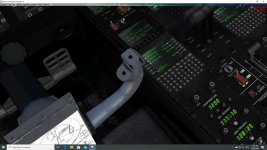
But I'm having a bit of a problem trying to get everything started with a 'cold & dark' cockpit.

The overhead panel is quite dark to actually see what I'm clicking, but with a lot of fiddling I can get things going.

What I'm after , is there a way to modify the aircraft or panel cfg, so that's it's all up and running when I select the aircraft?

Thanks.

Pete.
[/FONT]
 
you need to power on the lower mfd from memory and the power states is an option plus the aircraft configuration
 
Well I did a clean install to my new FSX/SE and Laptop, no issues, it was rearing ready to rock n roll.
Try this https://www.youtube.com/watch?v=0AzvTfevZvk
Remember there where different versions of the IRis 27J thru development, so please remove clean all previous installs before installing the one free from Iris.
 
I originally included both of those links in my earlier answer.

But the actual question by the OP was "...is there a way to modify the aircraft or panel cfg, so that's it's all up and running when I select the aircraft?"

So I dropped them and echoed that I would be interested in that option also. Still interested but it looks like jeansy may have pointed us in the right direction.

Will have to check it out.
:ernaehrung004:
 
I've finally sorted the start sequence :jump:

Once you've selected the aircraft and the sim starts, you'll be sitting in a 'Cold & Dark' cockpit.

In the VC, zoom in on the FMS, click on the 'Menu' button, then click on the 'Power On - ENG' button.

Everything is now up and running and you'll be ready to taxy.

A couple of seconds is all it takes.

I'm a happy chappy now.:jump: :jump:

Pete
 

Attachments

  • FMS.jpg
    FMS.jpg
    61.3 KB · Views: 11
Back
Top