

ryanbatc
Charter Member
I know some users here have this aircraft. I bought it during their sale recently. I like it a lot but am having some navigation issues.
I read through the manual but what it says to do is not working for me. I also get a sound.ini error on startup. Sounds still work for the most part. The wind indicator reads backwards but that's minor really. I'm more concerned about: How to tune a course?
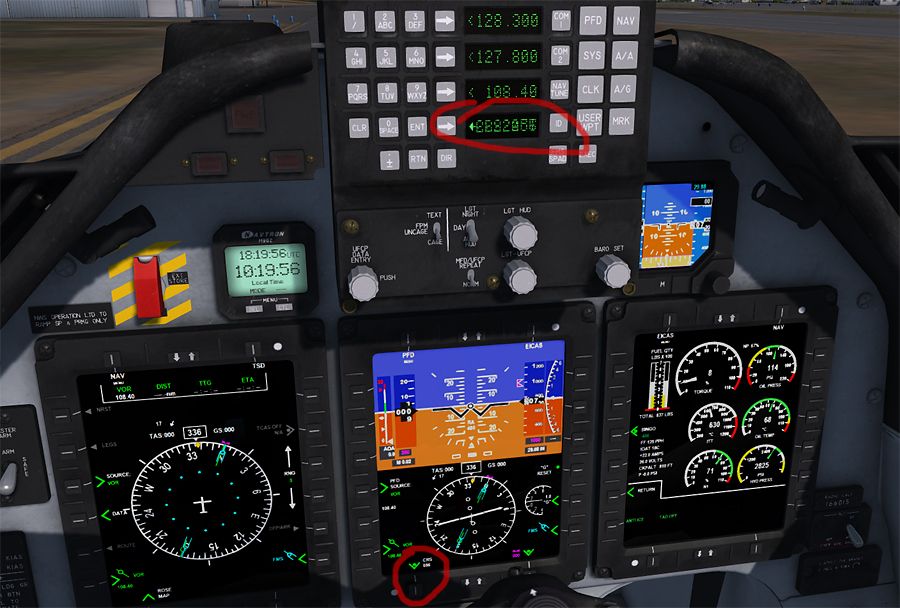
I should be able to press NAV on the UFCP then tune a course and press ENT, but that doesn't work. I get this goobily gook on the readout. From the manual I should also be able to turn the data entry dial and set a course from there. The numbers change on the UFCP itself when I do this but I'm unable to set it for good... it always defaults back to what was in before. Also is there a way I can just rotate the NAV1 needle without tuning a specific course? If can use the RMI to see what radial/course I'm on but I'd like to be able to tune one manually.
What am I missing?
I read through the manual but what it says to do is not working for me. I also get a sound.ini error on startup. Sounds still work for the most part. The wind indicator reads backwards but that's minor really. I'm more concerned about: How to tune a course?
I should be able to press NAV on the UFCP then tune a course and press ENT, but that doesn't work. I get this goobily gook on the readout. From the manual I should also be able to turn the data entry dial and set a course from there. The numbers change on the UFCP itself when I do this but I'm unable to set it for good... it always defaults back to what was in before. Also is there a way I can just rotate the NAV1 needle without tuning a specific course? If can use the RMI to see what radial/course I'm on but I'd like to be able to tune one manually.
What am I missing?
