
Issues with Royal Australian Air Force Campaign

Ruddman

Members +
The only one I've installed since all the rest seem a PITA to install. This one was barely achievable. What an odd platform. Anyway...

The start location in Port Moresby isn't anywhere near the strip. Anyway to change it?
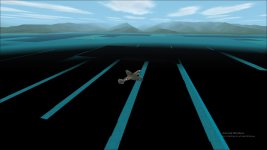
Also the ocean on the LAE side looks a little....black.
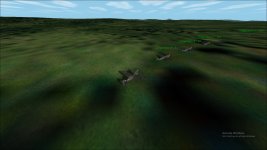
Port Moresby.jpg
Black ocean.jpg
 
The only one I've installed since all the rest seem a PITA to install. This one was barely achievable. What an odd platform. Anyway...

The start location in Port Moresby isn't anywhere near the strip. Anyway to change it?
Also the ocean on the LAE side looks a little....black.

View attachment 91976
View attachment 91977

Did you put in the scenery recommended in the readme?If not that's the problem.There are 4 sets of scenery for the area.The new Uncle Tgt scenery won't work because the campaign was done long before it came out.None of the older missions will work with the newer scenery unless someone decides to upgrade the missions.This can take a lot of time.There only a few mission builders now and they work or rework their own missions and campaigns.

Hiede
 
Did you put in the scenery recommended in the readme?If not that's the problem.

Hiede

Sadly one needs to me a NASA mathematician to work out these readme' and instructions. Complicated. :dizzy:

I haven't added any scenery except mesh.
 
The only one I've installed since all the rest seem a PITA to install. This one was barely achievable. What an odd platform. Anyway...

The start location in Port Moresby isn't anywhere near the strip. Anyway to change it?
Also the ocean on the LAE side looks a little....black.

View attachment 91976
View attachment 91977

I think that campaign is an auto-install? So you should have in your CFS2/SCENEDB folder, folders with the airfields in them, that need to be activated. You should have folders,
AF_PNG_airfields,
KD_MR_Port_Darwin,
MR_Australia, and
MR_Papua_New_Guinea
I think?

These can be activated 2 ways.
Either hand edit the scenery.cfg file

or
when you open CFS2, go to settings/scenery library/add area
(settings button is bottom left corner of screen when CFS2 opens)

find each folder, and add each, then move each one down the list that is displayed, to just above "default scenery"

click ok until you get back to the initial CFS2 screen. Then exit (CFS2 needs to be restarted), and then re-start CFS2.
 
Ah I'm so stupid.
Forgot to add them to scenery library. :banghead:

Works perfectly! Wow, nice to start on a runway. :biggrin-new:

I just have to add the B25 VC and a few other other files for ships etc etc.


I did notice trying a single mission it wouldn't load. Is that because it involved a B-25 with needed extra files that I haven't installed? If its not installed the mission wont load?

Appreciate the help though!! Cant believe I missed a simple thing like that. :shame:
 
Ah I'm so stupid.
Forgot to add them to scenery library. :banghead:

Works perfectly! Wow, nice to start on a runway. :biggrin-new:

I just have to add the B25 VC and a few other other files for ships etc etc.


I did notice trying a single mission it wouldn't load. Is that because it involved a B-25 with needed extra files that I haven't installed? If its not installed the mission wont load?

Appreciate the help though!! Cant believe I missed a simple thing like that. :shame:


Looks like you need the TR_B25_VC
and also 3 ships - merchant0141, merchant0241, merchant0341
 
Yup, if you are missing an aircraft, vehicle or object the mission will not load. You can also hand edit the mission file and substitute a different aircraft or object if necessary.
 
Back
Top