
Japanese Gauge Ideas?

Ali Cat

Charter Member
But first the elephant in the room or at least my room. I've been posting over on Wolfi's thread about make a "slanted" inclinometer because I thought the lower panel was angled. I did some research last night and from what I'm finding it is not. What a bonehead mistake to make.

Now to my request. As I still would feel odd about uploading for just one gauge, I've decided to make a few more Japanese Gauges. I would prefer needle type gauges as they are so easy. In FS SDK terminology, "Sliders", and "Moving" (exa: throttle and compass, respectively) I would consider. "Icon" types (exa: switches and indicator lights) -- er uh, probably not. The only one I'll rule out is the "Sprite" type (Exa: artificial horizon). I've made one before and they're a mess. I've scoured the internet for info on how to methodical set two of the required parameters and can say with some confidence that no one knows. So yea, no days of trial an error (guessing via desperation) at this time.

Needle gauges are easy? You likely doubt this but it is true. Soon I'm going to write it down in do A, then B, then C fashion. No code knowledge needed. Actually, at least up to the intermediate gauge level making, being able to read "c" won't help at all. The problem here is the obfuscation of the "gauges.h" file. A topic for another time.

Also a requirement is that I can find drawings or pictures to work from.

So, a few Japanese gauge you would like?


Mike
 
Hello Mike, hello Gents
I'm actually testing, with trials and errors, a gimballed whiskey compass for my RAF Re8 CFS2 plane, using the "SPRITE" macro, it permits me to understand a bit more what is awaited for a sprite to work. The WHISKEY_COMPASS_DEGREES token variable is here on x direction and the PLANE_BANK_DEGREES on 0 direction, so I realised that the values awaited seems to be as it:
The zero value returned by the token variable is on the card center, for x and y directions, and the card movement is of one pixel by variable unit, so on this bitmap, the two north points are distanced from 360 pixels, and, the south point being in the card center, the equation for the token var return is "val = 180.0 - pelement->source_var_x.var_value.n"
The zero value for the 0 direction is on the card's north, the token variable PLANE_BANK_DEGREES returns from 0 with horizontal position to 360 clockwise, the bank is here limited from 0 to 25 on a right turn and from 335 to 360 on a left turn. I had to add a bit more on the card bitmap on left and right to avoid card's display interruption, so I realised that the card width and height variations don't change anything on the gauge variables returns for the sprite macro, different in that to the MOVING_IMAGE where the card dimensions determinates the awaited returns from the token var.
The PLANE_PITCH_DEGREES token variable could be set up on the "y" direction, but the 2D display of the gauge let it not so obvious for a proper rendering.
The panel entries for the joined gauge are:
gaugexx=whiskey!Compass, x position , y position , gauge width

Good work with the gauges, gauge power is amazing :love:

Cheers
Martin
 

Attachments

  • whiskey.zip
    49.9 KB · Views: 6
  • compass_card.png
    compass_card.png
    7.3 KB · Views: 5
Hello Ali Cat,
I have been working on Japanese gauges as well, but for CFS1. I suspect I am way behind you as for what I have been able to accomplish thus far. Am in complete agreement. Much of the SDK functions are hidden in macros that being proficient in C programming isn't a great advantage.

If you are looking for Japanese cockpits, there are a bunch of books by Robert Mikesh that might help. I have electronic copies of a few and hard copies of others.

- Ivan.
 
Curious, didn't Mopar Mike do a bunch of Japanese gauges awhile back, or were they just multi-engine gauges?
 
Klein: Hello again -- it' is good to hear from you. Your logic above, once I gave it a good read, makes perfect sense. I've done some poking around with your gauge and, yep I get it. Your card bmp is 360 pixels from one North to the other with enough left over on each side to stay within the mask. If CFS2 is using 0 to 360 (thanks, I had not confirmed this) then 360 devided by 360 gives you a scale of 1. Next you have to offset it by 180 because you want -180 to 180 not 0 to 360 (all my way of thinking of what you just said). I guess the best way to explain what I've struggled with is one issue in the SDK, specifically the "attitude" gauge. On card one the author, using MAKE_SPRITE, sets the TEXTURE_SCALE_Y to 2.33 -- this parameter I have yet the reproduce. I think I'm going have to put grid lines on the card image so I can see exactly how the card is being moved. It's possible, perhaps even likely, the card is not being moved near its limit and trying to deduce what is going from the outside is fruitless.

I loaded your gauge and took her flying. Nice job -- that extra touch of realism with the card rotating makes a big difference. Good work on the "painting" as well. It looks sharp and professional.

On a related note, the Inclinometer gauge I just made I started by using MAKE_SPRITE. I'm rusty at gauge making and was thinking I would need it to round the ends of the level indicating glass tube as it bends at the ends inward into the gauge. It's a small point and in game no one probably even notice. At any rate I bailed for the above reasons and switched to MAKE_MOVING. At that point everything just fell into place.

Til' next time my good man. I've more to share from my gauges.h explorations so perhaps we'll meet soon over on the panels forum.

Ivan: Actually, I've followed your gauge making trials and tribulations on and off for some time. I don't remember the title but I read from begining to end some years ago the thread where you Klein discussed the difficulties of getting some gauges to behave as they should. As to " I suspect I am way behind you" -- oh, I don't think so. My feel is that you, myself, and Klein have been through the fires of making some difficult gauges. My issue is that I almost never call for I help. I am sure the two of you could help me in many ways.

On a more fun note, while cleaning up my code for this recent gauge I hit that line, which is infamous to me. What M$, really? I have to comment on your #include of a *.c file? I managed to stay sort of professional but hear is what I wrote (line 13) ...

/******************************************************************************/
/* Main file to create some Japanese gauges. ++++++++++++++++++*/
/* By: Ali Cat of SOH ++++++++++++++++++++++++++++++++++*/
/******************************************************************************/

#include "gauges.h"
#include "Inclinometer.h"

/* Start of Inclinometer gauge **********************************************/
#define GAUGE_NAME "Inclinometer\0"
#define GAUGEHDR_VAR_NAME gauhdrInclinometer
#define GAUGE_W 100

/* Include the inclinometer code (ugliest line of code I have ever seen). ***/
#include "Inclinometer.c"

/* Set up the above gauge(s) and make them visible outside of this Dll. ***/
GAUGE_TABLE_BEGIN()
GAUGE_TABLE_ENTRY(&gauhdrInclinometer)
GAUGE_TABLE_END()

Take care Ivan and keep up the good work.

Mike
 
Last edited:
Fibber, I for one one do not know. I have of course read many of his more recent post but his gauge making era was a bit before my time. Thanks for the comment.

Mike
 
Thanks Ali Cat.
At this point, I am just trying to put together a fairly reasonable gauge set for each of three or four projects to get them to the releasable stage.
There is the Japanese A6M series which has a bit of an overlap with your Japanese gauges here.
I also have a Japanese Army type Manifold Pressure gauge for my Ki 61.
There is the long suffering B-25C Mitchell which needed the B-11 CHT gauge I just completed.
There is the pair of P-38 Lightnings I built as a design study a few years ago. Both need paint though.
The Lightnings are strange because the panels between the F and the J are actually quite different and even the gauges are different.
I figure sooner or later one project or another will reach critical mass.

The include of a .c file doesn't bother me so much as the #DEFINE in the "Parent" C file and the #UNDEF of the same value in the "Child" source file. I figure that a definition and the removal of it should occur in the same source file if possible.

- Ivan.
 
It's an interesting topic, best practices, and one that I've seen get quite heated among seasoned c coders. It's a language that brings deep passions to so many. I'll just say that the more c I wrote, the more I listened to the good style, structure, and overall design crowd. Though I am one who also adores c, I'm not one who criticizes other for their methods. After all c was born after efforts from another group (Cambridge?) to develop a compiler that would not let you code "improperly". It was not popular and so complicated they never finished. Richie came along with the belief that, no, we need a language that trusts the coder.

We're putting together small programs, for free, for a small crowd, and most importantly for fun. Hence some loosening of best practices is quite reasonable. I myself, however, have vowed to return to my previous standards. Even with the naming conventions used in the SDK, a mostly style issue, I'm not going to take the lead from the MS samples again. Yes, there are many issues here from big to small. I do like your insight about the ending undefines. Ugly, but to each his own.

Also, from now on any gauges file I upload with include all source files. I encourage others to do the same while I understand why one might not be willing.

Much to talk about. I'm working on the SDK Attitude sample gauge issue as we speak. She's up and running in the game and, though early to draw a firm conclusion, it's looking like the y scaling factors are just wrong. When I first drop into free flight, in a level attitude, the top of the sprite (aka card above) was well down from the top of of the mask. I did not touch the source except for deleting all the file version setting lines which no longer compiles. I'll report what I find when I feel good about it.

One more thing about the including a c file issue. I could see it if something was gained. A real time game -- save a few clock cycles, yea cool. My understanding, however, of what the use of gauges.h implements is it does not. There's very little code in a gauge file that actually runs. An example, of course, is the callbacks that run when the gauge is updated. But no matter how the gauges file is structured these calls will have to be done and the cost of their overhead, while small, must be paid. To others reading this you may find it surprising that all that alien looking macro code (the "stuff" in uppercase) largely just sets data values for the gauge and the game accesses that data through pointers (a value that represents where the data is in memory -- ie very fast). Maybe I'm missing something -- plowing your way into actually "reading" gauges.h is hard.

Mike
 
Hello gents
Mike, your idea to share about gauges is excellent, and Ivan seems to agree to share his ideas too.
Not being a programmer I often struggle with codes and I find sometimes solutions after many trials and errors, with perhaps not always orthodox procedures, but that seem to work, I will be happy to share about it.
Perhaps the "Panels design and tips" part of the forum would be nice for it ;)

Cheers
Martin
 
Klein, well that put a big smile on my face. - the two of you continue to impress. I'm imagining a newbie gauge maker who does not have to reference the SDK samples. With good comments in the code and perhaps a bit of clear documentation, they might avoid many of the headaches that we have pushed through.

Your logic above on the whiskey compass continues to help me. Also, I found the bug in my gauge logging code. I'm now getting good floating point numbers. Pitch clearly ranges from -90 to +90 degrees with minus being up. A bit odd but it explains a lot.

See you soon over at the Panels forum,

Mike
 
One more thing about the including a c file issue. I could see it if something was gained. A real time game -- save a few clock cycles, yea cool. My understanding, however, of what the use of gauges.h implements is it does not. There's very little code in a gauge file that actually runs. An example, of course, is the callbacks that run when the gauge is updated. But no matter how the gauges file is structured these calls will have to be done and the cost of their overhead, while small, must be paid. To others reading this you may find it surprising that all that alien looking macro code (the "stuff" in uppercase) largely just sets data values for the gauge and the game accesses that data through pointers (a value that represents where the data is in memory -- ie very fast). Maybe I'm missing something -- plowing your way into actually "reading" gauges.h is hard.

Hello Ali Cat,
I believe your interpretation here is not quite correct.

The including of .c files is just a means of hiding the code from one module (gauge) from another.
It is actually a reasonably effective means of separation.
As for difference in run time speed, there is none at all because all of these includes and macro expansions are compile time C Pre-Processor directives. The code that is actually compiled AFTER the the C Pre Processor (CPP) goes through it is just one big straight line C file.
Sometimes if you don't know what a macro is doing, it might be worth while to examine CPP output to see what C code is actually being generated.
What we are actually doing here is programming a mess of interrupt (and event / timer) driven handlers which use some trigger to cause a non-linear procedure(s) to execute. Thus when a mouse movement happens over an area, it causes an interrupt and the handler runs.
For the general concept, look at the old Int-21H I/O handlers.

As for DLLs, there is compile time linking in which all unresolved references are looked for in a .lib file. The DLL idea is that sometimes you won't know what calls will be made at run time and if certain references are made, a library will be linked at run time rather than compile time.

This is how the business works as I understand it.

- Ivan.
 
Yes, of course, I know what a preprocessor directive is and dll's and I get along fine. And software interrupts, having coding using them, well I'm showing my age. And, just in case, no problem with your mentioning all of that as our acquaintance is so new.

Perhaps I just didn't write it well. My point is if there is no difference why violate a best practice?

As far as "reasonably effective" we can agree to disagree.

Completely different issue but I'm out of the blue getting a ERR_SSL_PROTOCOL_ERROR. Both desktop and laptop will not connect. I've tried chrome and edge but no go. I'm on my phone now which connects, mostly. I've tried everything recommended (short of buying a new computer, tee-hee) and no joy. I can't upload or download so for now I'm dead in the water.

Cheers and wish me luck,
Mike
 
I didn't mean to offend. It sounded like you were interpreting the .C includes differently.
Regarding the new SOH changes, I am actually having the same problems.
The solution appears to be to connect here with HTTP rather than HTTPS.
It will throw a warning message that it is not secure but will let you do it if you "proceed anyway".
When you establish a connection, you can log in and then it goes back to HTTPS.
Sounds like the folks managing the server had a minor reconfiguration. I didn't figure this out for almost a week and figured I just could not get on SOH because the server had died.
 
And 21H gives me the feeling of ... Nostalgia? I am old :culpability: . Absolutely no offense taken - we'll get there my man.
Mike
 
I believe part of this process is developing "Best Practices" as we go.
I don't do any kind of configuration management or version control at the moment, but if I did, having the guts of each functional gauge in a separate source file would be useful.

I don't know if you saw the P-38 Lightning Fuel Gauge set that I did. It is one of the very few times in which I have actually combined more than one gauge into the multi gauge set. Engine1 through Engine4 for dial gauges really doesn't count. There is so little code difference.
The reason I am bringing this up is that it seemed like you were planning on putting multiple Japanese gauges into the same multi gauge.
How would you choose what to include?

How big are the gauge backgrounds you are using? I started with around 300 x 300 because I was working with the FS98 SDK and those were the sizes of the examples. I started going smaller because that is what CFS1 stock gauges use and other SDKs also use smaller backgrounds.
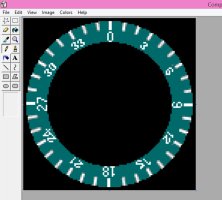
Recently I found with the Japanese Type 92 Compass that 118 pixels is just too small.

- Ivan.
 
Not including the c files - I'm not going to go that far. I will post some samples soon. To some my changes may seem small even trival but I dont agree. One change, just switching to "Hungarian Notation" caused me to find an implict cast I had missed and made the bug in my gauge logging routine obvious. More to come.

Just now I'm back connected on my desk top. I had given up - just buy my own router as my gut told me that would fix it (I am not a network guy). My ISP, Spectrum, had switched to a router that you can only access through their app and you can't change much. Many howls of protest on message boards arround the web erupted when they did this. Given up? Well not exactly. I know, like so many, that my best moments or ideas come when I get away from the PC both physcically and mentally. This mourning I thought just install TOR - I've always wanted to try it anyway. Turns out it no longer runs on Windows 7 so, OK, a free VPN then. Boom, that got it first try - I am back.

On gauge background size sounds like you're ahead of me. I've always used sizes simular to the stock gauges. I think its a very good question. There are so many size settings in the panels SDK, and some override others - I've never worked through it. With modern high res monitors should I be using larger sizes? If nothing else I did run into limits "taking a picture" of this most recent gauge in Blender. As I zoomed in more for clearer numbers and ticks at a certain point they actually got more blurry.

PS: I've never made a gauge via the blender route before and I really like it. I don't like painting on a PC even though I seem to have been born able to draw realistically and through the years have become a competent painter (oils, acrylic, and watercolors). Blender, like GIMP, is very frustrating to learn but you eventually hit a fluency and, for me, boy is it fun.

Mike
 
Actually, I don't use "Blender", but I do use GIMP and MS Paint in combination to work on bitmaps.
It seems like each tool is able to do something that the other doesn't do quite as well. GIMP processes whole images well, but it doesn't work all that well when trying to paint individual pixels such as one might when trying to do lettering or numbers. Switching from Foreground colour to Background colour is cumbersome.

In CFS2, you already have the fancy Japanese Type 92 Compass in the stock A6M fighters. We do not have that in CFS1, so one of my recent gauges was something along these lines. I simply modified the SDK Whiskey Compass which was only 118 pixels wide but had to change the Card because too few numbers were showing in the window in the Mask.
The Card became much narrower (!) and I also found out something which may already be obvious to you all.
The number of pixels from North to North (zero to zero degrees) can be anything you want, but the width of the card must be that North to North dimension PLUS the number of pixels in the Mask from the centerline to the edge on each side of the North pixel on the card.

The other thing I found out is that 118 pixels (changed to 119 pixels to give a center pixel is way too small to do any good lettering.
The compass ring on this gage has numbers around the edge at various angles. Here is what it looks like on a 115 x 115 bitmap.
Coding is good. Images are trash. I tried the same thing at about 300 x 300 and things look pretty good.

- Ivan.

CompassRing115.jpg
 
Earlier today I pulled the Compass Ring from the stock CFS2 A6M2 gauge.
It turned out to be even smaller than what I am using. Mine is 115 x 115 pixels.
The one in the stock gauge is 103 x 103 pixels but the numbers definitely look better than mine.
Their numbers are about 50% larger and on the outside of the ring instead of the inside of the ring as mine are.
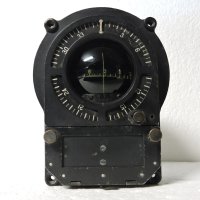
Attached is an image of an actual Japanese Type 92 Compass.

- Ivan.

Type92_CompassFace.jpg
 
Not including the c files - I'm not going to go that far. I will post some samples soon. To some my changes may seem small even trival but I dont agree. One change, just switching to "Hungarian Notation" caused me to find an implict cast I had missed and made the bug in my gauge logging routine obvious. More to come.

Just now I'm back connected on my desk top. I had given up - just buy my own router as my gut told me that would fix it (I am not a network guy). My ISP, Spectrum, had switched to a router that you can only access through their app and you can't change much. Many howls of protest on message boards arround the web erupted when they did this. Given up? Well not exactly. I know, like so many, that my best moments or ideas come when I get away from the PC both physcically and mentally. This mourning I thought just install TOR - I've always wanted to try it anyway. Turns out it no longer runs on Windows 7 so, OK, a free VPN then. Boom, that got it first try - I am back.

On gauge background size sounds like you're ahead of me. I've always used sizes simular to the stock gauges. I think its a very good question. There are so many size settings in the panels SDK, and some override others - I've never worked through it. With modern high res monitors should I be using larger sizes? If nothing else I did run into limits "taking a picture" of this most recent gauge in Blender. As I zoomed in more for clearer numbers and ticks at a certain point they actually got more blurry.

PS: I've never made a gauge via the blender route before and I really like it. I don't like painting on a PC even though I seem to have been born able to draw realistically and through the years have become a competent painter (oils, acrylic, and watercolors). Blender, like GIMP, is very frustrating to learn but you eventually hit a fluency and, for me, boy is it fun.

Mike
Hello Gentlemen
Actually, for the VC round gauges with needle or sprite use, I size the gauges to 256X256, and add the frame width to this format for the 2D panel subgauges, it permits to fit the $gauges.bmp with a maximum of sixteen round vc gauges with clear reading, the format for this last being 1024x1024.
I tested many formats for gauges, all works, but some wide formats don't show in very poor screen resolution like 640x480.

MAKE_MOVING can afford very wide cards, the maps for my west front map gauge are 5312x4382, the gauge is a bit long to load, but it works and reads well, I didn't checked really if it has a great incidence on the frame rate when a panel use it.

MAKE_SPRITE is limited by the panel windows dimensions, according to what I noticed. In the "building panels and gauges" document from the FS2KSDK, the textures might be 256x256 for it, but it seems the macro can afford other formats if you respect some distance from the windows edges. If the mask is wider that the card, the card can repeat (it was the case for the gimballed compass gauge I provided in example, I needed to enlarge the card height with black, not for the card to repeat)

I don't know a lot about MAKE_STRING, not really needed for WW1 gauges.

Keep on your nice work with the gauges !
Cheers
Martin :jump:
 
Back
Top
