

TeiscoDelRay
Life Time CM
I want to thank all the people that asked me for the JF Connie textures. I added new seating veiws to the download and will post them here for those that already have the cockpit and anyone that wants more realistic seating views in your JF Connie. Also a screenshot of the next project underway, a well worn and used Connie that has a story.
Here is the config entries for changed cockpit seating views.
The seating views for virtual cockpit have always bothered me so I changed them to put you right in the seat. The original views for pilot had you off the seat toward the center of the plane, same for right seat. Also the engineers seat view put you off the seat and in the center as well. If you use my config settings you will be centered in each seat. This really helps with the engineers veiw as you are now up to the panel, not across the cabin.
Downside is the seating in this plane is far to the edge of the cockpit having you look out the slanted windows. I also keep the original pilots view that you can get to using the view change key "A".
Backup Your Aircraft Config First. Make a copy of your original config to go back if you do not like the new views.
Easy to install, just locate your aircraft config for the Connie version you want to change views and open it with notepad. copy my veiw configs (below text) and paste them into your aircraft config and overwrite when asked. Then go into the sim and choose the plane you modified and use the "A" key when you get to the virtual cockpit to go through the new views. Look down in each new view and you will notice you are now centered in the seat for that station.
Connie Aircraft config located in your Connie version foler. Example: FSX\SimObjects\Airplanes\JF_L049\aircraft.cfg
Copy the below text exactly and paste into your aircraft config file -Overwrite when asked-
[CameraDefinition.0]
Title = "Left Seat"
Guid = {b207e1b0-8515-11db-b606-0800200c9a66}
Origin = Virtual Cockpit
MomentumEffect = Yes
SnapPbhAdjust = Swivel
SnapPbhReturn = False
PanPbhAdjust = Swivel
PanPbhReturn = False
Track = None
ShowAxis = YES
AllowZoom = TRUE
InitialZoom = 0.55
SmoothZoomTime = 2.0
ZoomPanScalar = 1.0
ShowWeather = Yes
XyzAdjust = TRUE
ShowLensFlare=FALSE
Category = Cockpit
PitchPanRate=30
HeadingPanRate=75
PanAcceleratorTime=0
HotKeySelect=1
InitialXyz=-0.15, -0.02, 0
InitialPbh=0, 0, 0
[CameraDefinition.001]
Title = "Right Seat"
Guid = {8ff6c134-098d-409f-baec-caba3f683f98}
Origin = Virtual Cockpit
MomentumEffect =False
SnapPbhAdjust = Swivel
SnapPbhReturn = False
PanPbhAdjust = Swivel
PanPbhReturn = False
Track = None
ShowAxis = YES
AllowZoom = TRUE
InitialZoom = 0.4
SmoothZoomTime = 2.0
ZoomPanScalar = 1.0
ShowWeather = Yes
XyzAdjust = TRUE
ShowLensFlare=FALSE
Category = Cockpit
PitchPanRate=20
HeadingPanRate=60
InitialXyz=1.08, -0.02, -0.0
InitialPbh=2, 0, 0
[CameraDefinition.002]
Title = Flight Engineer
Guid = {8599A410-B569-450E-B72A-11412B294AE0}
Origin = Virtual Cockpit
MomentumEffect = False
SnapPbhAdjust = FALSE
SnapPbhReturn = False
PanPbhAdjust = swivel
PanPbhReturn = False
Track = None
ShowAxis = YES
AllowZoom = TRUE
InitialZoom = 0.5
SmoothZoomTime = 2.0
ZoomPanScalar = 1.0
ShowWeather = Yes
XyzAdjust = TRUE
ShowLensFlare=FALSE
Category = Cockpit
PitchPanRate=20
HeadingPanRate=60
InitialXyz=.5, -0.12, -0.9
InitialPbh=12, 0, 100
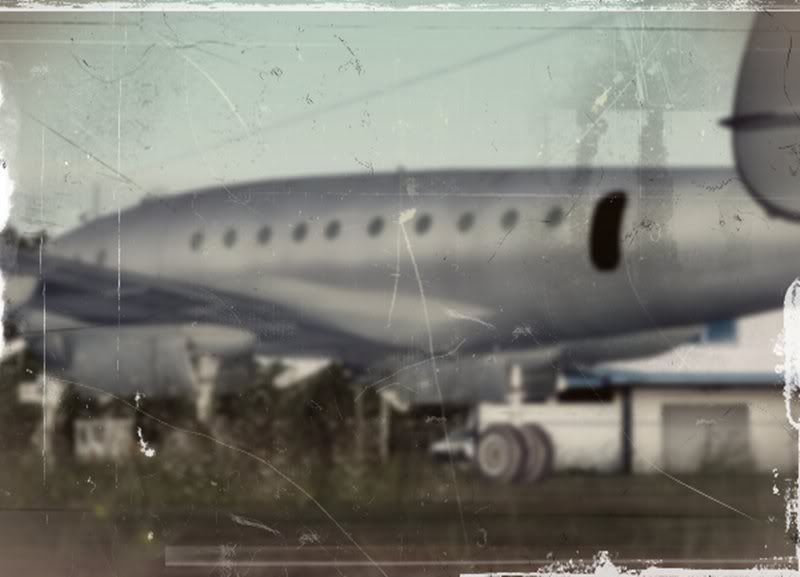
Now here is a photo taken many years ago of a derelict abandoned Connie somewhere in the Northwest. I will have more information about this soon.

Here is the config entries for changed cockpit seating views.
The seating views for virtual cockpit have always bothered me so I changed them to put you right in the seat. The original views for pilot had you off the seat toward the center of the plane, same for right seat. Also the engineers seat view put you off the seat and in the center as well. If you use my config settings you will be centered in each seat. This really helps with the engineers veiw as you are now up to the panel, not across the cabin.
Downside is the seating in this plane is far to the edge of the cockpit having you look out the slanted windows. I also keep the original pilots view that you can get to using the view change key "A".
Backup Your Aircraft Config First. Make a copy of your original config to go back if you do not like the new views.
Easy to install, just locate your aircraft config for the Connie version you want to change views and open it with notepad. copy my veiw configs (below text) and paste them into your aircraft config and overwrite when asked. Then go into the sim and choose the plane you modified and use the "A" key when you get to the virtual cockpit to go through the new views. Look down in each new view and you will notice you are now centered in the seat for that station.
Connie Aircraft config located in your Connie version foler. Example: FSX\SimObjects\Airplanes\JF_L049\aircraft.cfg
Copy the below text exactly and paste into your aircraft config file -Overwrite when asked-
[CameraDefinition.0]
Title = "Left Seat"
Guid = {b207e1b0-8515-11db-b606-0800200c9a66}
Origin = Virtual Cockpit
MomentumEffect = Yes
SnapPbhAdjust = Swivel
SnapPbhReturn = False
PanPbhAdjust = Swivel
PanPbhReturn = False
Track = None
ShowAxis = YES
AllowZoom = TRUE
InitialZoom = 0.55
SmoothZoomTime = 2.0
ZoomPanScalar = 1.0
ShowWeather = Yes
XyzAdjust = TRUE
ShowLensFlare=FALSE
Category = Cockpit
PitchPanRate=30
HeadingPanRate=75
PanAcceleratorTime=0
HotKeySelect=1
InitialXyz=-0.15, -0.02, 0
InitialPbh=0, 0, 0
[CameraDefinition.001]
Title = "Right Seat"
Guid = {8ff6c134-098d-409f-baec-caba3f683f98}
Origin = Virtual Cockpit
MomentumEffect =False
SnapPbhAdjust = Swivel
SnapPbhReturn = False
PanPbhAdjust = Swivel
PanPbhReturn = False
Track = None
ShowAxis = YES
AllowZoom = TRUE
InitialZoom = 0.4
SmoothZoomTime = 2.0
ZoomPanScalar = 1.0
ShowWeather = Yes
XyzAdjust = TRUE
ShowLensFlare=FALSE
Category = Cockpit
PitchPanRate=20
HeadingPanRate=60
InitialXyz=1.08, -0.02, -0.0
InitialPbh=2, 0, 0
[CameraDefinition.002]
Title = Flight Engineer
Guid = {8599A410-B569-450E-B72A-11412B294AE0}
Origin = Virtual Cockpit
MomentumEffect = False
SnapPbhAdjust = FALSE
SnapPbhReturn = False
PanPbhAdjust = swivel
PanPbhReturn = False
Track = None
ShowAxis = YES
AllowZoom = TRUE
InitialZoom = 0.5
SmoothZoomTime = 2.0
ZoomPanScalar = 1.0
ShowWeather = Yes
XyzAdjust = TRUE
ShowLensFlare=FALSE
Category = Cockpit
PitchPanRate=20
HeadingPanRate=60
InitialXyz=.5, -0.12, -0.9
InitialPbh=12, 0, 100
Now here is a photo taken many years ago of a derelict abandoned Connie somewhere in the Northwest. I will have more information about this soon.

