

-
Please see the most recent updates in the "Where did the .com name go?" thread. Posts number 16 and 17.
-
Special Server Maintenance
Just when you think you have everything running some what better...
You get a message from the Hosting company. Short story they need to move us to a new server. I have been working with them to plan a good date for all concerned. Here is what we have come up with as a schedule.
- November 4th 17:00 -5UTC shut off the forums and start backup proceedures. During this time there will be no access to the forums or the Resource Section.
- November 5th Continue with Backups and download same until complete.
- November 6th 7:00 turn over server to hosting company to move system to new server
- November 7th - 8th restore backups and upgrade forum software.
If all goes well we should be back online on November 8th.
To keep you updated we will post updates on AVSIM forums.
Thank you for your support.
You are using an out of date browser. It may not display this or other websites correctly.
You should upgrade or use an alternative browser.
You should upgrade or use an alternative browser.
Local Legends #5 Available Now - Beechcraft Model 18
- Thread starter thomas_mac
- Start date


Fnerg
SOH-CM-2023
Does anyone know how I can remove the registration number from the side? Thanks.
 reg number by Doug Smith, on Flickr
EDIT: Ok, using ModelXConverter I was able to identify the registration title, and found the sections in the panel.cfg. When I apply the " /// " in front of the entry,I loose the font, but the large white background still remains. That is still a mystery to me. Can't locate any registration number background material. So then, how would I include this change in a repaint upload? Any help is appreciated.
reg number by Doug Smith, on FlickrEDIT: Ok, using ModelXConverter I was able to identify the registration title, and found the sections in the panel.cfg. When I apply the " /// " in front of the entry,I loose the font, but the large white background still remains. That is still a mystery to me. Can't locate any registration number background material. So then, how would I include this change in a repaint upload? Any help is appreciated.
Last edited:
Fnerg
SOH-CM-2023
Leave the atc_id in the aircraft.cfg file empty?
No luck. Background is gone, font remains. Thanks for the suggestion Jankees, I'll have to mess with it later. Going to be late for work! Dangit. lol
Does anyone know how I can remove the registration number from the side? Thanks.
EDIT: Ok, using ModelXConverter I was able to identify the registration title, and found the sections in the panel.cfg. When I apply the " /// " in front of the entry,I loose the font, but the large white background still remains. That is still a mystery to me. Can't locate any registration number background material. So then, how would I include this change in a repaint upload? Any help is appreciated.
This may be misunderstanding the question but, when you go into aircraft selection in MSFS, isn’t there a customization menu that allows you to choose the N number, or leave it blank?
Nice! And thanks for the consideration.


Leaving the registration blank (I think) just lets the sim place a default, like ASXGS. I've never tried it, but maybe putting in just a space might do the trick?
Fnerg
SOH-CM-2023
I solved the issue, it seems that when I put the entry like this - atc_id = " " with space between the quotations, the serial was gone, however, initially I had 3 spacebar presses between the quotations, and the sim hung on startup. Tried to launch a few times, stalled before the home screen every time. Removed the repaint, no problem, started perfectly. Went then to 2 spacebars, and MSFS started, no registration number or background. Thank you for the suggestion Tom you were right, and Jankees thanks for showing me how. A space...wow.


Bomber_12th
SOH-CM-2025
I don't often use autopilot systems, but having seen some posts where people were confused about how to use the autopilot system in this Beech 18, I thought it worth sharing this very helpful video that I saw today. It is impressive just how much functionality there is!
Bomber_12th
SOH-CM-2025
Additionally, I found this excellent video showing what it is like to fly a real Beech 18. I was delighted to find that, as I watched it, everything that was mentioned and shown only confirmed how accurate the flight model is for the Microsoft/Carenado Beech 18 - the required nose-up takeoff trim setting (about 3-5 degrees nose up), the takeoff/climb/cruise power settings and operating airspeeds, the incredible responsiveness in roll/light touch on the ailerons, the absolute lack of rudder authority when the tail isn't flying, and the mentioning of how challenging it is to control/master in a crosswind.
Bomber_12th
SOH-CM-2025
For anyone who may be interested, I've released some tweaked versions of the three stock bare metal liveries, which adds a fresh polishing to the bare metal, as well as more properly defining the silver-painted sections (ailerons, flaps, rudders, elevator). Additionally, it appears that the developer mistakenly left the vent scoops atop the fuselage on these without proper textures, and while correcting that, I decided on the "black top" and "white top" versions that I would paint them to match as well (which I think looks much better than leaving them bare metal as before). On the "black top" version, I've also darkened the black on top to match the stripes (which aren't the same value in the stock textures).
https://flightsim.to/file/35958/beechcraft-model-18-a-fresh-polishing


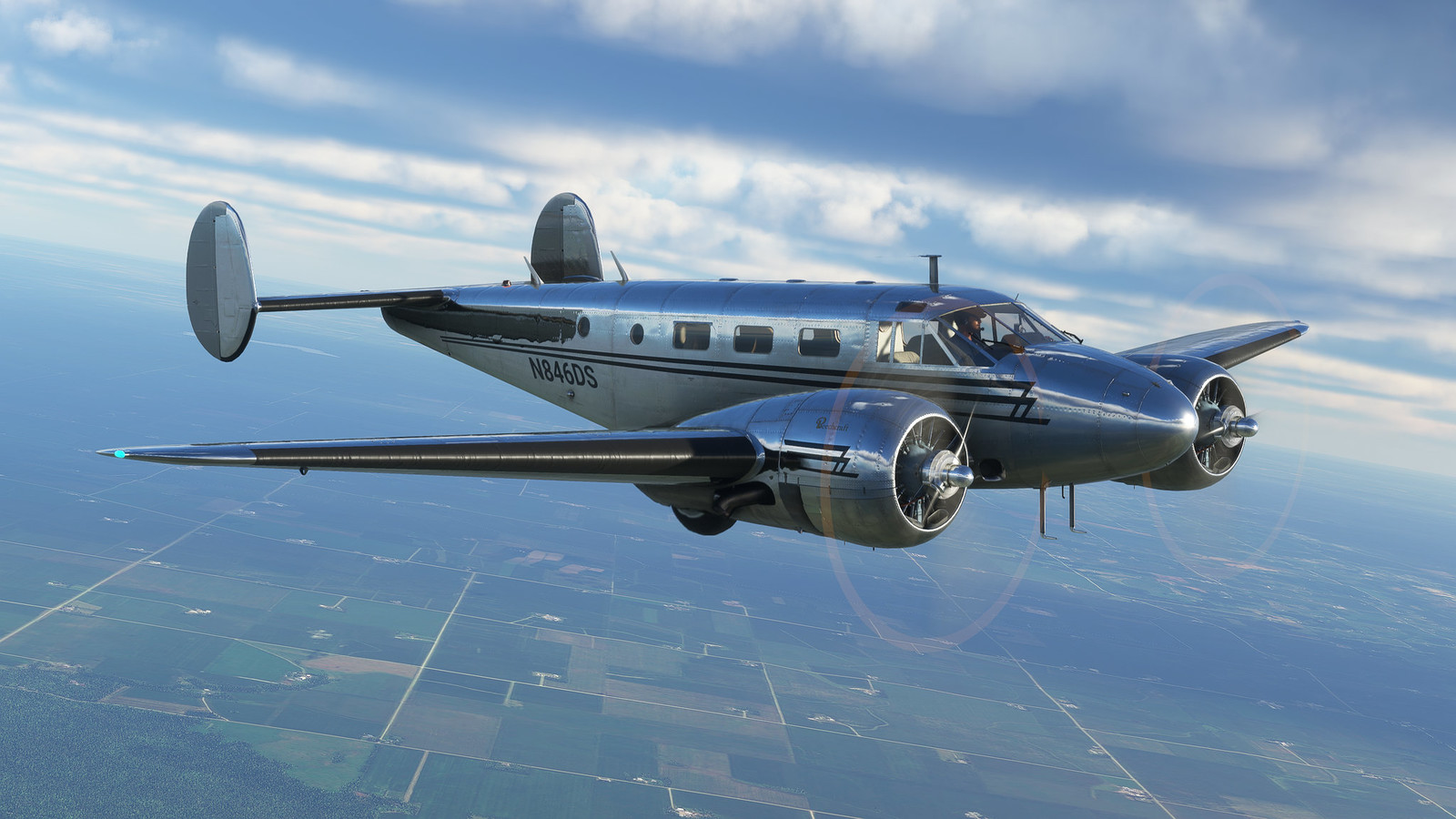


https://flightsim.to/file/35958/beechcraft-model-18-a-fresh-polishing

Bomber_12th
SOH-CM-2025
Please note that these aren't new repaints, but are textures that replace the three stock bare metal liveries within the sim - which don't actually overwrite or replace the files, since it is packaged to just be placed into your community folder as a separate install (just as easy to uninstall, if you don't like the changes).
Please note that these aren't new repaints, but are textures that replace the three stock bare metal liveries within the sim - which don't actually overwrite or replace the files, since it is packaged to just be placed into your community folder as a separate install (just as easy to uninstall, if you don't like the changes).
Beautiful! I love old polished aluminum. Heck, I like NEW polished aluminum!


jankees
SOH-CM-2026
here's the last of the three Swiss Beeches
 jk5178 by JanKees Blom, on Flickr
 jk5181 by JanKees Blom, on Flickr
jk5178 by JanKees Blom, on Flickrjk5181 by JanKees Blom, on Flickr
collensr
SOH-CM-2025
For anyone who may be interested, I've released some tweaked versions of the three stock bare metal liveries, which adds a fresh polishing to the bare metal, as well as more properly defining the silver-painted sections (ailerons, flaps, rudders, elevator). Additionally, it appears that the developer mistakenly left the vent scoops atop the fuselage on these without proper textures, and while correcting that, I decided on the "black top" and "white top" versions that I would paint them to match as well (which I think looks much better than leaving them bare metal as before). On the "black top" version, I've also darkened the black on top to match the stripes (which aren't the same value in the stock textures).
https://flightsim.to/file/35958/beechcraft-model-18-a-fresh-polishing
Stunning John!