• Please see the most recent updates in the "Where did the .com name go?" thread. Posts number 16 and 17.

    Post 16 Update

    Post 17 Warning old domain name stealing credentials

  • Special Server Maintenance

    Just when you think you have everything running some what better...

    You get a message from the Hosting company. Short story they need to move us to a new server. I have been working with them to plan a good date for all concerned. Here is what we have come up with as a schedule.

    1. November 4th 17:00 -5UTC shut off the forums and start backup proceedures. During this time there will be no access to the forums or the Resource Section.
    2. November 5th Continue with Backups and download same until complete.
    3. November 6th 7:00 turn over server to hosting company to move system to new server
    4. November 7th - 8th restore backups and upgrade forum software.

    If all goes well we should be back online on November 8th.

    To keep you updated we will post updates on AVSIM forums.

    Thank you for your support.

Locating a specific location?

Navy Chief

Senior Member
I don't know if this is possible, but am betting it is. If I can get the coordinates for my address (not sure how to do that), is there a way to input these values into the sim to assist me in finding my address in the sim? NC
 
Yes, if you have the coordinates from something like Google Maps or Bing Maps, you can copy them and paste them (Ctrl+V) into the search bar in the world map and it works perfectly.

When doing this, you can treat it just like anything else - you can set your departure at that point, you can set your arrival at that point, and you can set that point as a waypoint in the middle of a flight plan by adding it. I've done that a few times with a landmark I wanted to check out, by making a flight plan from one airport to another and adding the coordinates for the landmark as a waypoint along the way, which will modify the flight plan accordingly.
 
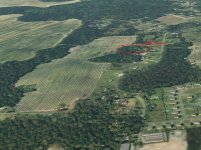
I knew how to fly out of KCSG and follow the highways to my area. The world in my area is accurate.
attachment.php
 

Attachments

  • 2020_08_24_07_58_30_Greenshot.jpg
    2020_08_24_07_58_30_Greenshot.jpg
    146 KB · Views: 8
Yeah, that's how I found where I work. My Home is easy to find because it's by a lake, so flew to my home and then followed the highways I take to get to work. It was really cool being able to actually navigate via VFR.
 
I will try both methods. Now that a ultralight is available for the sim. NC

Stuff is coming faster than I can keep up! Could you point me at the ultralight? I was going to port the old trike from FSX over tomorrow. But if someone's already done one, why make busywork for myself?
 
Yes, if you have the coordinates from something like Google Maps or Bing Maps, you can copy them and paste them (Ctrl+V) into the search bar in the world map and it works perfectly.

Could you get a screenshot of this? I'm trying it, but getting nowhere. I think I'm not using the correct format.

Edit: Disregard - I was pasting in the wrong place!:banghead:
 
Just as a quick example for anyone interested, if one uses Google Maps, right-click on Google Maps for the location you want and select "What's Here?" This will put a pin on that spot and a little link with coordinates at the bottom of the map. Click on that link and then you will want to copy the format of the second line of coordinates (where the arrow is pointing), exactly, and paste them using Ctrl+V into the World Map search bar in the sim. For this example I simply chose Mount Rushmore (though it is not yet depicted in the sim). Then in the World Map, you can set this as the departure point, the arrival point, or a waypoint, as I've also illustrated below.


Back
Top